
pehohlhkhbcfdneocgnfbnilppmfncdg
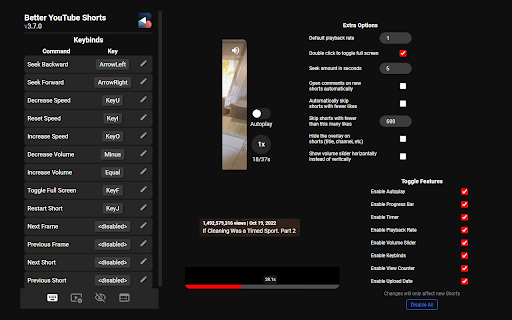
Take back the controls on YouTube Shorts with playback, volume, progress bar and more! Notice: This extension is currently unmaintained, expect bugs and issues. If you are interested in maintaining this repository, please create an issue or submit changes via PR in GitHub or contact me@ynshung.com. ⏭️ Control your YouTube Shorts just like a normal YouTube video! Features include progress bar, seeking, playback speed, auto skip and more. You can also customize the keybinds to your liking! List of features: - Progress bar at the bottom with time and duration - Seeking 5 seconds backward and forward with arrow keys (adjustable time) - Mini timestamp and speed above the like button (can be scrolled on!) - Fullscreen support with F key and double click - Decrease and increase playback speed with keys U and O - Click the speed button to revert to normal speed or toggle between different speeds - Toggle to auto skip short when current one ends - Control volume with the volume slider or with - and =, mute audio with M - Customizable keybinds - 🌐 Supports more than 10 languages! Extra features: - Start short from beginning with J - Go to the next or previous frame of the video - Set default playback rate when first opening shorts - Auto skip short with likes below custom threshold (e.g. 500 likes) - Auto open comment section on each short - Hide overlay on shorts (title, channel, etc.) - Go to the next frame or previous frame with . and , while paused - View counter and upload date above video title Fully open-source with MIT License: https://github.com/ynshung/better-yt-shorts If you have any suggestions or feedback, please let us know here: https://github.com/ynshung/better-yt-shorts#issues--suggestion

Transpose ▲▼ pitch ▹ speed ▹ loop
Change the pitch and speed of music and loop sections directly on YouTube, Spotify and many other streaming platforms. Practice solos, learn difficult passages, train your voice or transcribe music in real time. Trusted by 1,000,000+ musicians, teachers and students worldwide. • Change pitch ±12 semitones • Adjust speed from 25% to 400% • Loop sections instantly • Works on YouTube, Spotify, and many other streaming platforms • No sign-in required Designed for musicians who practice regularly and want more control. • Dedicated workspace • Timeline with draggable markers • Clips, sequences, and saved songs • Premium pitch engine with formant control • Voice reducer an equalizer • Cloud sync ⯈ Perfect for: • Slowing down complex solos on YouTube • Adjusting songs to your vocal range • Learning riffs phrase by phrase • Practicing difficult passages with loops • Transcribing music inside your browser

Youtube Shorts Controller
Youtube Shorts Controller for fast-forwarding, rewinding, and modifying playback speed This extension allows you to fast forward and rewind YouTube shorts by 2.5 and 5 seconds. It also allows you to modify playback speed in increments of .25x. The current playback speed as well as timestamp are also displayed on the bottom left of the video.

YouTube Shorts Progress & Volume Controller
Allows a slider based controlling volume in youtube shorts and Removes Sponsored posts too Frustrated by the lack of volume control and constant barrage of sponsored shorts disrupting your flow? Look no further! This Chrome extension puts you in the driver's seat of your YouTube Shorts experience. Enjoy precise volume control with a handy slider, letting you fine-tune the audio to your liking. No more scrambling to adjust the system volume in a panic when a blaring short explodes onto your screen. But that's not all! This lightweight extension also acts as a sponsor shield, seamlessly filtering out sponsored content so you can binge uninterrupted on the good stuff. Worried about privacy? Rest assured, this extension stays focused on its core mission: enhancing your Shorts experience. It doesn't store or access any of your personal information, so you can relax and enjoy a smoother, frustration-free Shorts adventure. This extension caters to everyone who is searching for a extension to control the volume of youtube shorts in their PC. This functionaility is currently missing on web based UI on laptops and PCs.

YouTube Shorts Progress Bar
Adds a video progress bar to YouTube Shorts! Jump ahead, rewind, or simply track your progress through any short with ease. Immerse yourself in the world of YouTube Shorts with our YouTube Shorts Progress Bar extension. As creators continue to innovate in their storytelling through this exciting format, we believe you should have complete control over your viewing experience. This extension introduces a much-needed feature to the YouTube Shorts player - a video progress bar. This gives you the ability to see where you are in the video, down to the second, and enables you to skip to a specific part of the video without having to restart or watch the whole thing. 1. Video Progress Bar: Clearly visualize your progress through any YouTube short. 2. Skip & Rewind: Jump ahead to your favorite parts or go back to rewatch moments you may have missed, all with a simple click on the progress bar. 3. User-friendly Design: The progress bar is integrated seamlessly into the YouTube Shorts player, making it easy to use and non-disruptive to your viewing experience. 4. No interruptions: Our extension doesn't interfere with the original functionality of YouTube. Enjoy all the features you love, with added control. To start using, simply install the extension and start watching YouTube Shorts. The progress bar will automatically appear at the bottom of the player. You can then click on any part of the progress bar to skip forward or backward in the video. Our YouTube Shorts Progress Bar extension aims to enhance your YouTube Shorts experience, providing you with the control to view content your way. Install today and revolutionize your YouTube Shorts viewing experience!
