
inpmbpkngacgeljphlapgdgdjmoffild
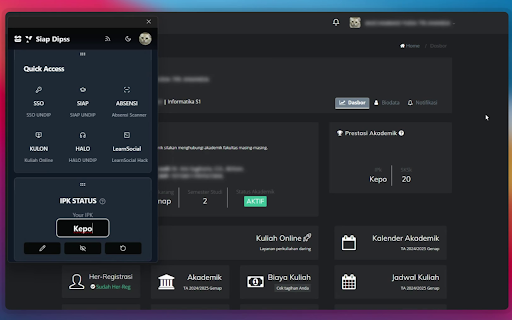


Extension for better SIAP Undip experience. Created by myudakk. Feature ~~> - Foodtruk helper - Auto Learn Social - Quick Navigation Undip - Block Pop-ups on SSO - Custom Automate PBM evaluation form - Hide / Edit user's IPK - Dark / Dark Mode for SSO/SIAP/Kulon - Enable Right Click, Copy, Inspect etc - Custom Profile - And many many More!

MeowCad Solver
Extension allowing you to pass even the hardest MeowCad quizzes 1️⃣ Click on the question in the quiz and the correct option(s) should select automatically. 2️⃣ Hold Ctrl key and hover with mouse over the options, the right one should select. ⚠️ The extension doesn't work on final exams ⚠️ Read more: https://github.com/ingui-n/netacad-solver

Scopus Document Download Manager
This extension only works for Scopus authenticated users. The Scopus download manager will not do anything for unauthenticated users. Scopus Document Download Manager is a free browser extension enabling download functionality in Scopus, as well as a Quick Document Search function for Scopus authenticated users. To search, authenticated users can simply click on the browser extension icon to display the search form. This extension saves authenticated users the hassle of visiting individual publisher web sites to download documents one by one. Instead, it seamlessly connects to publisher websites to download full text PDFs directly from your browser without needing to configure and maintain a list of entitlements. How do you use this extension in Scopus? 1) From the document search results or document list pages, select one or several documents and click on Download button 2) From a Scopus abstract record page, click on Download button When successfully downloaded, your PDF document(s) will be saved to your browser Downloads folder. In the event that the extension fails at retrieving the PDF (e.g. you are not entitled to the full text or the download is prevented by the publisher web site) the Document Download Manager will provide a link to the publisher web site so you can easily open the page and try to download the full text manually.

Session Share
Share your website account cookies to your friends without login with password. Session Share can be used for account sharing on video platforms (e.g. IQiyi, Youku), educational services (e.g. New Oriental, Udacity), and similar platforms. Share exclusively with trusted individuals. Recipients will gain full account access during your active login session - this is an extremely high-risk operation. For Chrome users: After accessing the webpage, use the right-click context menu for copy/paste operations instead of keyboard shortcuts. To terminate all active shared sessions: Manually log out of your account and reauthenticate. Contact for support: scottleung@qq.com or feedback in https://github.com/scott-leung/session_share_feedback/issues

View Once Plus: Photo Preview on Whatsapp Web
Revisit and download 'view once' photos as many times as you like on WhatsApp Web. Unlock the power of "view once" photos on WhatsApp Web with our innovative extension. Ever wished you could see those fleeting moments more than once? Now you can! Our extension allows you to view "view once" photos in your browser, giving you the freedom to save or view them as many times as you like until you open them on your mobile device. Experience the convenience of revisiting your favourite photos without limitations. Download now and never miss a moment again! Features: View "view once" photos in your browser. Save or view photos multiple times until opened on your phone. Simple and intuitive interface for seamless browsing. Unlock the power of "view once" photos on WhatsApp Web. Download now!
