
dnacggjlcbpfcfchkkogedlkenpnlfbi
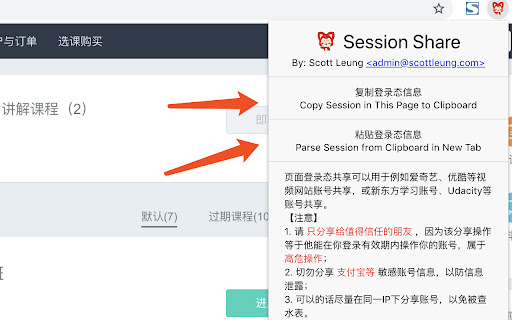
Share your website account cookies to your friends without login with password. Session Share can be used for account sharing on video platforms (e.g. IQiyi, Youku), educational services (e.g. New Oriental, Udacity), and similar platforms. Share exclusively with trusted individuals. Recipients will gain full account access during your active login session - this is an extremely high-risk operation. For Chrome users: After accessing the webpage, use the right-click context menu for copy/paste operations instead of keyboard shortcuts. To terminate all active shared sessions: Manually log out of your account and reauthenticate. Contact for support: scottleung@qq.com or feedback in https://github.com/scott-leung/session_share_feedback/issues

ChatGPT Cookies
Easily copy or download your ChatGPT Cookies + user-agent values with one click. This Chrome Extension allows you to quickly and easily copy ChatGPT cookie values and user-agent strings to your clipboard, or export a single `.env` file with everything. Usage: 1. Install the extension 2. Click on the extension icon in the Chrome toolbar to automatically navigate to the ChatGPT website 👉️ https://chat.openai.com/chat 3. Select one of the options to automatically copy the `SESSION_TOKEN`, `USER_AGENT`, and `CF_CLEARANCE` or all values at once to your clipboard, or download a single `.env-all` with all of them. 4. Paste the values wherever they are needed in your project, such as in the `.env` file. #### v2.0 - Copy individual cookies or copy all at once - Export all values as an .env file - Added onboarding.html page #### v1.1 - Added the ability to copy `SESSION_TOKEN`, `USER_AGENT`, and `CF_CLEARANCE` values in addition to the `SESSION_TOKEN` value - Added a prompt to confirm that the session token has been successfully copied - Fixed a bug where the extension was not correctly copying the `CF_CLEARANCE` value

Session Share - Login Sharing Made Easy
Share your website account cookies to your friends without login and password Want to share your favorite websites like Netflix and Amazon Prime with friends without giving them your password? With Session Share, you can easily share your login sessions safely and securely! 🔒 Key Features: - Easy Sharing: Share your website sessions with friends in just a few clicks. 📲 - No Passwords Needed: Keep your passwords private while sharing access. 🔑 - Secure and Safe: Your data is protected with top-notch security. 🛡️ - Unlimited Sharing: Share as many sessions as you want with our flexible plans. 🔄 - Cross-Device Sync: Access your sessions from any device, anytime. 💻📱 How It Helps: - Stay Connected: Share your favorite sites like Netflix and Amazon Prime with friends and family without hassle. 🎬🛍️ - Save Time: No need to log in and out repeatedly; just share your session. ⏰ - Peace of Mind: Your passwords stay safe, and you control who gets access. 🧘♂️ Premium Features ⭐: - Unlimited Account Saving ($2.99/month or $14.99/year - Save 37%) - Cloud Sync: Access your shared sessions across all devices - Priority Support: Get help when you need it - No Ads: Clean, distraction-free experience - Advanced Security: Extra layer of protection for your sessions - Share with Multiple Friends: Perfect for family sharing Session Share makes it easy to share your online world with others while keeping your information secure. Perfect for students, families, and anyone who loves to share! Try Premium today and unlock the full sharing experience! 🌟

LoadConnect
Plugin that simplifies communication between carriers and brokers by allowing carriers to send emails with one click from loadboard LoadConnect.io - is the ultimate Google Chrome extension for Carriers and Dispatchers! With LoadConnect extension, you can send pre-written emails to brokers, search for loads and plan the routes in Google maps - one click! LoadConnect is your all-in-one loadboard plugin. The tool allows Truck Carriers and Dispatchers to react to any posted load x10 faster 🚀 FEATURES: 📩 Send Emails With One Click - Create personalized email templates using dynamic variables for each load. 💆♂️Automatically Estimate RPM - Set filters for minimum miles and rates, exclude specific states, and see the RPM breakdown right on the load board. 🌏 Open Google Maps with Load Information - Get all the load details you need on Google Maps, including truck location, pickup origin, and destination. ⭐️ Check Brokers' Ratings - Stay informed and protected by checking brokers' ratings and reading reviews from fellow carriers, helping you identify scammers and unreliable brokers. HOW IT WORKS? 1️⃣ Click the “Add to Chrome” 2️⃣ Sign up to your LoadConnect account 3️⃣ Edit your Email Template 4️⃣ Open your Load Board 6️⃣ Start Sending Emails WHY LoadConnect.io? ⚡️ React to loads 10X faster ❤️ Every 3rd user recommends Loadconnect.io to their friends 😉 See the value in just 3 minutes - for free

Chegg Expert - Every tool you need(Safest)
VIP Solutions Chrome Extension For Chegg Experts UPDATE : Now you can share you account with other friends just by sharing the code. NEW VERSION FEATURES AND UPDATES: This extension is all rounder tool for experts on chegg with following features. Background refresh / No full page reload to save memory and loading issues. Auto Refresh Alarm Settings: 1. Choose Your refresh time from 10 seconds to 180 seconds 2. Automatically stop refreshing after given time 3. Automatically accept questions for you 4. Auto Skip questions i. Auto Skip long questions with more than 1500 words ii. Auto skip questions with more than 2 images 5. Get Notifies on telegram about new question if you are away: > You can view your own expert details and your own answer links > Direct Button to search question on google and get answers > Direct Ai button > One click skip button
