
ojplelelocihfchkdaebocpankipadmp


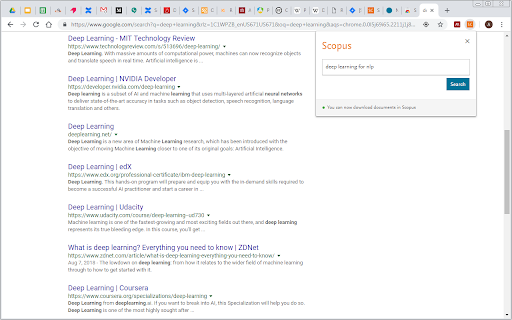
This extension only works for Scopus authenticated users. The Scopus download manager will not do anything for unauthenticated users. Scopus Document Download Manager is a free browser extension enabling download functionality in Scopus, as well as a Quick Document Search function for Scopus authenticated users. To search, authenticated users can simply click on the browser extension icon to display the search form. This extension saves authenticated users the hassle of visiting individual publisher web sites to download documents one by one. Instead, it seamlessly connects to publisher websites to download full text PDFs directly from your browser without needing to configure and maintain a list of entitlements. How do you use this extension in Scopus? 1) From the document search results or document list pages, select one or several documents and click on Download button 2) From a Scopus abstract record page, click on Download button When successfully downloaded, your PDF document(s) will be saved to your browser Downloads folder. In the event that the extension fails at retrieving the PDF (e.g. you are not entitled to the full text or the download is prevented by the publisher web site) the Document Download Manager will provide a link to the publisher web site so you can easily open the page and try to download the full text manually.

Belom SIAP
Extension for better SIAP Undip experience. Created by dafex301. Extension for better SIAP Undip experience. Features: - Block Pop-ups on SSO - Automate PBM evaluation form - Hide user's IPK - Dark Mode for SSO/SIAP/Kulon

Science Research Assistant
Search for scientific information as quickly as possible while researching and writing scientific papers. Save notes for reference. Science Research Assistant is a powerful Chrome extension designed to assist scientists, students, journalists, and anyone seeking reliable scientific research. Whether you're writing a thesis or gathering facts, this tool ensures you find and utilize research efficiently and effortlessly. With a simple selection of any keyword or phrase on a webpage, you can instantly search relevant scientific journals. The extension also offers advanced meta-search options and other valuable tools to enhance your research process. You can easily save text from webpages or PDFs for future reference, and seamlessly export your saved records to PDF for better organization. The built-in algorithm analyzes text from any webpage, identifying the most frequently used keywords and key information, all while highlighting important details. You can even customize the algorithm with your own rules, enabling you to swiftly pinpoint the most crucial insights from lengthy papers or web content. If you're still in the early stages of exploring a research topic or formulating a hypothesis, the Science Research Assistant helps you navigate the overwhelming volume of available information. With its News and Trends feature, you can quickly gauge the popularity and future relevance of a topic, while receiving related suggestions to inspire fresh ideas. This extension is your essential tool for fast, accurate, and insightful research, helping you stay ahead in your field. Science Research Assistant will help you to: · Search and analyze the complex structure of web information · Search scientific journal articles · Search books · Search patents · Search records history · Save notes to record's history · Backup your notes · Compile reports and export to PDF · Use helpful meta-search patterns to dig deeper into the web · Track news and trends Usage: - Save selection text to notes – select text on a web page, click the right mouse button, and choose “Add .. to notes” from your context menu. - Keyword analysis – click the right mouse button and then choose “Keyword frequency analysis (beta)” from the context menu. - Keyword distribution – click on the highlighted keyword to see all its appearances in the text. - Keywords analysis settings overlay – choose the number of words in a keyword phrase (one to five) and the minimum required frequency within the text (from two to 10) you would like to get analysis for. Click the refresh button or remove the results button to remove the analysis. - Selection search – select any word in text on a web page, click the right mouse button, and choose “Science search for ..” from your context menu. This activates a search of various journals and web tools (see Settings). - Settings/Manual search – click on the extension icon in the top right corner of your web browser. - Filter saved records by keyword - Click "A+" button to resize the text - Click "📤 to PDF" button to export selected records and notes to PDF. - Click 🗑️to remove selected records and notes. We always welcome suggestions on what science sources and useful tools to include in future releases of the Science Research Assistant, so do not hesitate to contact us by using the provided form in the settings section. Thanks for all feedback!

Scholar Spots
Enhances Google Scholar profile pages with additional publication data and cool visualizations. Unlock the full potential of Google Scholar profiles with Scholar Spots! This powerful Chrome extension enhances your research analysis by adding new publication data, e.g., publication type, average citations per year, peak citation period, citation trend, and the most frequent title words, all visualized through interactive, great-looking bubble charts! With Spots, you can quickly analyze a researcher's publication history, track citation trends, and measure the impact of their work—all at a glance. Whether you're a researcher, student, or academic, this tool helps you gain deeper insights into a scholar’s academic output. If you enjoy using Spots, we'd love to hear your feedback! Please consider sending us an email, leaving a positive review, and sharing it with your friends and colleagues!

SciSpace: Do hours of research in minutes
Your AI research assistant for understanding scientific literature. Your AI research assistant for discovering and analyzing scientific literature. With SciSpace, you no longer have to open new tabs and Google unfamiliar concepts every time you come across one. Just ask SciSpace for research-backed explanations or summaries for any text, maths, and tables in any research paper, technical blog post, or report you’re reading. You can also ask follow-up questions, and it will give you answers with citations. With SciSpace for Chrome, you can: 👌 Simplify technical language — SciSpace gives you simple explanations for jargon, acronyms, and complex paragraphs. All you need to do is highlight them. 🤿 Delve deeper while learning — Choose from SciSpace’s preset questions or ask your own if you have doubts while reading an article. 🔢 Understand math and tables in PDFs — Clip unfamiliar math equations or tables using SciSpace to find out what exactly they mean. 🌐 Toggle between multiple languages — Interact with SciSpace in 13 languages and get explanations in your native language. 🔖 Bookmark the URL — Save any article or PDF to your collection in SciSpace. Come back to it any time and pick up right where you left. 📡 Find related papers – Discover research papers related to any passage you highlight. Literature Review – Want to inquire about a research question or topic you have in mind? Ask the Lit. Review tool and find insights from 270 million+ papers in the SciSpace repository. Citations in answers – No more fake references or misinformation. Copilot now gives a citation with every answer along with the location of the source.
