
mpjmhmoagckhkodnfbhmkhoajdcpffip
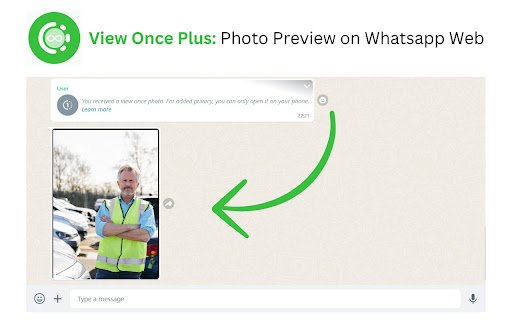
Revisit and download 'view once' photos as many times as you like on WhatsApp Web. Unlock the power of "view once" photos on WhatsApp Web with our innovative extension. Ever wished you could see those fleeting moments more than once? Now you can! Our extension allows you to view "view once" photos in your browser, giving you the freedom to save or view them as many times as you like until you open them on your mobile device. Experience the convenience of revisiting your favourite photos without limitations. Download now and never miss a moment again! Features: View "view once" photos in your browser. Save or view photos multiple times until opened on your phone. Simple and intuitive interface for seamless browsing. Unlock the power of "view once" photos on WhatsApp Web. Download now!

Privacy Extension For WhatsApp Web - WABULK
Protect your privacy on WhatsApp Web, lock your screen, and hide messages, images, profile, and more with blur effects. Privacy Extension for WhatsApp Web offers privacy protection features that allow you to lock your screen and selectively hide messages, images, profile, and more. With this extension, you can safeguard your conversations on WA Web and prevent unauthorized access or prying eyes. # Feature ✅ Screen lock: The Lock Screen feature requires a password to access WhatsApp Web, ensuring that your messages and conversations remain private even when you're away from your computer. You can also set a time limit for automatic lock screen activation. ✅ Message hiding: The Hidden Chat Messages feature allows you to blur out certain content, which can only be revealed by hovering over it with your mouse. This feature includes six independent toggles: Users/Group Names, Profile Pictures, Last Message Preview, All Messages in Chat, Media Preview, and Text Input. ✅ Convenience: Use keyboard shortcuts to quickly turn on/off screen lock and message hiding features, making it easy to use. The Lock Screen shortcut key is Alt+X, and the overall toggle for Hidden Chat Messages is Alt+Z. You can customize these shortcuts in chrome://extensions/shortcuts. # Home Page https://privacy-wa-web.wabulk.net/ We're here to help! For any questions or feedback, contact us at info@wabulk.net.

Story Saver
Simply Download & Save stories from Facebook, Instagram, and WhatsApp. Jun 16 2025 Update fix bug Mon 7 Apr 2025 : Update download all in instagram profile Browser Extension for Downloading Videos and Photos from Facebook and Instagram with One Click Looking for a quick and easy way to download videos, stories, and photos from Facebook and Instagram? Our browser extension is the perfect solution for you. With its powerful features, you can download any video or photo from these popular social platforms in just one click. One of the standout features of our extension is its ability to download videos from Facebook with just one click. No need for complicated websites or bulky software anymore! You can download any video you like directly from Facebook while browsing, and it will be saved on your device in the highest possible quality. Facebook stories capture fleeting yet memorable moments from your friends or favorite pages. With this extension, you can easily download Facebook stories in seconds. Simply click the download button, and your favorite stories will be saved instantly for you to view anytime. Download Photos and Videos from Instagram Instagram is known for its high-quality photos and videos, and our extension makes it super simple to download Instagram photos and videos. Whether it’s an artistic photo or an inspiring short video, you can grab them all with a single click, making it easier than ever to keep the content you love. • User-friendly interface. • Fast downloads with high-quality results. • Completely free and secure. This browser extension helps you save amazing moments from Facebook and Instagram with a single, effortless click. Install it today and start enjoying the convenience of instant downloads! Update 3nd March: Fix Instagram issues for non-english. Story Saver allows you to save photos and videos stories. All you have to do is installing this extension, an icon will appear at the top-left corner of the browser, Click on that icon and whoosh the story will be downloaded, Oh and another thing the extension will rename the story to something readable ;) If there's anything wrong with the extension contact me on my email: storysaverex@gmail.com

WAIncognito - WhatsApp Online Hide & Restore Deleted Messages | WPPME.COM
Turn off WhatsApp read receipts, recover deleted messages, save statuses, and hide online presence with WAIncognito. 👀 WA Incognito helps you protect your privacy and add more useful features to enhance your WhatsApp Web experience. [ Key Features ] ✅ Disable Read Receipts: Keep your activity private by turning off blue ticks. 🔄 Recover Deleted Messages: See and restore messages deleted by others. 👤 Hide Online Status: Stay online without letting others know. 💾 Save Status Updates: Download photos or videos from WhatsApp statuses quickly. ✏️ Disable Typing Indicators: Stop showing "typing" while composing messages. [ Why Use WA Incognito? ] Protect your privacy: Control who knows you're online or has read their messages. Recover lost chats: Access deleted messages you might have missed. Download WhatsApp statuses easily without extra apps. Take control of your messaging experience with WA Incognito. [ For All WhatsApp Users ] Stay private: No one knows you’re online or typing. Keep chats secure: Recover deleted messages instantly. Save favorite content: Download statuses to preserve photos or videos. [ Disclaimer ] This tool is independent and not affiliated with WhatsApp LLC. The tool complies with legal standards and respects all applicable terms of service.

Privacy Extension For WhatsApp Web
Hides your messages until you hover over them. To increase privacy in public spaces the Privacy Extension For WhatsApp™ Web blurs your messages. Your messages and other content only reveals upon hovering over with your mouse cursor. Additionally you can quickly toggle all effects by using a keyboard shortcut or by clicking the toggle button in the extension menu. It adapts to your needs by letting you decide which elements you want to blur. Most important options: - All messages in chat: Blurs all messages in the current chat. - Last messages preview: Blurs all message previews on the left. - Media preview: Blurs all images, videos, stickers, ... in separation from the text. - Profile pictures: Blurs all profile pictures. An extended list of features can be found on our page: https://pfwa.lukaslen.com/ Quick Toggle: Use the keyboard shortcut to quickly toggle the extension on or off (Default: Alt+X). To change this navigate to: "chrome://extensions/shortcuts" --- This extension does not collect information about you or your messages. We only communicate with our server to display information about problems or updates. Visit the privacy policy to learn more. This project is licensed under the MIT license - see the LICENSE file for details. WhatsApp is a trademark of WhatsApp Inc., registered in the U.S. and other countries. This extension is an independent project developed by Lukas Lenhardt and has no relationship to WhatsApp or WhatsApp Inc.
