
inahogkhlkbkjkkaleonemeijihmfagi
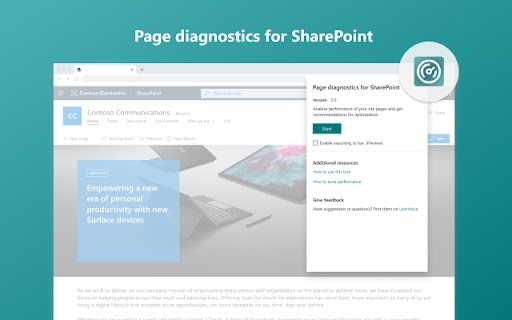

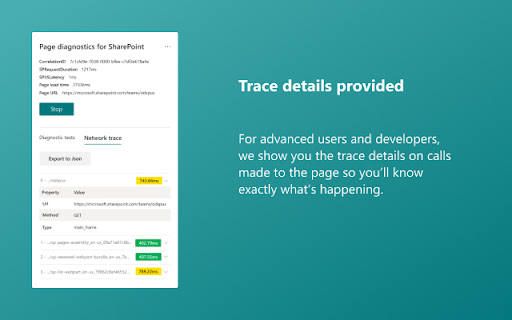

A tool to identify page performance problems in SharePoint Online Page Diagnostics for SharePoint Online is aimed at assisting our customers optimize the performance of their Classic and Modern SharePoint site pages. The tool does not make any changes but rather highlights recommended practices showing them in an Attention Required, Improvement Opportunities and No Action Required sections. Reducing the server time and load on SQL within SharePoint is an important part of maintaining consistent performance with SharePoint and in particular SharePoint Online especially considering the performance optimizations Microsoft has made. The tool will highlight some of the optimizations and recommend utilizing these available resources. Each recommended practice also has a “Learn more” link to direct you to the right resource to assist you. Please also review the “How to use this tool” guide available from the About page. This extension supports SharePoint Online and is not designed for SharePoint on-Premises.

Microsoft Search
A secure and easy way to access workplace search with Microsoft Search - find information at work like people,files,sites and more Now there's a secure, easy way to search work and find the info you need faster. Here are just some of the things you can find when you use the Microsoft Search extension: • People: connect with co-workers, see who they report to, what they’ve worked on recently, and more • Files: get quick access to your recent files and see what others have shared with you • Sites: find SharePoint sites and other internal pages you have access to • Org charts: explore the relationships between teams and connect with people faster • Answers: get links to popular resources and find answers to common work questions • Acronyms: get definitions for acronyms and abbreviations used across your organization • Conversations: find info shared in your private chats and see what others are saying in public conversations • Calendars: view your schedule for the day and see which meetings you have in common with co-workers When you search, you'll only see results from your organization that you can access. Also, none of the internal info or results are available to the public or other organizations, including Microsoft. To help protect you and your work info, sign in to the extension with the same work account you use for Outlook, SharePoint, or other Office apps.

Test & Feedback - Private
Now everyone on the team can own quality. Capture findings, create issues, and collaborate with the team, directly from the browser. Test & Feedback - Now everyone on the team can own quality. Capture findings, create issues, and collaborate with the team, directly from the browser. Everyone in the team, be it product owners, developers, testers, UX designers etc., can now test their web-apps and give feedback, all directly from the browser on any platform: Windows, Mac, or Linux. All kinds of teams will now be able to drive quality in 3 easy steps – capture, create & collaborate. Capture - Take notes, screenshots with annotations, and screen recordings to capture problems. Automatically include rich data like user actions (as an image action log), page load data, and system information. Create - Create bugs, tasks, and feedback response work items to send feedback or report problems. Create test cases quickly based on the image action log while you explore your app. Automatically attach all your captured information. Collaborate - Work offline in standalone mode, then export your session to share findings with your team. For more integrated experiences with end-to-end traceability, connect to Azure DevOps Services or to Team Foundation Server 2015 or later. For example, you can explore user stories directly from the board, manage all feedback requests received, and easily track bugs, tasks and other work-items. To view completed exploratory sessions and get insights across all completed sessions, for example, details about sessions and work items that are created, explored, and weren’t explored, plus other data, go to your exploratory testing insights page. You can use the extension for FREE in these modes: Standalone and Connected Standalone Mode: Available to everyone. Any team, large or small, can use standalone mode to capture issues using screenshots with inline annotations and notes and then share the results using a session report. No connection to Azure DevOps Services or Team Foundation Server required. Connected Mode: Connect to Azure DevOps Services/Team Foundation Server to drive your exploratory testing and feedback flows. - Users with Basic access: Full capture and create capabilities to submit bugs, tasks and test cases. Includes collaboration capabilities like end-to-end traceability, rich insights across completed exploratory sessions, simplified bug/task tracking & triaging, and so on. - Users with Stakeholder access: Full capture and create capabilities, except for test cases, to submit feedback and respond to feedback requests from your team. Feedback experiences are available in Team Services and TFS 2017 or later only. Learn more https://docs.microsoft.com/en-us/azure/devops/test/perform-exploratory-tests?view=vsts

Level up for Dynamics 365/Power Apps
The extension helps Dynamics 365/Power Apps users to perform advanced actions, that normally require bookmarklets. Source code and help for this extension can be found in https://github.com/rajyraman/Levelup-for-Dynamics-CRM

SP Formatter
Customize your SharePoint Column, View or Form Layout Formatting JSON using a full-featured editor instead of the default one. - Live Preview as you type (no need to click "Preview" button) - Intellisense (suggestions) based on Column or View formatting schema, CSS styles, replaceable tokens (`@currentField`, list fields with `$` based on the context) - JSON validation with error messages in the editor - Help tooltips for JSON properties - Color highlights - Line numbers, brace matching, collapsible regions - Hotkeys: search, replace, format document, go to line and others available for monaco-editor - Easily switch between default and enhanced editor - VSCode integration - Full screen mode - SharePoint Online - SharePoint 2019 (through a separate extension, read more https://github.com/pnp/sp-formatter/blob/master/sp2019/README.md) CHANGELOG: https://github.com/pnp/sp-formatter/blob/master/web-extension/CHANGELOG.md
