
gnldpbnocfnlkkicnaplmkaphfdnlplb
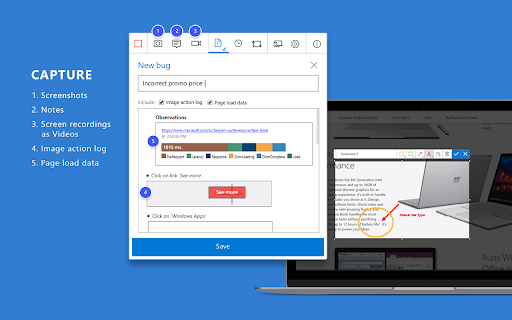
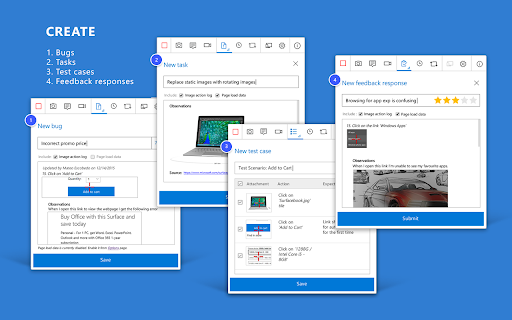

Now everyone on the team can own quality. Capture findings, create issues, and collaborate with the team, directly from the browser. Test & Feedback - Now everyone on the team can own quality. Capture findings, create issues, and collaborate with the team, directly from the browser. Everyone in the team, be it product owners, developers, testers, UX designers etc., can now test their web-apps and give feedback, all directly from the browser on any platform: Windows, Mac, or Linux. All kinds of teams will now be able to drive quality in 3 easy steps – capture, create & collaborate. Capture - Take notes, screenshots with annotations, and screen recordings to capture problems. Automatically include rich data like user actions (as an image action log), page load data, and system information. Create - Create bugs, tasks, and feedback response work items to send feedback or report problems. Create test cases quickly based on the image action log while you explore your app. Automatically attach all your captured information. Collaborate - Work offline in standalone mode, then export your session to share findings with your team. For more integrated experiences with end-to-end traceability, connect to Azure DevOps Services or to Team Foundation Server 2015 or later. For example, you can explore user stories directly from the board, manage all feedback requests received, and easily track bugs, tasks and other work-items. To view completed exploratory sessions and get insights across all completed sessions, for example, details about sessions and work items that are created, explored, and weren’t explored, plus other data, go to your exploratory testing insights page. You can use the extension for FREE in these modes: Standalone and Connected Standalone Mode: Available to everyone. Any team, large or small, can use standalone mode to capture issues using screenshots with inline annotations and notes and then share the results using a session report. No connection to Azure DevOps Services or Team Foundation Server required. Connected Mode: Connect to Azure DevOps Services/Team Foundation Server to drive your exploratory testing and feedback flows. - Users with Basic access: Full capture and create capabilities to submit bugs, tasks and test cases. Includes collaboration capabilities like end-to-end traceability, rich insights across completed exploratory sessions, simplified bug/task tracking & triaging, and so on. - Users with Stakeholder access: Full capture and create capabilities, except for test cases, to submit feedback and respond to feedback requests from your team. Feedback experiences are available in Team Services and TFS 2017 or later only. Learn more https://docs.microsoft.com/en-us/azure/devops/test/perform-exploratory-tests?view=vsts

SelectorsHub
Locators Plugin to Auto Generate and Verify Playwright Locators, XPath & CSS Selectors. SelectorsHub - Auto-generate Playwright Locators, XPath & CSS Selectors SelectorsHub is a powerful developer tool that automatically generates and verifies Playwright locators, XPath, and CSS selectors for web automation testing. Key Features: 1. Auto-generation: Instantly generates multiple selector types including native Playwright locators, XPath, CSS selectors, IDs, names, and more. 2. Advanced element support: Works seamlessly with iframes, Shadow DOM, SVG elements, dynamic elements, dropdowns, and complex UI components. 3. Smart suggestions: Auto-suggests attributes, text values, and occurrences to help you build selectors faster—no more copying and pasting from the DOM. 4. Error detection: Provides clear error messages indicating what's wrong with your XPath or CSS selectors. 5. Element highlighting: Automatically highlights matching elements and scrolls them into view for easy verification. 6. XPath Healing: Verify all the xpath in one shot. 7. Locators Page: Generate Locator Page in one go. How to Use: 1. Open Chrome DevTools (F12 or right-click > Inspect) 2. Navigate to the SelectorsHub tab in the DevTools sidebar, or click the SelectorsHub icon in your browser toolbar 3. Inspect any element to automatically generate all selector types 4. For Playwright locators, click the "Playwright Selectors" button, then inspect the element 5. Type or edit selectors in the input box—smart suggestions will help you complete them quickly 6. Press Enter to verify and highlight all matching elements on the page Perfect for: a) QA Engineers and Test Automation professionals, b) Web developers working with Playwright, Selenium, Cypress, or other testing frameworks c) Anyone who needs reliable, maintainable element selectors

Level up for Dynamics 365/Power Apps
The extension helps Dynamics 365/Power Apps users to perform advanced actions, that normally require bookmarklets. Source code and help for this extension can be found in https://github.com/rajyraman/Levelup-for-Dynamics-CRM

Katalon Recorder (Selenium tests generator)
Selenium IDE alternative to record and export Selenium scripts. With reports & screenshots. Fast & open-source. Katalon Recorder is a free, lightweight web extension that serves as an alternative to Selenium IDE. Designed for automating browser actions and tests, Katalon Recorder is available on Chrome. With Katalon Recorder, you can: Ensure quality by testing your work before passing it on to the QA team. Maintain end-to-end software quality through automated testing. Monitor web application functionality using synthetic testing. Track testing activities with shareable reports, complete with visual dashboards and charts. Save time by automating repetitive browser tasks such as generating reports, filling out forms, and even automating web-based games. Privacy notice: Katalon Recorder is designed with user privacy in mind. Your test artifacts are securely stored on your local machine, ensuring no data is transmitted to our servers. To learn more about Katalon Recorder, visit https://docs.katalon.com/katalon-platform/plugins-and-add-ons/katalon-recorder-extension/get-started/katalon-recorder-overview

BlazeMeter | The Continuous Testing Platform
Record Selenium and HTTP traffic to create a load and functional tests in less than 10 minutes (Apache JMeter Compatible). The BlazeMeter Chrome extension enables you to - Record. Upload. Run. The Chrome extension records all HTTP/S requests and actual user interactions that your browser sends. It creates a JMeter or Selenium script, and automatically uploads it to BlazeMeter.com, where you can execute tests with a single click. No need to install JMeter nor Selenium to record or run GUI Functional, API Functional, or Performance tests, the Chrome extension will create the JMeter (JMX) and Taurus Selenium (YAML) scripts automatically. The extension will also allow you to debug and test your recorded Selenium session on your local Chrome browser. By using JMeter locally, you can debug and enhance the JMX file created by the Chrome Extension to ensure your script is ready to go. WHAT'S NEW: https://guide.blazemeter.com/hc/en-us/articles/115004970329-Chrome-Extension-Changelog-Chrome-Extension-Changelog Features - Record test scenarios without scripting experience - Record all HTTP/S requests made by your browser - Record user GUI actions - Add assertions to your Selenium steps - Add transaction labels (for JMeter and Selenium) during recording - Support for shadow locators (Lightning Web Components) - Apache JMeter Compatible - Taurus Selenium Compatible - Run tests without installing test scripting applications - Run Performance tests for up to 3,000,000 concurrent users - Run load tests in under ten minutes - Run API Functional Tests - Run GUI Functional Tests - Run Selenium tests and JMeter tests side by side to get the best of both worlds - Debug scripts - If you want to record transactions, Chrome version 58 or newer is required - Recommended minimum version of Chrome is 58 - For certain features (e.g. converting to JMX, Scriptless Scenario Editor), a free BlazeMeter.com account is required
