
fahnnnailfccbjpdjeafekniiaflekca


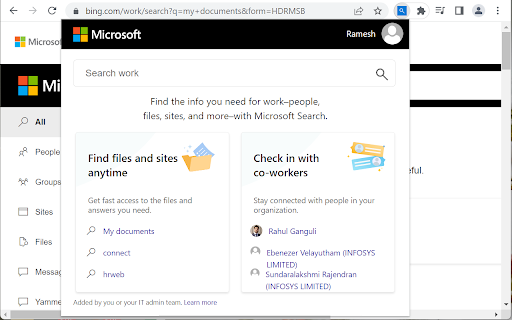
A secure and easy way to access workplace search with Microsoft Search - find information at work like people,files,sites and more Now there's a secure, easy way to search work and find the info you need faster. Here are just some of the things you can find when you use the Microsoft Search extension: • People: connect with co-workers, see who they report to, what they’ve worked on recently, and more • Files: get quick access to your recent files and see what others have shared with you • Sites: find SharePoint sites and other internal pages you have access to • Org charts: explore the relationships between teams and connect with people faster • Answers: get links to popular resources and find answers to common work questions • Acronyms: get definitions for acronyms and abbreviations used across your organization • Conversations: find info shared in your private chats and see what others are saying in public conversations • Calendars: view your schedule for the day and see which meetings you have in common with co-workers When you search, you'll only see results from your organization that you can access. Also, none of the internal info or results are available to the public or other organizations, including Microsoft. To help protect you and your work info, sign in to the extension with the same work account you use for Outlook, SharePoint, or other Office apps.

Shortcuts For Microsoft
Disclaimer =================================== The developer of this extension is not affiliated in any way with Microsoft. All icons and names are a trademark of Microsoft. Notice: All referenced brands, product names, service names and trademarks are property of their respective owner(s). Version =================================== 1.0.1 - Extension logo updated. 1.0.2 - Updated links to Photos and Tasks. 1.0.3 - Updated links and icons 1.0.4 - Manifest version to 3

Centro 365
Centro 365 is a powerful and intuitive extension to your browser, simplifying management of Microsoft 365 and Microsoft Azure. Whether you're in charge of a single product or multitasking across various roles as a Global Administrator, Centro 365 keeps everything you need within reach. • Over 700 Microsoft 365 shortcuts, spanning 18 different admin centres • Powerful real time search, with two distinct modes of operation • Quickly and easily reach admin centres from the address bar, with support for the omnibox • Curate your own list of Favourites, which can be shortcuts from Centro 365 or items found elsewhere • Incognito mode (Private browsing) support • Customise what shows up when you open the extension, the admin centres that show up in the sidebar, and more • Beautiful light and dark modes • Handy keyboard shortcut so you don't need to grab your mouse Proudly made, with love, in the UK.

SharePoint Quicklinks
This extension displays useful URLs on a SharePoint online site, which are applied to the currently visited site/page. Additionally, you can store your own URLs. This extension offers various quick links to SharePoint, such as site contents, site settings, site permissions, etc. This saves a lot of "clicks". For me as a SharePoint developer and all other SharePoint developers, some URLs are of course also very useful for SPFx development. Therefore, in addition to the "normal" `loadSPFx=true` URL parameters (with which you can test the SPFx WebParts on the current page), there is also the option of loading an SPFx Application Customizer. For this purpose, the App Id is requested (prompt dialog) as soon as you click on the URL. You can use the placeholders `{webappurl}`, `{weburl}`, and `{pageurl}`. Only links that have been "enabled" by the user will be displayed. The placeholder `{pageurl}` is replaced by the current (SharePoint) page URL. If you are not on a page, the links are not displayed.

Microsoft Bing InPrivate
Microsoft Bing InPrivate — private and anonymous search in Chrome. Install the Microsoft Bing InPrivate extension to ensure your web searches are private and protected. With this extension you'll get: • Private search by default - your default search engine will be set to Bing with Bing InPrivate search toggled on • Anonymous browsing on Bing - Microsoft sign in is automatically disabled and your search history will not be saved on Bing.com • Advanced privacy settings for Chrome - you will get one-click access to privacy preferences for Chrome, including history, passwords, cookies, and more Add the Microsoft Bing InPrivate extension today to search anonymously, control your privacy preferences for Chrome, and browse the web with peace of mind.
