
fmeihfaddhdkoogipahfcjlicglflkhg

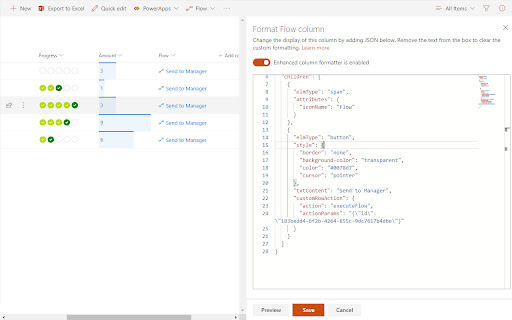


Customize your SharePoint Column, View or Form Layout Formatting JSON using a full-featured editor instead of the default one. - Live Preview as you type (no need to click "Preview" button) - Intellisense (suggestions) based on Column or View formatting schema, CSS styles, replaceable tokens (`@currentField`, list fields with `$` based on the context) - JSON validation with error messages in the editor - Help tooltips for JSON properties - Color highlights - Line numbers, brace matching, collapsible regions - Hotkeys: search, replace, format document, go to line and others available for monaco-editor - Easily switch between default and enhanced editor - VSCode integration - Full screen mode - SharePoint Online - SharePoint 2019 (through a separate extension, read more https://github.com/pnp/sp-formatter/blob/master/sp2019/README.md) CHANGELOG: https://github.com/pnp/sp-formatter/blob/master/web-extension/CHANGELOG.md

Power Automate Utility
Build tools for Power Automate Save any action (including nested containers in Classic) to our own clipboard. Then add to any of your Power Automate flows. Export actions to your device, send to others who can then import them. Review all actions and inputs contained within the clipboard item. History - lists all previous flows you have edited Force Power Automate to always load in Classic UI mode Now works with New UI Hot Keys -Alt+c Adds last added action -Alt+s saves flow -Alt+c opens checker -Alt-z undo (Classic Only) -Alt-t tests flow with last flow in history -Alt+q switch to edit (if in run log) -Alt-x toggle copilot (New UI Only)

Modern List See More for SP
When displaying the item in the SharePoint Modern List, display it in the state that clicked 'See More'. The multiline textfields in the SharePoint Modern List are displayed in a reduced size, and you have to click 'See More' to see them all, which is annoying. This extension works when displaying the item in the Modern List, display it in the state that clicked 'See More'. Disclaimer: Microsoft, SharePoint, and Microsoft 365 are trademarks of the Microsoft group of companies. This extension is an independent project and is not affiliated with Microsoft.

AppReview for Power Apps
Automatic Code Review For Microsoft Power Apps. Upload your solution or legacy app zip and AppReview extracts key information from the Power App and solution, this includes: -Experimental Settings -Screens -Components -Variables -Formula -Connections -Data sources -Flows -Environment Variables -Tables -Test scripts -Code Review Scoring / Flags -Simple screen diagram Key Features: -All component code shown in one screen -Connection privileges used

PowerUI for Power Automate
Improves the flow editor user interface for Power Automate ➗ Gives more room for expression editing ↔ Makes action steps wider using more screen real estate ↕ Makes drop down lists larger using the full height of the screen 📃 Works with both types of formula edit & dynamic value picker ⚓ Docks popups to top of screen 🎨 Uses just css styling to help you make better flows Feedback welcome - click the link in the extension popup Roadmap - Configurable action width - better layout for condition steps - dock location choice - scratchpad - more formula expression builder input improvements
