
piajkgbpepkfdpogbcngdfbdnccdnidi


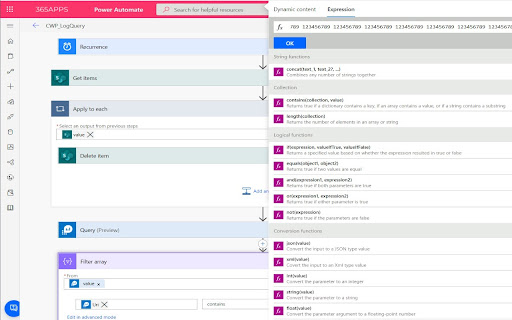
Improves the flow editor user interface for Power Automate ➗ Gives more room for expression editing ↔ Makes action steps wider using more screen real estate ↕ Makes drop down lists larger using the full height of the screen 📃 Works with both types of formula edit & dynamic value picker ⚓ Docks popups to top of screen 🎨 Uses just css styling to help you make better flows Feedback welcome - click the link in the extension popup Roadmap - Configurable action width - better layout for condition steps - dock location choice - scratchpad - more formula expression builder input improvements

AppReview for Power Apps
Automatic Code Review For Microsoft Power Apps. Upload your solution or legacy app zip and AppReview extracts key information from the Power App and solution, this includes: -Experimental Settings -Screens -Components -Variables -Formula -Connections -Data sources -Flows -Environment Variables -Tables -Test scripts -Code Review Scoring / Flags -Simple screen diagram Key Features: -All component code shown in one screen -Connection privileges used

D365: Dynamics 365 & Power Platform updates
Stay updated with Microsoft Dynamics 365 and Power Platform D365 extension keeps you updated with the latest of - Microsoft Dynamics 365 - Power Platform - Microsoft 365 & - Azure D365Hub aggregates related content from hundreds of Blogs, YouTube channels and Podcasts to keep you updated with the latest happenings. D365Hub doesn't fetch the complete story from the blogs, it just presents you with the image, title and a link back to the original post. If you find any helpful blog missing from D365Hub then please submit it at https://d365hub.com D365Hub extension UI has been designed to provide you with intuitive navigation and a clutter-free experience Hope you will like it!

xRM MDA
Productivity tools for Power Apps Makers xRM MDA is an extension for Power Apps model-driven apps and maker pages. It combines naming rules, record helpers, metadata navigation, JSON payload tooling, and generated documentation in one extension. Some utilities are familiar to teams that already use Level Up style tooling. The difference here is the shortcut-first workflow, the reusable template flow, and the additional maker-focused documentation and naming features. (Special thanks to Natraj Yegnaraman and Level Up for Dynamics 365 for their contribution to the Dynamics 365 maker community.) - Keyboard shortcuts for high-frequency record and metadata actions. - Metadata launch from both record context and list context. - Reusable template workflow for saving and reapplying form values. - JSON object manipulator for record payload inspection, editing, create, update, and template work. - Context-aware naming rules across maker surfaces. - Built-in documentation views for forms, workflows, diagrams, and security. - Navigation explorer for moving between table metadata surfaces from inside the app. xRM MDA is designed for users who want frequent actions on the keyboard instead of repeated popup interaction. - Alt+F to set a fake value on the current record or fill the full form. - Alt+F+N to set fake values in a new record. - Alt+G to toggle Godmode. - Alt+N to show or hide logical names. - Alt+C to clone the current record. - Alt+I to copy the current record ID. - Alt+M to open metadata tools for the current entity. Record and testing utilities - Clone the current record. - Copy the current record ID. - Show or hide logical names. - Toggle Godmode while customizing or testing. - Keep Godmode and logical name visibility available across navigation. - Fill the current form with fake data. - Fill a new record with fake data. - Reuse saved values through templates. The extension includes a persistent template workflow for repeated test and setup scenarios. - Save current form values for reuse. - Store templates from the popup and JSON tooling surface. - Reapply templates on later records. - Use templates together with fake-fill and payload editing flows. The JSON object manipulator is one of the main advanced features in xRM MDA. - Inspect record payloads directly. - Edit values in a JSON-oriented view. - Open existing records or create new ones. - Run update and create style operations. - Work with relationships. - Add empty properties. - Randomize values. - Save payloads as templates. - Open metadata tools from the current record. - Open metadata tools from the current list view. - Use the navigation explorer to search tables and jump between metadata surfaces. Naming and maker automation The naming engine applies rule-driven naming behavior across maker experiences. - Global publisher prefix configuration. - Table naming rules. - Column naming rules. - Column data-type overrides such as lookup, yes/no, choice, and text. - Form naming rules for tabs and sections. - Template token support in form naming rules. - Web resource path and extension rules. - Process naming support. - Warning when the detected publisher prefix does not match the configured global prefix. Documentation and analysis features - Form documentation with field metadata. - Filters for fields, tabs, and sections. - Visual state indicators such as required, read-only, and audit state. - Workflow cross-reference with triggering attributes. - Visibility into workflows, business rules, BPFs, plugins, and Power Automate. - Relationship diagrams with SVG and Draw.io export. - Security role matrix by privilege depth. - Word export of collected documentation. - Power Platform makers. - Dynamics 365 consultants. - Admins. - Solution engineers. - Teams that repeat the same record setup and testing flows. - Teams that want more keyboard-driven execution. - Teams that want naming automation and documentation in the same extension. If your team already uses Level Up style utilities, xRM MDA is strongest where you need: - More direct shortcut-driven execution. - A stronger template and fake-fill workflow. - JSON payload editing from inside the extension. - Naming automation for maker surfaces. - Built-in documentation, relationship, and security views. xRM MDA is focused on faster maker workflows inside Dynamics 365 and Power Apps through shortcuts, templates, fake-fill tools, naming rules, metadata entry points, JSON payload tooling, and technical documentation views.

Power Automate Utility
Build tools for Power Automate Save any action (including nested containers in Classic) to our own clipboard. Then add to any of your Power Automate flows. Export actions to your device, send to others who can then import them. Review all actions and inputs contained within the clipboard item. History - lists all previous flows you have edited Force Power Automate to always load in Classic UI mode Now works with New UI Hot Keys -Alt+c Adds last added action -Alt+s saves flow -Alt+c opens checker -Alt-z undo (Classic Only) -Alt-t tests flow with last flow in history -Alt+q switch to edit (if in run log) -Alt-x toggle copilot (New UI Only)
