
ilonmfcpfefeelkojaclhipbfmodbfli

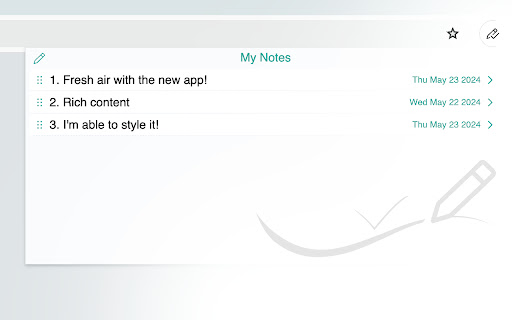


My-Notes - Put your story into notes... It is a simple and useful application that saves a quick note right without leaving a browser. This extension can sync with Google Drive and encrypt the data if desired... to keep it safe, and secure. Features - Markdown it! A plain text format editor for writing structured documents. Based on the CodeMirror with markdown-it renderer followed by the CommonMark spec. - WYSIWYG-style editing. A Rich content editor ideally produce clean, semantically meaningful documents while still being easy to understand. Based on the ProseMirror with the bridge the gap between editing explicit, unambiguous content like Markdown, and classical WYSIWYG editor. - Automatically saves notes to Google Drive into data file If Authorized on options page. - Can encrypt all data synced to the cloud, using AES-GCM encryption with the only key that the user carries. - No one can know about sensitive information until decrypted. - Please be noted, if a key is lost, it will be impossible to recover the data. Please remember that key and keep it safe. - Drag & drop to reorder the notes in a desired order. - Dark and Light themes. - No data is collected from a user. - Offline mode.

Note Sidebar
Note Sidebar is a lightweight and useful add-in designed for taking notes from the sidebar of your web browser. With this browser extension, you can customize the note paper according to your preferences, whether it is your favorite background color, squared graph paper, or lined paper. It serves as a secure notepad extension for writing notes in a minimalist design. Everything you type is automatically saved securely in your web browser. The Note Sidebar can be used for various purposes, such as creating a to-do list for tasks you plan to work on later in the day, jotting down any thoughts, taking notes on YouTube videos in the simplest way possible, or even recording meeting notes. It is ideal for students, teachers, managers, IT experts, influencers, engineers, and business owners. Additionally, it is suitable for medical professionals who need to write therapy notes, urgent care doctor notes, and physical reports. You can retrieve your personal notes on all your synced web browsers and edit them at a later time without interrupting your work. What are you waiting for? Your thoughts deserve the best. Install the extension and start taking notes. Browser extension features: ◆ Automatically Saving: Instantly type your note and automatically save it on your local and synced settings. ◆ Infinity Text: Write as much as you want without worrying about character limits, just like your personal journal. ◆ Font Style: Customize the font color, font size, line height, and background paper. ◆ Text Format: Choose between Plain Text or Rich Text format, supporting Bold, Italic, Underline, Hyperlink, and custom text background. ◆ Text To Speech: Convert your text to speech and select your preferred voice for a personalized experience. ◆ Copy to Clipboard: Easily copy text the complete text area in your clipboard with a single click button. ◆ Print: Print your current note directly from the sidebar. ◆ Character Counter: Keep track of the number of characters in your typed text. ◆ Context Menu Note Addition: Quickly add notes using the right-click menu to copy text into your note sidebar. ◆ Toolbar Customization: Hide buttons in the bottom toolbar to streamline your workspace. ◆ Note Locking: Secure your note with your personal password ◆ Export Options: Export your notebook text to a TXT file, perfect for importing into Google Docs, Microsoft Word, or Apple Pages. ◆ Shortcut: Customizable shortcut key to open the Note Sidebar. ◆ Custom Toolbar Icon: Select your preferred toolbar icon in either light or dark mode, adapting to your visual preferences. ◆ Accessibility: Accessibility Ready with labels for the interactive elements. ◆ Support Dark Mode, which makes it comfortable for your eyes. Project Information: https://www.stefanvd.net/project/note-sidebar/browser-extension Required Permissions: ◆ "contextMenus": This is to add the "Copy text to sidebar" menu item in the web browser context menu. ◆ "sidepanel": Allow the note to be visible in the side panel. ◆ "storage": Save settings locally and sync with your web browser account. >> Unlock an option feature to protect your eyes at night and focus on the video player, such as YouTube™, by installing Turn Off the Lights browser extension for YouTube and Beyond. https://chromewebstore.google.com/detail/turn-off-the-lights/bfbmjmiodbnnpllbbbfblcplfjjepjdn

Advanced Notepad
Simple Notepad yet filled with rich features. Format text, create multiple notes, autosave, remote backup. Faster than ever. Chrome Advanced Notepad is a simple yet powerful notepad filled with rich features. 1) Quick Notes Don't want to create a note to store temporary text? No worries, you can store the notes in Quick notes and erase them whenever you want to. 2) Multiple Notes You can create multiple notes. No need to worry about storage. 3) Auto Save No need of a Save button, Advanced Notepad stores the notes without you doing anything. It will store as and when you create a note or you start editing it. 4) Format Notes You can format your notes. Create unordered/ordered lists, make the text bold, underline, italic or strike it out. 5) Remote Backup Backup your notes on cloud and restore it on any computer. Powered by JSONbin.io You could read more around privacy policy at https://8bit.codes/privacy v2.2 - Increased base font size of notes - Increased size of the Notepad - Fixed Date/Time format issue on creating notes vs updating. - Delete now will request for confirmation before you delete a note. - Editor will now show the last active note as default opened when closed and opened next which will help you continue with your workflow with ease. - Fixed JSONbin.io Cloud Backup feature for notes. - Highlight / Remove Highlight for text v2.0 - Fixed a few bugs - Resized the window, now it's more bigger than earlier. - Longer file names, use a line break to decide the file name once you start typing in the notes. - Notepad will now show Created At & Updated At timestamps for the new notes created (Updated will show up for the older notes too). - Fonts are darker and more clearer. v1.1 - Set the note file name to default if no text found in the note.

Page Notes
Attach notes to any webpage — they're right there when you come back. Syncs via your own Google Drive. No third-party servers. Page Notes — notes that live where you need them Attach a note to any web page. When you come back, it's right there — no searching, no switching tabs. Perfect for login hints, tracking IDs, project context, or anything you'd otherwise forget. SMART & LIGHTWEIGHT Create notes scoped to a specific URL (one article, one order page) or an entire domain (everything on amazon.com). Use #tags to organize notes across sites, and spot pages with notes instantly — the icon changes color when there's a note waiting. YOUR DATA, YOUR RULES, NO LOCK-IN Page Notes never sends your data to third-party servers. Notes live in your browser by default, or sync to your own Google Drive for cross-browser access. For sensitive notes, enable client-side encryption with a passphrase that's never stored anywhere. WORKS EVERYWHERE Syncs across Chrome, Edge, Brave, and all Chromium browsers — plus Firefox. View and edit notes on mobile via the web app at pagenotes.app. • FAQ: pagenotes.manugarg.com/faq • Bugs & feature requests: GitHub Issue Tracker (Store review replies don't work!) • Firefox Add-on: addons.mozilla.org/firefox/addon/mg-page-notes • Privacy Policy: pagenotes.manugarg.com/privacy.html • Blog: https://medium.com/@manugarg/10-000-users-for-page-notes-1f75786c2a41 • Website: https://pagenotes.manugarg.com

Notepad
Simple notebook which helps you to save/manage your notes. Features : 1.Lightning fast experience. 2. No login required. 3. Formatting options. 4. Recycle Bin. 5. Manage notes in categories 6. Automatically sync with chrome. 7. Reorder notes. Future roadmap: 1. Search capabilities. 2. Copy to clipboard. 3. Print notes. 4. Themes (dark/light mode). 5. Download notes. 6. Support for multiple language
