
omjdheidbhoghpfdnndkgoelfiogjfla
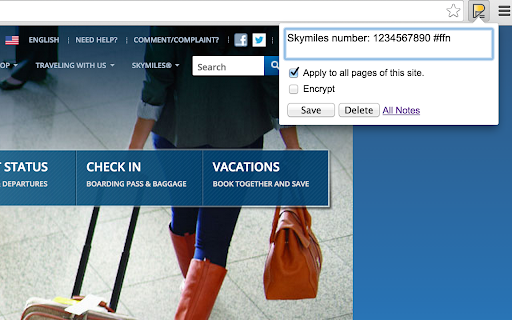


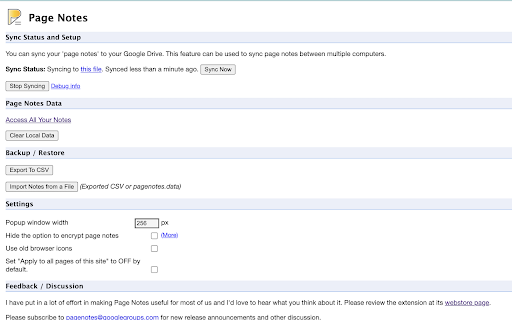
Attach notes to any webpage — they're right there when you come back. Syncs via your own Google Drive. No third-party servers. Page Notes — notes that live where you need them Attach a note to any web page. When you come back, it's right there — no searching, no switching tabs. Perfect for login hints, tracking IDs, project context, or anything you'd otherwise forget. SMART & LIGHTWEIGHT Create notes scoped to a specific URL (one article, one order page) or an entire domain (everything on amazon.com). Use #tags to organize notes across sites, and spot pages with notes instantly — the icon changes color when there's a note waiting. YOUR DATA, YOUR RULES, NO LOCK-IN Page Notes never sends your data to third-party servers. Notes live in your browser by default, or sync to your own Google Drive for cross-browser access. For sensitive notes, enable client-side encryption with a passphrase that's never stored anywhere. WORKS EVERYWHERE Syncs across Chrome, Edge, Brave, and all Chromium browsers — plus Firefox. View and edit notes on mobile via the web app at pagenotes.app. • FAQ: pagenotes.manugarg.com/faq • Bugs & feature requests: GitHub Issue Tracker (Store review replies don't work!) • Firefox Add-on: addons.mozilla.org/firefox/addon/mg-page-notes • Privacy Policy: pagenotes.manugarg.com/privacy.html • Blog: https://medium.com/@manugarg/10-000-users-for-page-notes-1f75786c2a41 • Website: https://pagenotes.manugarg.com

PAGENOTE
Highlight, annotate, and take notes on any HTML & PDF. Build your personal knowledge base.- free, easy to use, no sign-up required. Pagenote – Effortlessly Capture, Annotate, and Organize Web Content Pagenote is a sophisticated browser extension built to revolutionize how you collect, annotate, and manage information on the web. Designed as a versatile note-taking tool, it supports a broad spectrum of functionalities that include text highlighting, image capture, in-browser annotations, tagging, offline HTML saving, and full-page screenshots—all accessible through an intuitive, lightweight interface without requiring any sign-in. Whether you are a student, researcher, professional, or knowledge enthusiast, Pagenote offers an elegant workspace for transforming your browsing sessions into productive, organized, and easily retrievable knowledge bases. By integrating deeply with your browsing experience, Pagenote allows you to mark up any webpage with highlights, comments, and drawings. You can capture not only textual information but also screenshots and images with comprehensive annotation tools. Contextual tags and notes can be attached

MyMenu
Your personal menu ! Former name: Customize Menu. A collection of chrome pages with additional functions v1.3.0 customize font size fix edit item and delete item button v1.1.1 new feature: Cloud sync It is disabled for old user. (Because you may have different setting in different computer) To enable it, just go to Backup tab and check "Synchronous Setting". new feature: a lot of panels related functions Unless you use dev or canary channels, you should go to "chrome://flags/#enable-panels" and Enable Panels to make them work. v1.0.0 Chrome Style option page Remove Task Manager Remove script and custom item support(because of new chrome extension rule)

Ultra Button
A button for everything. You can now access most of chrome features in one Ultra Button. Functions Including: Bookmarks, Extensions, Downloads, History and Tabs. Mouse Middle Button Behaviors Bookmarks: Open bookmark in background Extensions: Remove extension Downloads: Remove download record History: Open history in background Tabs: Close tab or window ~~~~~~~~~~~~~~~~~~~~~~~~~~~~~~~~~ The icons in this extension were downloaded from Noun Project. https://thenounproject.com/ v 0.9.0 add download notification You can enable it in the options v 0.4.1 add session control You can now restore closed tab or windows

Anywhere stickers - simple sticky notes
Attach sticky notes to any page * Nice look and feel. * Synchronizes across your logged-in browsers. * Easy to use. * Nothing excessive, only what you need to remember a pair of words.
