
ibmpamplhebgoidhhlpdgenhdhmchdoa
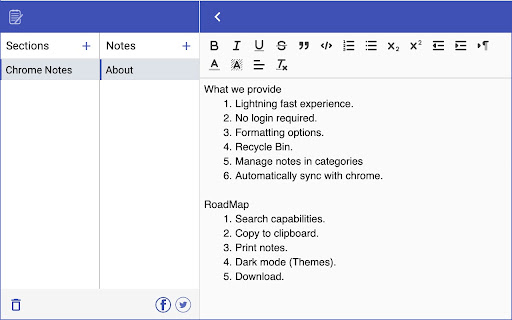
Simple notebook which helps you to save/manage your notes. Features : 1.Lightning fast experience. 2. No login required. 3. Formatting options. 4. Recycle Bin. 5. Manage notes in categories 6. Automatically sync with chrome. 7. Reorder notes. Future roadmap: 1. Search capabilities. 2. Copy to clipboard. 3. Print notes. 4. Themes (dark/light mode). 5. Download notes. 6. Support for multiple language

GoodPlan: Your Everyday Note-Taking Companion
A streamlined, user-friendly journal app for daily use! Designed to maximize your efficiency and save precious time! GoodPlan: Daily Journal, Notes & Planner for Your New Tab 🚀 Transform your New Tab page into a distraction-free productivity hub. GoodPlan isn't just a notepad; it is an intelligent workspace that lives in your browser. Whether you are bullet journaling, managing a to-do list, or saving research from the web, GoodPlan keeps you organized without slowing you down. Replace the chaos of scattered sticky notes with a calm, organized daily view. 📅 Smart Daily Planning • Auto-Rollover Tasks: Never lose track of a to-do item. Unfinished tasks automatically move to the current day. • Sticky Calendar: Jump to any date in the past or future to review notes or plan ahead. • Daily & Weekly Views: Zoom in for daily focus or zoom out for a weekly summary. 📝 The Dual-Note System • Split Screen Interface: Keep your "Daily Notes" on the left and "Permanent Notes" (ideas, long-term goals) on the right. • Full-Page Editor: Enjoy a spacious, distraction-free writing environment. ⚡ Rapid Capture Tools • Web Clipper (Context Menu): Highlight text on ANY website, right-click, and instantly add it to your daily journal. • Quick Popup: Access today's notes instantly by clicking the extension icon without opening a new tab. 🌙 Built for Focus • Auto Dark Mode: Protect your eyes with a dark theme that automatically activates from 9 PM to 8 AM. • Accessibility First: Fully optimized for keyboard navigation and screen readers. 🔒 Privacy & Simplicity • No Account Required: Install and start typing immediately. No sign-ups, no passwords. • Local Data: Your thoughts stay on your device. HOW IT WORKS 1. Install GoodPlan. 2. Open a New Tab to see your daily workspace. 3. Start typing your plan for the day! 4. Browsing the web? Right-click interesting text to save it to your journal instantly. Perfect for students, developers, writers, and anyone who wants to declutter their mind. Upgrade your browser today with GoodPlan—your personal assistant, memory keeper, and planner.

BriskNote: New Tab Notes that Sync across Devices
Take notes on any new browser tab and sync them with your phone Make your life more productive with every new browser tab you open. Taking a note is as simple as opening a new tab. Access your notes across platforms - browsers, mobile apps, and the web. If you spend a good amount of time on your web browser, and you like to take quick notes, then BriskNote is for you. BriskNote is the perfect middle ground between oversimplified sticky notes and complex desktop note-taking software. BriskNote is perfect for taking notes while having conversations, jotting down spontaneous ideas, making lists, storing drafts or pieces of code, and so on. And of course, it's absolutely free!

Memento
A simple but smart notepad; A place to go to get out your thoughts quickly and save them for later. Memento is a very simple and elegant, yet smart offline notepad with rich text-editing capabilities. It allows you to take as many notes as you would like. Not only that, but you can also access your notes quickly and simply. Features 🌿 Elegant, Beautiful, and customizable UI 🌿 Opens on each tab 🌿 Rich text-editing 🌿 Dark Mode 🌿 Emoji Picker 🌿 As many notes as you want 🌿 Note Search 🌿 Privacy Mode for presentations 🌿 Pin notes to the top for better visibility 🌿 Powerful Shortcut system 🌿 Command Palette for accessing common options. 🌿 Use the notepad in Latin. 🌿 Create and Restore Backups 🌿 Export and Import Markdown 🌿 Note Archive and recovery system 🌿 Cleanup Utilities: Duplicate note elimination 🌿 Multiple Language Support (currently EN, DE, HR, ES, HI, FR, LA, PT, ZH, EL, SK) 🌿 Data Privacy and anonymity.

Notes – Quick Tab Notepad
Take quick notes distraction-free — with rich text formatting, task lists, keyboard shortcuts, auto-save and sync, themes, and more. Capture your ideas instantly! Your notes are saved and synced by your browser as you type—perfect for reminders, to-dos, or long-form writing, all on one page. ✨ Format text with markdown and shortcuts. ✅ Create and manage task lists with checkboxes. 🔄 Synced and auto-saved across devices. ✂️ Copied text is beautifully formatted. 📝 Export notes as Markdown, HTML, or plain text. 🖨️ Print your notes or save them as a PDF. 🔍 Customize fonts and zoom preferences. 🌓 Toggle between Dark and Light themes. 🛡️ Fully private, no third-party servers involved. Make the Most of It: 👉 In the settings, you can change the font type and size, set the writing area to full width or centered, and enable spelling suggestions. 👉 Use headings to quickly navigate through your notes. Got an idea... 💡Just one click and you're ready to write it down!
