
icokiikdmaaecdehkchflilmbmmedpga
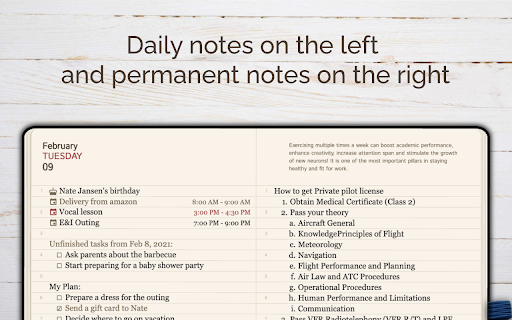

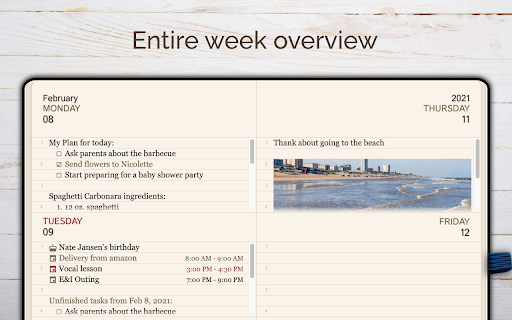

A streamlined, user-friendly journal app for daily use! Designed to maximize your efficiency and save precious time! GoodPlan: Daily Journal, Notes & Planner for Your New Tab 🚀 Transform your New Tab page into a distraction-free productivity hub. GoodPlan isn't just a notepad; it is an intelligent workspace that lives in your browser. Whether you are bullet journaling, managing a to-do list, or saving research from the web, GoodPlan keeps you organized without slowing you down. Replace the chaos of scattered sticky notes with a calm, organized daily view. 📅 Smart Daily Planning • Auto-Rollover Tasks: Never lose track of a to-do item. Unfinished tasks automatically move to the current day. • Sticky Calendar: Jump to any date in the past or future to review notes or plan ahead. • Daily & Weekly Views: Zoom in for daily focus or zoom out for a weekly summary. 📝 The Dual-Note System • Split Screen Interface: Keep your "Daily Notes" on the left and "Permanent Notes" (ideas, long-term goals) on the right. • Full-Page Editor: Enjoy a spacious, distraction-free writing environment. ⚡ Rapid Capture Tools • Web Clipper (Context Menu): Highlight text on ANY website, right-click, and instantly add it to your daily journal. • Quick Popup: Access today's notes instantly by clicking the extension icon without opening a new tab. 🌙 Built for Focus • Auto Dark Mode: Protect your eyes with a dark theme that automatically activates from 9 PM to 8 AM. • Accessibility First: Fully optimized for keyboard navigation and screen readers. 🔒 Privacy & Simplicity • No Account Required: Install and start typing immediately. No sign-ups, no passwords. • Local Data: Your thoughts stay on your device. HOW IT WORKS 1. Install GoodPlan. 2. Open a New Tab to see your daily workspace. 3. Start typing your plan for the day! 4. Browsing the web? Right-click interesting text to save it to your journal instantly. Perfect for students, developers, writers, and anyone who wants to declutter their mind. Upgrade your browser today with GoodPlan—your personal assistant, memory keeper, and planner.

My work Board
Build your own Work Board, Kanban board, Business Model Board and manage your cards This extension is totally free and use a tab to manage your tasks. You can use a KANBAN board or many other types of board that you can customize. With this free tool, you can create several projects and pre-defined boards like: ○ Kanban ○ To Do List ○ Eisenhower matrice ○ SWOT matrice ○ Business Model Canvas ○ Value Proposition Canvas ○ ... -> But you can also create and customize your own Board or modify all the existing boards The purpose of this tool is to clean your workstation of all post-it by putting then in a board. This tool are going to help you clarify your thinking - Personalize Columns and Rows - Add or delete Columns and Rows - Personalize the label of each Columns and Rows - Visualize the number of Card in each window - Personalize card types - New cards can be added easily. You can create 5 different card types. - Drag & Drop interface to move cards. - Add an alarm on the cards to remind you the work you have to do - Cards synchronisation on different computers, for this you must be logged in with a Google account - You can use keyboard shortcuts for the first four card types (Alt+1, Alt+2, Alt+3, Alt+4) - Setup - You can setup 5 card types - You can decide the color of each card type - You can configure the font of each card type You have questions, comments or suggestions for new features, please email us at contact@dpa-consulting.fr

Mahalo
Preserve cherished memories and organize your plans in a single, convenient digital haven. Mahalo: Your Daily Gratitude and Activity Journal Chrome Extension Mahalo transforms your browsing experience by integrating a gratitude journal and a daily activity tracker directly into your Chrome browser. It's designed to help you focus on what truly matters, enriching your daily life with positivity and organization. - **Date-Separated Pages**: Log your thoughts and answers to gratitude prompts for any selected day, adding personal remarks with ease. - **Weekly View**: Overview and edit your weekly notes, maintaining a clear perspective on your progress. - **Rich Text Editor**: Customize your entries with bullet points, various colors, and more for a personalized journaling experience. - **Extension Icon Access**: Quickly access your journal through the browser's top-right corner. Choose between opening the full notebook or a handy popup of the current day's notes - configurable in the settings. - **Smart Popup Feature**: Clicking the extension icon brings up the notes for the current or selected day, perfect for jotting down thoughts while watching a video. - **Page Notes Collection**: Seamlessly integrate information from web pages directly into your journal via the context menu. - **Sticky Calendar Navigation**: Easily navigate between dates with a calendar that highlights days with entries. - **Full-Page Editor Mode**: Dive into detailed note-taking with a distraction-free, full-page editor. - **Weather Updates**: Stay informed with current weather conditions, including temperature, sunrise/sunset times, and wind speed, displayed at the bottom of the page. - **Automatic Dark Mode**: Transition to a comfortable dark theme post-sunset to protect your eyes. - **3D Animation Effects**: Enjoy a visually appealing flipping page effect and ambient coffee smoke in dark mode. - **Inspirational Quotes**: Discover thought-provoking quotes about gratitude on the right side of the notebook. - **Offline Accessibility**: Access all your notes even without an internet connection. - **Flexible Configuration**: Customize your new tab page with Mahalo or revert to the default. Adjust the behavior of the G-icon to suit your preferences. - **Simple, Instant, and Free**: Enjoy an easy-to-use, free extension with ads. ### Permissions and Privacy: - **"New Tab Page"**: Display the extension when opening a new tab, adjustable in settings. - **"Geo Location"**: For accurate weather updates. Dark mode activation is based on this. - **"Storage"**: Stores your notes and settings locally, similar to cookies. - **"Context Menus"**: Enables text collection from web pages for your notes. Mahalo is committed to minimal permissions and user privacy, ensuring a secure and enriching journaling experience. Enhance your daily routine with gratitude and organization - try Mahalo today!

Notepad
Simple notebook which helps you to save/manage your notes. Features : 1.Lightning fast experience. 2. No login required. 3. Formatting options. 4. Recycle Bin. 5. Manage notes in categories 6. Automatically sync with chrome. 7. Reorder notes. Future roadmap: 1. Search capabilities. 2. Copy to clipboard. 3. Print notes. 4. Themes (dark/light mode). 5. Download notes. 6. Support for multiple language

New Tab Todo List: Checklist, Notes, Outliner
Beautiful and sharable checklists, notes, and to-do lists. Collaborate and outline in real-time. Turn your New Tab into a Todo List! ✏️ A lightning fast new tab productivity page and dashboard with stunning backgrounds, todo, tasks, lists, and more. Make your new tab / start page the way it should be: Fast, customizable, beautiful and productive! Make lists, outlines, todos, and more. With the New Tab Todo List extension for Chrome, just open a New Tab to capture your ideas, goals, and daily tasks. New Tab Todo List is a friendly space for your lists, outlines, and teams. Use it as your simple to-do list and task manager. You can instantly make a list and share it with your friends, family, and team. Simple, clean, and beautifully designed with relaxing themes and backgrounds. New Tab Todo List declutters your thoughts so you can focus on your tasks, ideas, and getting things done. Use New Tab Todo List to capture your ideas, goals, daily tasks and stay organized. A homepage you will fall in love with! Checklists, tasks, todos, quick notes, calendar and more. Replace your new tab with a personal productivity tool featuring to-do, task lists, team outliner, and inspirations. • New Tab into a beautiful task list • Collaborate with others, with real-time syncing • Share your task lists instantly using a share link • Easily invite friends and teammates to New Tab Todo List • Work together in a shared team space • Task lists with a natural editing interface • Edit to-do lists like a word doc and document • Mark any items as complete, whether bullet, number, or checkbox. • Infinitely nested lists with indent / outdent • Tag and filter tasks using #hashtag and @mentions • Works on phones and tablets, with live real-time syncing between devices • Automatic syncing between your phone, tablet and computer • Simply click to edit, like a text document • Easily expand and collapse outlines and lists • Inspirational wallpapers and photos • Beautiful and minimal interface • Simple, instant and FREE • Feel good, get motivated, seize the momentum and get things done! Yes, New Tab Todo List is completely free. Soon you will have the option to upgrade to New Tab Todo List Pro, which will have additional features like themes, sticker packs, and customizations. ➜ CAN I USE New Tab Todo List WITH MY TEAM? Yes. Create a space and invite your team instantly. It helps keep your lists and team organized. Members will have full access to lists in space. Use New Tab Todo List as your collaboration tool to help each other get stuff done. Meeting notes, task lists, collaborative documents and processes are now in one place in your shared New Tab Todo List space. Unleash your team’s potential ➜ CAN I COLLABORATE WITH OTHERS? Yes. New Tab Todo List allows you to edit lists dynamically with anyone through a share link in real-time. Your task lists are in sync across all devices live and in real-time. Collaboratively edit together in real-time with teams and groups. Simply select and share the edit link. Stay organized and make progress with your team projects using New Tab Todo List. Your team is on the same page!
