
hmaclocmioclbbcgnoiblgogphobpkaf


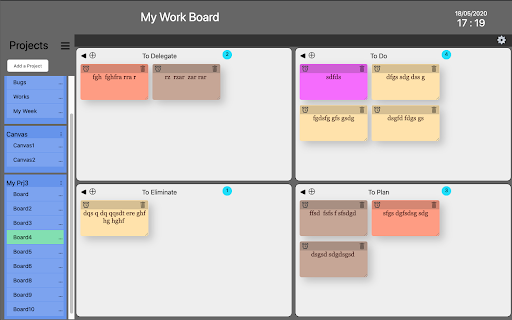


Build your own Work Board, Kanban board, Business Model Board and manage your cards This extension is totally free and use a tab to manage your tasks. You can use a KANBAN board or many other types of board that you can customize. With this free tool, you can create several projects and pre-defined boards like: ○ Kanban ○ To Do List ○ Eisenhower matrice ○ SWOT matrice ○ Business Model Canvas ○ Value Proposition Canvas ○ ... -> But you can also create and customize your own Board or modify all the existing boards The purpose of this tool is to clean your workstation of all post-it by putting then in a board. This tool are going to help you clarify your thinking - Personalize Columns and Rows - Add or delete Columns and Rows - Personalize the label of each Columns and Rows - Visualize the number of Card in each window - Personalize card types - New cards can be added easily. You can create 5 different card types. - Drag & Drop interface to move cards. - Add an alarm on the cards to remind you the work you have to do - Cards synchronisation on different computers, for this you must be logged in with a Google account - You can use keyboard shortcuts for the first four card types (Alt+1, Alt+2, Alt+3, Alt+4) - Setup - You can setup 5 card types - You can decide the color of each card type - You can configure the font of each card type You have questions, comments or suggestions for new features, please email us at contact@dpa-consulting.fr

Customize Tabs for Google Keep™
Customize Tabs for Google Keep™ Do you use Google Keep™ a lot to write notes, personal reminders etc? Currently, all your notes are organized on the same page and are not organized by categories. Having all the notes on the same page wont be an issue if you have a few notes written down. But it can become messy once you have over 20+ notes on the same page. You need a way to organize and keep track of notes inside Google Keep™. This extension helps you create separate categories for Google Keep™, this helps you manage your notes more clearly and easily. Choose the color you want for each new Category Tab you make in Google Keep™. Keep all your notes clearly separated and manage your Google Keep™ notes in a more efficient manner today. Disclaimer: Please note this extension is NOT made by Google and is made by an independent development team. All copyrights belong to their respective owners. Google doesn’t endorse or sponsor this Chrome extension. Customize Tabs for Google Keep™ is not owned by, is not licensed by and is not a subsidiary of Google Inc.

Neatly - Bullet Journal and Task Manager
A Bullet Journal as a Chrome extension for using anywhere Hey There! If you are looking for a digital bullet journal and want to manage your tasks easily, we recommend this extension to you. Unlike other websites, you can use this Chrome extension whenever you open a new tab. This means you don't need to open a specific webpage or application to achieve to this. - Task management per week and month - Categorize your tasks into 5 colors - Highlighting overdue tasks - Showing last week's overdue tasks on each week - Privacy mode to hide your task from others - Dark mode for dark theme lovers - etc... Language and Calendar Support - English language and Gregorian calendar - Persian language and Solar Hijri calendar - Your email is only used for account management and no promotional email will be sent to you. - Your input information, such as tasks and planning, is reserved for this extension and will not be given to third parties and will not be sold.

My-Notes
My-Notes - Put your story into notes... It is a simple and useful application that saves a quick note right without leaving a browser. This extension can sync with Google Drive and encrypt the data if desired... to keep it safe, and secure. Features - Markdown it! A plain text format editor for writing structured documents. Based on the CodeMirror with markdown-it renderer followed by the CommonMark spec. - WYSIWYG-style editing. A Rich content editor ideally produce clean, semantically meaningful documents while still being easy to understand. Based on the ProseMirror with the bridge the gap between editing explicit, unambiguous content like Markdown, and classical WYSIWYG editor. - Automatically saves notes to Google Drive into data file If Authorized on options page. - Can encrypt all data synced to the cloud, using AES-GCM encryption with the only key that the user carries. - No one can know about sensitive information until decrypted. - Please be noted, if a key is lost, it will be impossible to recover the data. Please remember that key and keep it safe. - Drag & drop to reorder the notes in a desired order. - Dark and Light themes. - No data is collected from a user. - Offline mode.

Daily Planner: Tasks, Notes, Goals
Plan your day with a productivity dashboard on every new tab. Track tasks, take notes, and stay focused with quotes. Turn Every New Tab Into Your Personal Productivity Hub Daily Planner transforms your browser's new tab into a powerful productivity dashboard. Stay organized, track tasks, and boost focus throughout your day—all in one beautiful interface. 📝 Smart Note-Taking - Rich text editor with full customization - Show/hide notes container for distraction-free browsing - Custom backgrounds to personalize your workspace ✅ Task Management - Create and organize daily tasks - Track your to-do list across all tabs - Simple, intuitive task completion 🎨 Personalization - Inspirational photos on every new tab - Motivational quotes to keep you inspired - Fully customizable interface 💡 WHY USERS LOVE DAILY PLANNER - Clean, minimalist design that doesn't distract - No account required - works instantly - Lightweight and fast-loading - Perfect for students, professionals, and anyone staying productive 🛡️ PRIVACY & SECURITY Your notes, tasks, and preferences stay completely private. All data is stored locally on your device. We never collect, share, or sell your personal information. Your privacy is our priority.
