
okkeepjinpaokniblacfcbaaffbfhfie


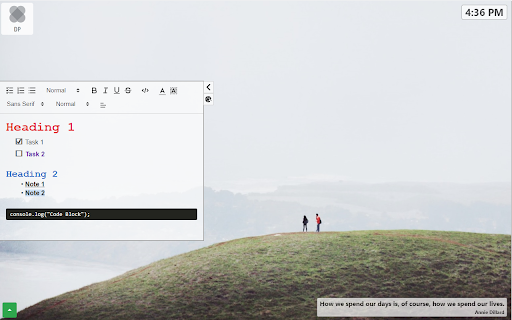


Plan your day with a productivity dashboard on every new tab. Track tasks, take notes, and stay focused with quotes. Turn Every New Tab Into Your Personal Productivity Hub Daily Planner transforms your browser's new tab into a powerful productivity dashboard. Stay organized, track tasks, and boost focus throughout your day—all in one beautiful interface. 📝 Smart Note-Taking - Rich text editor with full customization - Show/hide notes container for distraction-free browsing - Custom backgrounds to personalize your workspace ✅ Task Management - Create and organize daily tasks - Track your to-do list across all tabs - Simple, intuitive task completion 🎨 Personalization - Inspirational photos on every new tab - Motivational quotes to keep you inspired - Fully customizable interface 💡 WHY USERS LOVE DAILY PLANNER - Clean, minimalist design that doesn't distract - No account required - works instantly - Lightweight and fast-loading - Perfect for students, professionals, and anyone staying productive 🛡️ PRIVACY & SECURITY Your notes, tasks, and preferences stay completely private. All data is stored locally on your device. We never collect, share, or sell your personal information. Your privacy is our priority.

Task Planner
Use Task Planner app, organize tasks, create daily checklists and management projects easily. Simple to-do list on daily task board. ⚡ Supercharge Your Productivity with the extension Struggling to stay on top of your workload? This is daily task planner app. Designed for professionals, students, and busy individuals, it combines, and daily planner with task list in one seamless tool. 🌟 Why this app stands out 1️⃣ Fast task entry – add tasks to planner with just a few keystrokes. 2️⃣ Visual Progress Tracking. 3️⃣ Display date and time. 🌟 Powerful Features for Effortless Task Manage 📌 Customizable list – Tailor your digital task planner to your workflow. 📌 Time Estimates – Better plan your day. 📌 The app is always at hand in your browser window, just one click away. 🌟 Who benefits most from this app? 💼 Executives – Manage multiple projects. 🎓 Students – Track assignments in the to do. 👩💻 Remote Workers – Stay organized with online daily task planner access. 👨👩👧👦 Busy Parents – Coordinate family schedules via list maker. 🛒 Shoppers – Create to do list for groceries. ❓ Is there a limit I can add? ❗️ No limits – add as many items as needed to your daily list planner. 🌟 Pro Tips for Mastering for Work 🔥 Use the 1-3-5 Rule – 1 big, 3 medium, 5 small. 🔥 Review Weekly – Spend 15 minutes every Sunday planning in your google task planner. 🔥 Next-Day Prep – Spend 15 minutes at night outline tomorrow’s. 🔥 If the feels huge, split it into 5-7 small steps and tackle them one by one. 🔥 Work 30-60 min, then rest 15 min keep productivity high. 🌟 A minimalist task planner beats bloated apps because: ➤ Zero Learning Curve. No confusing features – just type and check them off. ➤ Always 1 Click Away in Chrome. No installs, no updates, no desktop clutter. ➤ Faster Than a Paper List. Instead of digging for a notebook, just click the extension icon mid-meeting. 🌟 Why Use? 🔹 Clear priorities – An to do list app helps separate urgent from distractions. 🔹 Nothing slips through the cracks, unlike sticky notes or memory. 🔹 Faster decisions – A google to do list shows what’s next, reducing wasted time. 🔹 Visual progress – planner online lets you track completion at a glance. 🔹 Daily focus – keeps you on track without overloading. 🔹 Structured workflow – A todo checklist app breaks goals into small steps. 🔹 Always accessible – A checklist online is available anytime—no lost papers or notebooks. 🌟 How saves time 💡 Eliminates decision fatigue – No more wasting time figuring out what to do next. 💡 Reduces multitasking – Focusing on one from your to-do list app is faster than juggling unfinished work. 💡 Cuts procrastination – Breaking into steps in your daily planner app makes starting easier. 💡 Avoids missed deadlines – with reminders ensures nothing gets forgotten. 💡 Minimizes distractions – Checking off items keeps you on track instead of sidetracked. 💡 Speeds up prioritization – A quick glance at your work planner shows what truly matters today. 🌟 How helps achieve goals 🎯 Breaks Goals into Steps – Turn into daily in app. 🎯 Tracks Measurable Progress – Check off completed items in your to-do list build momentum. 🎯 Forces Priority Alignment – daily shows if daily actually move you toward goals. 🎯 Creates Accountability – Unfinished stay visible until completed. 🎯 Identifies Time Wasters – A planning app reveals activities that don't contribute goals. 🎯 Provides Motivation – Visual progress in checklist encourages consistent action. 🌟 Helps you think less about upcoming work ✔ Offload mental clutter – Dump todos into the browser instantly, freeing mind for what matters. ✔ Quickly assess progress - counter shows how much work remains, so you know exactly where you are. ✔ One-click reset - clear what you've done and start over in seconds - no manual clearing required. ✔ Always within reach – Access right in the browser, no extra tabs. 🌟 Additional benefits 🌿 Reduces Mental Clutter – Dumping into frees up brainpower for creative work instead of remembering todos. 🌿 Improves Work-Life Balance – daily checklist helps separate "must-do" from options, preventing burnout. 🌿 Boosts Productivity – Clear priorities and deadlines keep focused, minimizing procrastination. 🌿 Enhances Accountability – Tracking progress creates a sense of achievement and motivates consistency. 🤗 We would be glad if you, our users, take the time rate our product and share thoughts on how to improve it. Feedback will help us improve the product and add new features. We hope you enjoy it!

Neatly - Bullet Journal and Task Manager
A Bullet Journal as a Chrome extension for using anywhere Hey There! If you are looking for a digital bullet journal and want to manage your tasks easily, we recommend this extension to you. Unlike other websites, you can use this Chrome extension whenever you open a new tab. This means you don't need to open a specific webpage or application to achieve to this. - Task management per week and month - Categorize your tasks into 5 colors - Highlighting overdue tasks - Showing last week's overdue tasks on each week - Privacy mode to hide your task from others - Dark mode for dark theme lovers - etc... Language and Calendar Support - English language and Gregorian calendar - Persian language and Solar Hijri calendar - Your email is only used for account management and no promotional email will be sent to you. - Your input information, such as tasks and planning, is reserved for this extension and will not be given to third parties and will not be sold.

Chrome Notes
A simple notepad extension for Google Chrome NEW: You can now use speech to text NEW: You can now open Chrome Notes with Ctrl+Shift+X (Command+Shift+X on mac) NEW: You can now download and upload complete backups NEW: Chrome Notes adds a right click menu option to send the selected text to a new note! NEW: You can now have multiple notes! NEW: You can now customize the font size! A simple notes extension, right in your browser! Easily copy around a few words to and from different browser windows and other apps. Thank you for over 100,000 users, 100 ratings and 4.5 stars! Chrome Notes remembers your notes and mode, even after closing your browser or restarting your computer! Notes are stored in local storage, so nobody else will ever see them, not us, and not Google, Microsoft, or Apple. Features: * Resizable notepad * Shortcut buttons for cut, copy, paste, and select all * Normal keyboard shortcuts work too * Save as a .txt file * Open in new window * Speak selected text out-loud * Remembers last notepad size for you next time * Store multiple notes, and quickly create, edit, share, or delete * Focus mode for distraction free writing * Adjustable font size * Right click and send selection to new note * Download and upload full backups * Speech to text (click the mic and speak to put your words on the notepad) * Keyboard shortcut Ctrl+Shift+X (Command+Shift+X on mac) to open Chrome Notes is the smart, simple notepad built for you 😊

New Tab Todo List: Checklist, Notes, Outliner
Beautiful and sharable checklists, notes, and to-do lists. Collaborate and outline in real-time. Turn your New Tab into a Todo List! ✏️ A lightning fast new tab productivity page and dashboard with stunning backgrounds, todo, tasks, lists, and more. Make your new tab / start page the way it should be: Fast, customizable, beautiful and productive! Make lists, outlines, todos, and more. With the New Tab Todo List extension for Chrome, just open a New Tab to capture your ideas, goals, and daily tasks. New Tab Todo List is a friendly space for your lists, outlines, and teams. Use it as your simple to-do list and task manager. You can instantly make a list and share it with your friends, family, and team. Simple, clean, and beautifully designed with relaxing themes and backgrounds. New Tab Todo List declutters your thoughts so you can focus on your tasks, ideas, and getting things done. Use New Tab Todo List to capture your ideas, goals, daily tasks and stay organized. A homepage you will fall in love with! Checklists, tasks, todos, quick notes, calendar and more. Replace your new tab with a personal productivity tool featuring to-do, task lists, team outliner, and inspirations. • New Tab into a beautiful task list • Collaborate with others, with real-time syncing • Share your task lists instantly using a share link • Easily invite friends and teammates to New Tab Todo List • Work together in a shared team space • Task lists with a natural editing interface • Edit to-do lists like a word doc and document • Mark any items as complete, whether bullet, number, or checkbox. • Infinitely nested lists with indent / outdent • Tag and filter tasks using #hashtag and @mentions • Works on phones and tablets, with live real-time syncing between devices • Automatic syncing between your phone, tablet and computer • Simply click to edit, like a text document • Easily expand and collapse outlines and lists • Inspirational wallpapers and photos • Beautiful and minimal interface • Simple, instant and FREE • Feel good, get motivated, seize the momentum and get things done! Yes, New Tab Todo List is completely free. Soon you will have the option to upgrade to New Tab Todo List Pro, which will have additional features like themes, sticker packs, and customizations. ➜ CAN I USE New Tab Todo List WITH MY TEAM? Yes. Create a space and invite your team instantly. It helps keep your lists and team organized. Members will have full access to lists in space. Use New Tab Todo List as your collaboration tool to help each other get stuff done. Meeting notes, task lists, collaborative documents and processes are now in one place in your shared New Tab Todo List space. Unleash your team’s potential ➜ CAN I COLLABORATE WITH OTHERS? Yes. New Tab Todo List allows you to edit lists dynamically with anyone through a share link in real-time. Your task lists are in sync across all devices live and in real-time. Collaboratively edit together in real-time with teams and groups. Simply select and share the edit link. Stay organized and make progress with your team projects using New Tab Todo List. Your team is on the same page!
