
lnfempckkegmaeleniojhjplemmebgfi
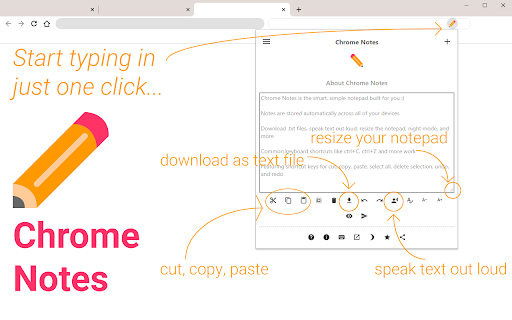


A simple notepad extension for Google Chrome NEW: You can now use speech to text NEW: You can now open Chrome Notes with Ctrl+Shift+X (Command+Shift+X on mac) NEW: You can now download and upload complete backups NEW: Chrome Notes adds a right click menu option to send the selected text to a new note! NEW: You can now have multiple notes! NEW: You can now customize the font size! A simple notes extension, right in your browser! Easily copy around a few words to and from different browser windows and other apps. Thank you for over 100,000 users, 100 ratings and 4.5 stars! Chrome Notes remembers your notes and mode, even after closing your browser or restarting your computer! Notes are stored in local storage, so nobody else will ever see them, not us, and not Google, Microsoft, or Apple. Features: * Resizable notepad * Shortcut buttons for cut, copy, paste, and select all * Normal keyboard shortcuts work too * Save as a .txt file * Open in new window * Speak selected text out-loud * Remembers last notepad size for you next time * Store multiple notes, and quickly create, edit, share, or delete * Focus mode for distraction free writing * Adjustable font size * Right click and send selection to new note * Download and upload full backups * Speech to text (click the mic and speak to put your words on the notepad) * Keyboard shortcut Ctrl+Shift+X (Command+Shift+X on mac) to open Chrome Notes is the smart, simple notepad built for you 😊

Note Anywhere
Make notes on any web page, any position. Make notes on any web page, at any position. Notes are saved in real time and load automatically when you revisit the page. Features: - Create notes on any web page, at any position - Notes are saved in real time - Drag and drop notes by the bar - Notes load automatically when you revisit a page - Badge on the icon shows note count for the current page - Customize note styles (colors, font, size) in options - Notes summary page to browse all your notes - Resize notes - Create notes via right-click context menu - Show / hide / iconize / pin / unpin notes - Sync notes between devices via My Atoms - Export notes to CSV 1.2.0 - Fixed notes failing to load after browser idle - Fixed batch delete not completing properly - Reduced extension size, improved stability - Minimum browser: Chrome 88+ 1.0.2 - Fix bugs on audio page 1.0.0 - After 10 years and used by more than 100K users, version 1.0.0 launched! Fixed bugs from 0.9.x and optimized performance. 0.9.0 — Sync notes between devices 0.8.4 — Show/hide date time on the bar 0.8.3 — Delete all notes from summary page 0.8.2 — Choose colors, pin/unpin notes 0.8.1 — Performance improvement 0.8.0 — Show/hide/iconize notes, list notes in popup 0.7.4 — Drag note by bar, fix select text bug 0.7.3 — Context menu support 0.7.2 — Resize notes 0.7.1 — Options page optimization 0.7.0 — Fix options save bug Please give me feedback if you like it!

Sidebar Note
Please use it for casual notes while watching Youtube, temporary reminders, etc.

Notes Online
The in-page notepad for taking notes online directly on any web page. No login, autosave, 1-click install, and full privacy This is a simple yet powerful notepad extension for Google Chrome that lets you take notes instantly while browsing — right within the same browser window. Whether you're researching, studying, or just organizing thoughts, it keeps everything accessible, editable, and saved – all in a sleek and distraction-free interface. No switching windows. No interruptions. No logins. Just pure focus. This is not just another notes app. It is your sticky-note companion for the web, designed with privacy, speed, and convenience in mind. ✨ SUMMARY ● Create, edit, or delete notes as needed ● Format with rich text and multimedia content ● Highlight web content and save text snippets with source info ● Unlimited number of notes ● Sticky-note design ● 1-click install, no login required, works offline and ad-free ● Autosave instantly 🚀 KEY FEATURES ➜ Works in-page: Take notes in the same browser window using the Chrome side panel. No switching between tabs or apps—everything happens where you're working. ➜ Sticky note design: Write like digital sticky notes that stay right where you need them. ➜ Unlimited: Create and organize as many notes as you want—there’s no limit! ➜ Private local storage: All your notes are saved only on your device. Notes are stored in local storage, so nobody else will ever see them ➜ Offline mode: Full functionality is available without internet access. ➜ No login required: Start using extension right away. No registration, no email, no password. ➜ Autosave: Your content saves automatically as you type. Don’t worry about losing your data—it’s safe, always. ➜ Ad-free: Enjoy a clean, focused experience without banners or pop-ups. ➜ 1-click install: Add the extension in seconds from the Chrome Web Store. 🖋️ WEB HIGHLIGHTING (SNIPPET CAPTURE) Support for web text highlighting lets you quickly collect content while you browse. Just select any text on a web page, and it will be automatically copied into a note—complete with: ▸ The selected text ▸ The page title ▸ A direct link to the source ▸ The site’s favicon 📝 POWERFUL RICH TEXT EDITOR The extension supports a full-featured toolbar to style and organize your content: ❖ Text Formatting: Bold, Italic, Underline ❖ Headings: Multiple header levels to structure your notes ❖ Lists: Numbered and bullet lists ❖ Checkboxes: Create interactive to-do lists ❖ Code Blocks: Insert syntax-highlighted code ❖ Links: Add and edit clickable links ❖ Clear Formatting: Remove styles with one click ❖ Images: You can save any text or image from the internet—just paste it! ❖ Keyboard shortcuts: Copy, cut, and paste work just as expected 💡 HOW TO USE Use in your day-to-day browser activities: ➤ Research: Highlight and save important quotes or data from articles. ➤ Work & Study: Take notes during online courses or meetings without switching tabs. ➤ Shopping Lists: Save product info and links for later. ➤ To-Do Lists: Keep daily tasks organized and visible. ➤ Content Planning: Draft blog posts, social captions, or outlines directly in your browser. Everything is automatically saved and updated across your open tabs. ❓ FAQ ❓: Where are my data stored? 🌟: All data are saved in your browser’s local storage. This means they are only accessible on your device, and not synced or shared with anyone. ❓: Can I use extension without an internet connection? 🌟: Yes! The extension works completely offline. You can create, edit, and view your data even when you're not connected to the internet. ❓: Do I need to create an account? 🌟: No account is needed. No login, no sign-up, no hassle. ❓: Are there any ads? 🌟: Absolutely not. The extension is 100% ad-free. ❓: Can I save images and links? 🌟: Yes! You can paste images and hyperlinks directly. They’re saved automatically. ❓: Is there a limit on how many stickers I can create? 🌟: No, you can create an unlimited number of stickers. ❓: How do I access the application while browsing? 🌟: Simply open the Chrome side panel by clicking the extension icon. 💬 FINAL THOUGHTS The application is a clean, efficient, and completely private browser notepad tool. With support for advanced formatting, web highlighting, and offline access, it’s the perfect note-taking app to keep your digital life organized. Whether you're a student, developer, writer, or casual web user, it's designed to fit seamlessly into your workflow. This is just a notepad online, but smarter. Use it as a web browser notepad, a personal online notebook, or a minimalist quick notepad that always stays with you—no matter what page you’re on. Notes Online is a lightweight notepad Google Chrome extension that lets you take notes directly on webpages

Notepad
Simple notebook which helps you to save/manage your notes. Features : 1.Lightning fast experience. 2. No login required. 3. Formatting options. 4. Recycle Bin. 5. Manage notes in categories 6. Automatically sync with chrome. 7. Reorder notes. Future roadmap: 1. Search capabilities. 2. Copy to clipboard. 3. Print notes. 4. Themes (dark/light mode). 5. Download notes. 6. Support for multiple language
