
bohahkiiknkelflnjjlipnaeapefmjbh


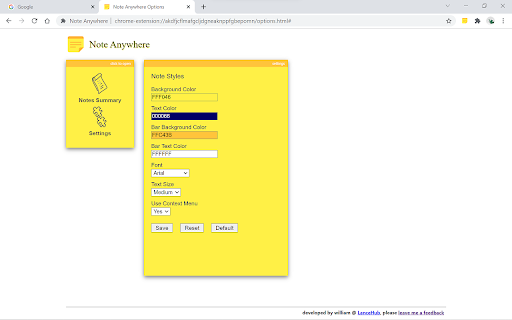
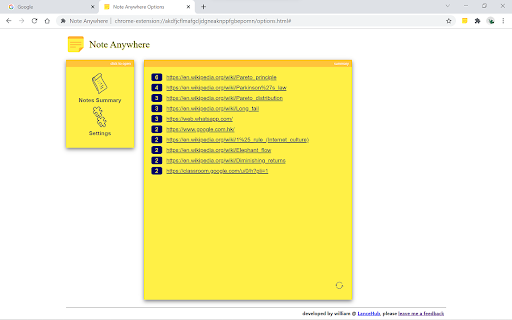
Make notes on any web page, any position. Make notes on any web page, at any position. Notes are saved in real time and load automatically when you revisit the page. Features: - Create notes on any web page, at any position - Notes are saved in real time - Drag and drop notes by the bar - Notes load automatically when you revisit a page - Badge on the icon shows note count for the current page - Customize note styles (colors, font, size) in options - Notes summary page to browse all your notes - Resize notes - Create notes via right-click context menu - Show / hide / iconize / pin / unpin notes - Sync notes between devices via My Atoms - Export notes to CSV 1.2.0 - Fixed notes failing to load after browser idle - Fixed batch delete not completing properly - Reduced extension size, improved stability - Minimum browser: Chrome 88+ 1.0.2 - Fix bugs on audio page 1.0.0 - After 10 years and used by more than 100K users, version 1.0.0 launched! Fixed bugs from 0.9.x and optimized performance. 0.9.0 — Sync notes between devices 0.8.4 — Show/hide date time on the bar 0.8.3 — Delete all notes from summary page 0.8.2 — Choose colors, pin/unpin notes 0.8.1 — Performance improvement 0.8.0 — Show/hide/iconize notes, list notes in popup 0.7.4 — Drag note by bar, fix select text bug 0.7.3 — Context menu support 0.7.2 — Resize notes 0.7.1 — Options page optimization 0.7.0 — Fix options save bug Please give me feedback if you like it!

My-Notes
My-Notes - Put your story into notes... It is a simple and useful application that saves a quick note right without leaving a browser. This extension can sync with Google Drive and encrypt the data if desired... to keep it safe, and secure. Features - Markdown it! A plain text format editor for writing structured documents. Based on the CodeMirror with markdown-it renderer followed by the CommonMark spec. - WYSIWYG-style editing. A Rich content editor ideally produce clean, semantically meaningful documents while still being easy to understand. Based on the ProseMirror with the bridge the gap between editing explicit, unambiguous content like Markdown, and classical WYSIWYG editor. - Automatically saves notes to Google Drive into data file If Authorized on options page. - Can encrypt all data synced to the cloud, using AES-GCM encryption with the only key that the user carries. - No one can know about sensitive information until decrypted. - Please be noted, if a key is lost, it will be impossible to recover the data. Please remember that key and keep it safe. - Drag & drop to reorder the notes in a desired order. - Dark and Light themes. - No data is collected from a user. - Offline mode.

Swifty Sticky Note
Swifty Sticky Note is a fast, secure, and straightforward extension designed for taking notes while browsing the web. It's all about speed and simplicity! Your data is stored exclusively on your browser's local storage, ensuring privacy and security. Side note: to enable or disable spell checker. Right-click on the sticky note --> Spellcheck --> Check the spelling for text fields.

Web Sticky Notes
Imagine having a virtual sticky note for each web page you visit, allowing you to jot down your thoughts, ideas, or to-dos in an instant. Web Sticky Notes is here to simplify the way you interact with the web. Are you tired of constantly switching between tabs and apps to access your notes? Web Sticky Notes saves you time and effort by providing a seamless, intuitive note-taking interface directly within the web pages you visit. Whether you're a student conducting research, a professional collecting information for a project, or simply someone who loves to explore the depths of the internet, Web Sticky Notes is your go-to solution for staying organized and efficient. Why should you install Web Sticky Notes? Contextual note-taking: Capture your thoughts and ideas directly on the web pages where they matter the most. No more searching through endless documents to find that one note you need. Sync across devices: Access your notes anytime, anywhere. Web Sticky Notes uses Chrome's built-in sync feature to make sure your notes are always available on every device where you've installed the extension. Minimalistic and modern design: Web Sticky Notes boasts a clean and intuitive interface, making it a pleasure to use. Group by Hashtag or Domain: Easily categorize and find your notes using hashtags or by grouping them based on the domain they were created on. Privacy-focused: Web Sticky Notes stores your data locally on your device, ensuring that your notes remain private and secure. Unlock the full potential of your browsing experience with Web Sticky Notes. Install now and transform the way you interact with the web!

Chrome Notes
A simple notepad extension for Google Chrome NEW: You can now use speech to text NEW: You can now open Chrome Notes with Ctrl+Shift+X (Command+Shift+X on mac) NEW: You can now download and upload complete backups NEW: Chrome Notes adds a right click menu option to send the selected text to a new note! NEW: You can now have multiple notes! NEW: You can now customize the font size! A simple notes extension, right in your browser! Easily copy around a few words to and from different browser windows and other apps. Thank you for over 100,000 users, 100 ratings and 4.5 stars! Chrome Notes remembers your notes and mode, even after closing your browser or restarting your computer! Notes are stored in local storage, so nobody else will ever see them, not us, and not Google, Microsoft, or Apple. Features: * Resizable notepad * Shortcut buttons for cut, copy, paste, and select all * Normal keyboard shortcuts work too * Save as a .txt file * Open in new window * Speak selected text out-loud * Remembers last notepad size for you next time * Store multiple notes, and quickly create, edit, share, or delete * Focus mode for distraction free writing * Adjustable font size * Right click and send selection to new note * Download and upload full backups * Speech to text (click the mic and speak to put your words on the notepad) * Keyboard shortcut Ctrl+Shift+X (Command+Shift+X on mac) to open Chrome Notes is the smart, simple notepad built for you 😊
