
iicacnkipifonocigfaehlncdmjdgene
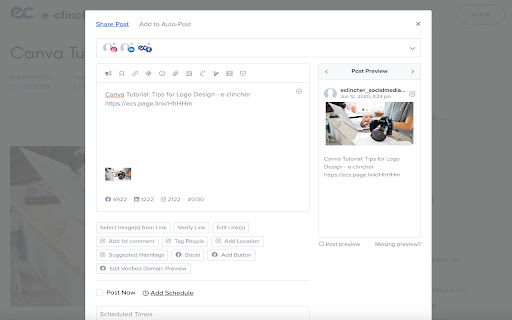
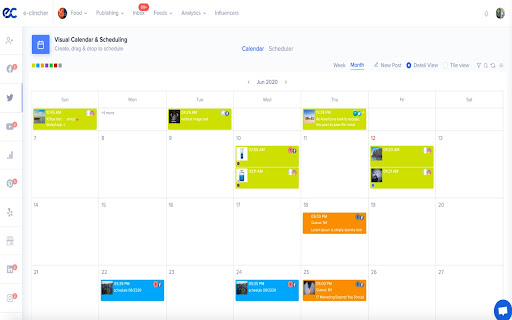

The easiest way to share, post and schedule web content, blogs and articles to all of your social media networks. Eclincher is a leading all-in-one platform designed to simplify and automate social media management, online listening management and local SEO enhancement. Our innovative tools empower businesses and agencies to optimize their digital marketing efforts efficiently and effectively.

Buffer
Buffer is the best way to share great content to Social Networks from anywhere on the web. The Buffer Chrome extension allows you to schedule posts through Buffer.com to your favorite social sites like Instagram, Facebook, TikTok, and more! Effortlessly capture content ideas, share articles and images, or schedule future posts with the click of button. All your content is automatically synced between your desktop and mobile account, so you can easily manage your social media content and grow your audience on the go. Use the Buffer web app to analyze and monitor engagement, respond to comments, and manage your social media presence across all your platforms. The use of the chrome extension requires a Buffer account - sign up now at Buffer.com!

Semrush Social Poster
Share content on social media with just one click while you browse the web Found something share-worthy while surfing the web? Schedule a post to Facebook, Twitter or LinkedIn from anywhere on the internet in just one click using the Social Media Poster extension, and the tool will make it live the moment you need it. Social Media Poster is an automation tool designed to help you easily reach your audience and manage your content in all major social networks from one tab; it lets you plan, schedule and publish posts, and analyze your social media performance. + Post across multiple social channels with just one click via Semrush Social Media Poster + Retweet any post in Twitter or schedule it for later by clicking on the extension’s icon below a tweet + Schedule and publish posts to LinkedIn, Facebook personal and business pages and Twitter + Schedule posts to Instagram and use smart reminders to publish them at a given time + Share an image by hovering over and clicking it + Use hotkey ‘Alt+S’ to share any webpage To use the extension, you need to be registered with Semrush and have at least one active project for which you’ve set up Social Media Poster. Can I use it for free? Yes, you can. You can schedule 10 posts for one social profile with the free Semrush account, and 1000 posts in all paid plans. Semrush is a leading digital marketing toolkit for SEO, PPC, SMM and content marketing professionals worldwide. With over 25 tools within the software, search data for 140 countries and seamless integration with Google services, Semrush provides solutions for in-house marketing teams and agencies working with clients in any industry.

RiteTag
Get hashtag suggestions for images and texts on any site (great for Instagram, Pinterest, Twitter, Facebook, LinkedIn). 1) GENERATE HASHTAGS FOR IMAGES Right click any image on any website and select "Get hashtag suggestions for image" or click Upload icon in the RiteTag bar to get hashtag suggestions for an image from your computer. 2) GENERATE HASHTAGS FOR TEXTS Type a hashtag and hit space to get instant hashtag suggestions (works on any website). Alternatively, select any text on the page (eg. text of your post), right click it and choose "Get hashtag suggestions for text". 3) COLORS INDICATING THE HASHTAG STRENGTH GREEN = use this hashtag to get seen now BLUE = use this hashtag to get seen over time RED = do not use this hashtag, your posts will disappear in the crowd GRAY = do not use this hashtag, very few people are following it **ADDITIONAL FEATURES** + Mouseover any hashtag in the bar to see brief recommendation + Click any hashtag in the bar to add it to the post + Click Copy button to copy all suggested hashtags to your clipboard + Click Compare to compare stats of hashtags currently shown in the bar + Click the RiteTag browser button to show/hide the RiteTag bar + Turn off extension for specific domains

SocialPilot
Expand the reach of quality content—whether your own or from others—by sharing it on social media in just a few clicks! With SocialPilot’s browser extension, you can share any content from a webpage, including blogs, product listings, videos, and more, across multiple social media platforms effortlessly. You can create custom posts, use Craft with AI to generate publish-ready content, or share an image post in one click. Save posts, publish instantly, or schedule them for the best engagement. All you need is a SocialPilot account to use the browser extension seamlessly! 2) Craft with AI: Get ready-made posts with captions and visuals perfectly aligned with the content in one click. 3) Generate AI-powered captions: Manually add captions to your posts or let SocialPilot’s AI do the work. 4) Customize posts for maximum impact: Add hashtags, mentions, geotags, emojis, and image tags to get maximum reach on your posts. 5) Upload, edit, and perfect your visuals: Upload images or videos from your own repository or use media fetched along with the content, editing as you go. 6) Keep all brands organized in one place: Schedule or share the post to all the accounts under one group or belonging to a client. 7) Reshare with automation: For evergreen content, set up schedules for it to be repeatedly posted, drawing eyes and engagement to your profile. 8) Stay consistent with scheduling: Simply select the best date and time for maximum engagement while scheduling. Your content will be published automatically—no extra steps required.
