
hclhpnhohpmlbadmeieecaandnglfodm

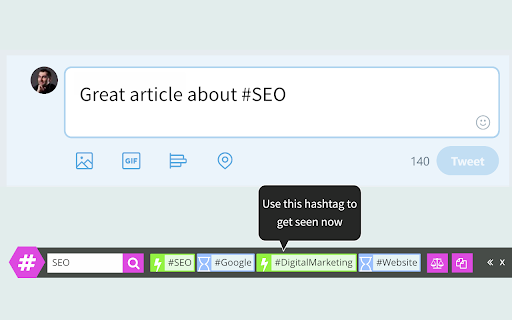
Get hashtag suggestions for images and texts on any site (great for Instagram, Pinterest, Twitter, Facebook, LinkedIn). 1) GENERATE HASHTAGS FOR IMAGES Right click any image on any website and select "Get hashtag suggestions for image" or click Upload icon in the RiteTag bar to get hashtag suggestions for an image from your computer. 2) GENERATE HASHTAGS FOR TEXTS Type a hashtag and hit space to get instant hashtag suggestions (works on any website). Alternatively, select any text on the page (eg. text of your post), right click it and choose "Get hashtag suggestions for text". 3) COLORS INDICATING THE HASHTAG STRENGTH GREEN = use this hashtag to get seen now BLUE = use this hashtag to get seen over time RED = do not use this hashtag, your posts will disappear in the crowd GRAY = do not use this hashtag, very few people are following it **ADDITIONAL FEATURES** + Mouseover any hashtag in the bar to see brief recommendation + Click any hashtag in the bar to add it to the post + Click Copy button to copy all suggested hashtags to your clipboard + Click Compare to compare stats of hashtags currently shown in the bar + Click the RiteTag browser button to show/hide the RiteTag bar + Turn off extension for specific domains

RiteForge
Schedule remarkable posts with instant hashtags, emojis, GIFs and CTAs 1/ Right-click selected text on any page to share great looking animated GIFs 2/ Instantly auto-hashtag or auto-emoji your post with the Enhance button 4/ Add Call-To-Actions to your links

Social Champ
Schedule and publish your social media content Post like champions and increase your social media reach by 75%, by smartly repeating your posts on twitter & facebook. Don't worry, before hiding duplicate post, we save analytics so that you can know your audience & judge better. A proven strategy used by many social media experts. And if you got nothing to schedule, we also have interesting stories for you to share on social media. Also, you can integrate your favorite RSS site. Oh, and we can schedule your posts on Facebook, Twitter & LinkedIn too! That was obvious, wasn't it? Social media is all about experimenting, try us now and see if it helps you grow your audience!

Semrush Social Poster
Share content on social media with just one click while you browse the web Found something share-worthy while surfing the web? Schedule a post to Facebook, Twitter or LinkedIn from anywhere on the internet in just one click using the Social Media Poster extension, and the tool will make it live the moment you need it. Social Media Poster is an automation tool designed to help you easily reach your audience and manage your content in all major social networks from one tab; it lets you plan, schedule and publish posts, and analyze your social media performance. + Post across multiple social channels with just one click via Semrush Social Media Poster + Retweet any post in Twitter or schedule it for later by clicking on the extension’s icon below a tweet + Schedule and publish posts to LinkedIn, Facebook personal and business pages and Twitter + Schedule posts to Instagram and use smart reminders to publish them at a given time + Share an image by hovering over and clicking it + Use hotkey ‘Alt+S’ to share any webpage To use the extension, you need to be registered with Semrush and have at least one active project for which you’ve set up Social Media Poster. Can I use it for free? Yes, you can. You can schedule 10 posts for one social profile with the free Semrush account, and 1000 posts in all paid plans. Semrush is a leading digital marketing toolkit for SEO, PPC, SMM and content marketing professionals worldwide. With over 25 tools within the software, search data for 140 countries and seamless integration with Google services, Semrush provides solutions for in-house marketing teams and agencies working with clients in any industry.

Keywords Everywhere - Keyword Tool
Keyword search volume, cpc and competition for 15+ websites like Google™ Search Console, YouTube™, Amazon™ & more Keywords Everywhere is a freemium chrome extension that helps more than 1.6 million users with online marketing. The free version has the following features - Website Traffic Metrics: View monthly estimates traffic & the top 10,000 keywords that any URL or Domain - Moz Link Metrics: View Moz Domain Authority, DA Trend, Spam Score, Total Referring Domains, Backlinks & more - SEO Metrics: SEO Difficulty, On-Page Difficulty, Off-Page Difficulty, Brand Queries & more. - SEO Reports: SEO reports generated by ChatGPT, Gemini, Claude and DeepSeek using metrics calculated by Keywords Everywhere - YouTube Metrics: Search Insights, SERP Metrics, Video Insights & YouTube Tags. - Local SEO Metrics: Google Maps metrics on locations for Local SEO - Keyword Widgets: See Topical Keywords, Related keywords, People Also Search For (PASF) keywords & Long-Tail Keywords. - On-Page Analysis: Analyze any URL to get the list of keywords in the content of the page, and the density of those keywords - Google Search Console Visualization: Transform your performance report into clean, easy to read tables and charts with a single click - Instagram Hashtag Generator: Generate the most popular hashtags for Instagram (no volume data). - Instagram Widgets: View Engagement metrics for Instagram Influencers - Pinterest Metrics: Pin Data, Search Insights, Trend Chat & Related Trends (no volume data). - Twitter Widgets: View Engagement metrics for Twitter Accounts - Prompt Templates: 200+ optimized prompt templates to help you get the most out of ChatGPT, Gemini, Claude and DeepSeek - Fanout Queries: See exactly the hidden queries that ChatGPT & Gemini use to answer your prompts. - Summary Generator: ChatGPT, Gemini, Claude and DeepSeek for Reddit, Hacker News, Quora and Stackoverflow The paid version has everything the free version has & - Search Volume for 15+ websites: Accurate monthly search volume, CPC, competition & 12 month trend data. - Trend Charts: Historical volume data in the trend charts from 2004 - Import Keywords: Import your keywords to see accurate monthly search volume, CPC, and competition for them. - Bulk Trends Data: Historical volume data obtained in bulk using Bulk Trends feature - Competitor Gap Analysis: Find keywords that your competitors rank for, and which you do not. - Multiple Google properties: Search, Search Console, Analytics, Keyword Planner & Trends. - Multiple eCommerce websites: Amazon, eBay & Etsy. - Multiple search engines: YouTube, Bing & Duck Duck Go. For a complete change-log for this extension please visit https://keywordseverywhere.com/changelog.html For videos on how to use the tool, please checkout our YouTube channel at https://www.youtube.com/@KeywordsEverywhere
