
hbapdpeemoojbophdfndmlgdhppljgmp
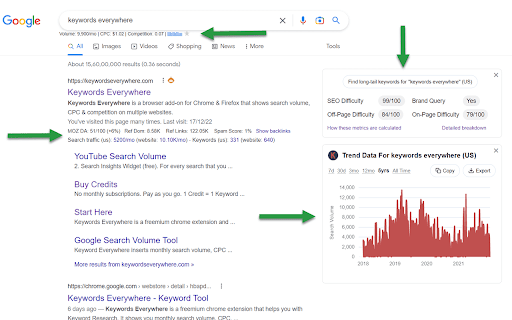


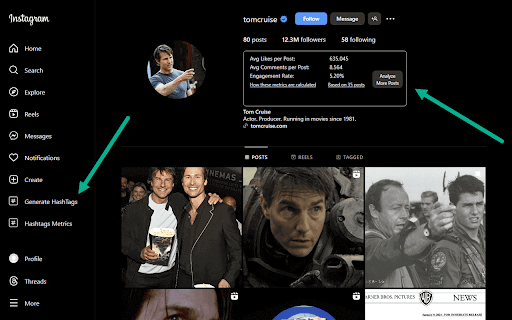

Keyword search volume, cpc and competition for 15+ websites like Google™ Search Console, YouTube™, Amazon™ & more Keywords Everywhere is a freemium chrome extension that helps more than 1.6 million users with online marketing. The free version has the following features - Website Traffic Metrics: View monthly estimates traffic & the top 10,000 keywords that any URL or Domain - Moz Link Metrics: View Moz Domain Authority, DA Trend, Spam Score, Total Referring Domains, Backlinks & more - SEO Metrics: SEO Difficulty, On-Page Difficulty, Off-Page Difficulty, Brand Queries & more. - SEO Reports: SEO reports generated by ChatGPT, Gemini, Claude and DeepSeek using metrics calculated by Keywords Everywhere - YouTube Metrics: Search Insights, SERP Metrics, Video Insights & YouTube Tags. - Local SEO Metrics: Google Maps metrics on locations for Local SEO - Keyword Widgets: See Topical Keywords, Related keywords, People Also Search For (PASF) keywords & Long-Tail Keywords. - On-Page Analysis: Analyze any URL to get the list of keywords in the content of the page, and the density of those keywords - Google Search Console Visualization: Transform your performance report into clean, easy to read tables and charts with a single click - Instagram Hashtag Generator: Generate the most popular hashtags for Instagram (no volume data). - Instagram Widgets: View Engagement metrics for Instagram Influencers - Pinterest Metrics: Pin Data, Search Insights, Trend Chat & Related Trends (no volume data). - Twitter Widgets: View Engagement metrics for Twitter Accounts - Prompt Templates: 200+ optimized prompt templates to help you get the most out of ChatGPT, Gemini, Claude and DeepSeek - Fanout Queries: See exactly the hidden queries that ChatGPT & Gemini use to answer your prompts. - Summary Generator: ChatGPT, Gemini, Claude and DeepSeek for Reddit, Hacker News, Quora and Stackoverflow The paid version has everything the free version has & - Search Volume for 15+ websites: Accurate monthly search volume, CPC, competition & 12 month trend data. - Trend Charts: Historical volume data in the trend charts from 2004 - Import Keywords: Import your keywords to see accurate monthly search volume, CPC, and competition for them. - Bulk Trends Data: Historical volume data obtained in bulk using Bulk Trends feature - Competitor Gap Analysis: Find keywords that your competitors rank for, and which you do not. - Multiple Google properties: Search, Search Console, Analytics, Keyword Planner & Trends. - Multiple eCommerce websites: Amazon, eBay & Etsy. - Multiple search engines: YouTube, Bing & Duck Duck Go. For a complete change-log for this extension please visit https://keywordseverywhere.com/changelog.html For videos on how to use the tool, please checkout our YouTube channel at https://www.youtube.com/@KeywordsEverywhere

TextOptimizer
You don’t have to be an SEO Expert to write expert SEO content! Using the latest technology in Neural Networks and Semantic Analysis, anyone can write content-rich text and optimize their content for best search engine results. TextOptimizer is a writing assistant tool which helps you write concise, high-quality and targeted content that is rich for your readers and optimized for search engines.

SEO Review Tools for Chrome!
This extension will help you to analyze an URL using SEO Review Tools SEO Review Tools for Chrome is a free extension which allows you to quickly check the URL your visiting with one of my 68 free SEO Tools. And in addition I’ve added my 6 favorite Google Tools. An overview of all the tools you can access using this Chrome extension: - AI Brand Visibility Tool - ChatGPT Visibility Tool - Perplexity Visibility Tool - Backlink Checker - Fresh Backlink checker - Broken link checker - Rank Checker - Domain rank tracker - Link Building Tool - Bulk Domain Rating checker - SEO Competitor Research - Full SEO Scan - Website Authority Checker - Domain Authority & Page Authority Checker - Paid Search Competitor Checker ★ SEO Content Tools - AI Content Optimization tool - Content coverage checker - SEO Content Editor - AI Writer - Content Re-writer - Content Brief Generator - Headline Generator - Content Outline Generator - Keyword Cluster Tool - FAQ Schema Generator - Keyword Research Tool - Keyword Difficulty Checker - SEO Content Score Checker - Keyword Sourcer [NEW] - eBay Keyword Tool - Featured Snippet Tool - Trending topics - Free Keyword Search Volume Checker - Keyword Density Checker - SEO Keyword suggestion Tool - Duplicate content checker - Readability Checker - Keyword Extractor - Bulk Web page Word Count checker - Bulk Title tag checker - Title Tag generator [NEW] - Bulk meta description checker - Meta Description Generator [NEW] - HTML Headings Checker - Website SEO Checker - Page Experience Checker - Core Web Vitals Test - PWA Testing Tool - Website Security Checker - Google PageSpeed checker - AMP Checker / Testing tool - Internal Link Analyzer - SEO Redirect checker - Canonical URL / Location Checker - Paid Search Competitor Checker - Domain Age Checker - Email Finder - Website Accessibility Checker [NEW] - Social page authority checker - Bulk Pinterest Pins checker - Facebook Comments box count checker - Bulk Facebook share count checker

Whatsmyserp
Research keywords without leaving your Google search results. Whatsmyserp, previously known as WMS Everywhere, is an extension that provides keyword metrics like search volume and cost-per-click for your current search term and a collection of related search terms. This free extension is built by WhatsMySerp.com

Free Link Checker by LRT
Free link checker to verify all links on a page. Finds broken, unverified, no-follow, follow, internal, external links. Analyze all links on a page in seconds - advanced and fast export of link data. This unique and free Link Checker allows you to check all links on a page and see broken links and unverified links in categories no-follow links vs. follow links, internal links vs. external links. An on-page link code browser lets you see the exact source code of any link on mouse over for quick spotting of issues. Highlighting no-follows and links from own projects are supported as well as other power-user features. Features * Live Links, Broken Links and Unverified Links * No-Follow Links vs. Follow Links * Own Network Links vs. External Links * Source Code Browser on Mouse Over * LRT Power*Trust for every link * Live Filter Link Detail Table Benefits * Built for professional SEO power-users * Replaces all other link checker extensions * "My domains" highlighting * Blazzing fast link data export feature * Ongoing development by LRT Screenshot #1 1. Count the total links the page 2. Count the number of live links 3. Count the number of unverified links 4. Count the number of live links broken links 5. Different link scope for internal, links, within same root domain and external links 6. Count the number of Follow vs No-Follow links for every link scope. Click on those numbers to traverse through code details 7. Go to fancy review and export function (see below) Screenshot #2 8. Full dynamic link detail table and export to Excel and CSV action 9. Show links by network status 10. Show links by link scope 11. Show links by Follow vs. No-Follow 12. Filter links by keyword Screenshot #3 13. Mouse over any link to see details 14. LRT Power*Trust to measure strength and trust of the target page where the link points to - if this is very low, this could be a problematic or new page 15. Full HTML Source Code to review and possibly spot spammy things 16. Blue Marker for own domains (configured in extension settings) 20180917 V0.1.2 - Initial release 20180918 V0.1.3 - Improved Export function and text labels 20190912 V0.1.5 - Added support for UGC and SPONSORED link rel attribute 20190917 V0.1.6 - Resolved issues with source code preview caused by "data-html" attribute.
