
igmjjjikokpgjnckgfcallenihoeabnk

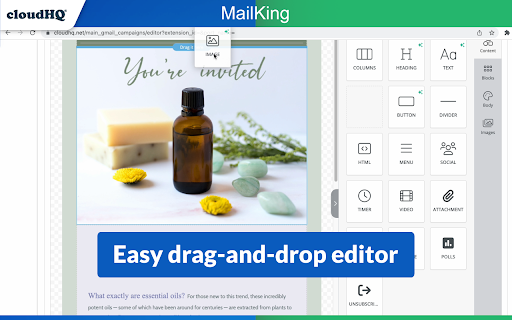


Looking for the best mass email and email marketing software available? MailKing sends your email campaigns from your Gmail address, so you're guaranteed higher open rates. Not only that, but it's built to work right in Gmail, so it's easy to access anytime you need to. Setting up a campaign is easy, intuitive, and extremely effective. ✅ Higher open rates ✅ Send emails from your Gmail, not "noreply@url.com" ✅ Thousands of professionally designed email templates for you to select ✅ Intuitive drag and drop email design editor if you prefer to design your emails from scratch ✅ HTML design editor available too ✅ Import Mailchimp templates, or Hubspot templates ✅ Easily upload CSV file from Mailchimp, Yesware, Salesforce, Zoho and other CRMs ✅ Mail merge available from any of your spreadsheets ✅ Email list builder ✅ Create multiple email contact lists for hyper-targeted campaigns ✅ Embed a branded signup form on your website with your logo, brand colors, and text ✅ Track opens, clicks, and replies ✅ Sequence and follow up email campaigns ✅ Full merge tag support: personalize name, email, or other data ✅ Detailed email campaign analytics ✅ Send up to 2000 emails/day based on Gmail send limits, upgrade to Premium Plan to remove logo on the bottom Bottom line: This is a solid mass email and email marketing software designed to help small to medium-sized businesses cut through the noise and get noticed. Enjoy this feature-rich app, a best-in-class mass email and email marketing software. Who uses MailKing? - Small Business Owners: For reliable and efficient email marketing campaigns. - Sales Professionals: To close deals faster and improve outreach efforts. - Marketers: Whether part of a small business or working as contractors, for creating impactful email campaigns. - Managers: To send internal newsletters and keep teams informed. - Organizations: For distributing internal newsletters, announcements, or notifications to employees. - Anyone: Who needs to send emails to large groups quickly and effectively. NOTE: For easy access to your settings and other cloudHQ apps, look for the cloudHQ icon in the top right corner of your Gmail inbox. Click on it to get started! NOTE: To access Hubspot and Mailchimp templates, simply click on the Hubspot or Mailchimp tab in the template browser to install the necessary extensions. cloudHQ. Helping your productivity, 1 click at a time. Website: https://www.mailking.io Pricing: https://www.mailking.io/pricing Support page: https://support.cloudhq.net/category/browser-extensions/gmail_campaigns/ Blog: https://blog.cloudhq.net Gmail, Google Shared Drive, Google Drive, and Google Workspace are trademarks of Google LLC. Use of these trademarks is subject to Google Permissions.

URL Link Previews for Gmail™ by cloudHQ
Automatically add full web URL link previews when composing your email. Share visually appealing previews, or the full contents of a URL link directly in your email. Here is how it works: - paste URL in your Gmail™ compose window - select "Preview", "Content", or "Preview" - we will automatically embed preview of the URL link into your email This includes private website URLs like: unpublished blog posts, pre-market listings for real estate, private legal contracts, and anything else that has a weblink! Sending attractive URL link previews, or a URL's full webpage content directly in your email, will help you get your message across in a visual way that people will appreciate. This is great for: -Realtors: Send your VIP clients a sneak preview for what's about to hit the market -Writers: Try sharing your unpublished blog posts with a graphic artist to make images or movies -Job Seekers: Try applying for a job by email with your LinkedIn profile and include its full content! -Business Owners: Did you get a contract that only you can see, but you want an outside opinion? Share it! -Salespeople: Sending emails with links to your products are boring! Send it with a visual preview! cloudHQ. Helping your productivity, 1 click at a time. cloudHQ website: https://www.cloudhq.net/ App website: https://www.gmail-url-link-preview.com/ Pricing: https://www.gmail-url-link-preview.com/pricing Support page: https://support.cloudhq.net/category/browser-extensions/gmail-url-link-preview Blog: https://blog.cloudhq.net

Copilot for Gmail™ by cloudHQ
Mini CRM for your Gmail Copilot for Gmail™ is a mini CRM that lets you see a snapshot view of your email contact's profile information, and any past emails conversations you've had. This is crucial to have so that you can respond intelligently, and help you dramatically cut down your search time when you're looking for a past email conversation you had with your email contact. Right within Gmail, you can: ✔️View profile information of the person you're emailing, or who emailed you ✔️Create private notes about this contact (For example: This client has needed support for over 4 hours last week) ✔️Set up a reminder alarm for this contact (For example: Follow up with client on a specific date/time) ✔️A list of all the email conversation history you have with that email contact ✔️A list of all documents and attachments related to that email contact This is great for anyone who wants to appear more professional, and have everything neatly organized in their email. Key features: ⭐️ person and company profile info ⭐️ easy access to all email messages ⭐️ easy access to all attachments ⭐️ notes (private or shared with the team) ⭐️ reminders cloudHQ. Helping your productivity, 1 click at a time. cloudHQ website: https://www.cloudhq.net/ App website: https://www.gmail-copilot.com/ Pricing: https://www.gmail-copilot.com/pricing Support page: https://support.cloudhq.net/category/browser/gmail-copilot Blog: https://blog.cloudhq.net Demo: https://www.cloudhq.net/demo Google Workspace, Google Sheets, Google Drive, Google Alerts and Gmail are trademarks of Google LLC. Use of this trademark is subject to Google Permissions.

Email Privacy Protector: Is My Email Tracked?
Anytime you open your emails, people could be tracking when you do it, and which links you click on. Protect your email privacy. This extension is an email tracking blocker for Gmail - it blocks all email tracking pixels so preventing marketers and spammers from monitoring when you open emails and click on links, thereby protecting your email privacy and security. Stop spammers & marketers dead! Anyone who's tracking your emails, will be sorely disappointed. Do you know that almost all the emails you receive are tracked to see when you open them and when you click on the links in them? With this email privacy protector, no one will ever be able to know when you opened your email, or have any information about any links that you clicked. This extension will block email tracking attempts used to detect when you open and read emails. Email Privacy Protector displays an 'shields' when it finds and blocks a tracking attempt inside of an email. How it works: 1. Install the extension. 2. Open an email in your Gmail. 3. You will see a small shield icon in the left corner and the text "This email is being tracked". 4. If you want to notify the sender that you have opened and read the email, hover over the "Tracking is blocked" text and click "Unblock". Your email privacy and security is our goal. NOTE: For easy access to your settings and other cloudHQ apps, look for the cloudHQ icon in the top right corner of your Gmail inbox. Click on it to get started! cloudHQ. Helping your productivity, 1 click at a time. cloudHQ website: https://www.cloudhq.net/ List of cloudHQ apps: https://www.cloudhq.net/apps App website: https://www.email-tracking-blocker.com/ Pricing: FREE Support page: https://support.cloudhq.net/category/browser/email-tracking-blocker/ Blog: https://blog.cloudhq.net

Gmail Web Clipper by cloudHQ
Save anything you see from web articles, texts, and snippets, directly in your Gmail. Free and simple. Give it a try today! Plus - save anything you want from the web like: ✔️ Articles, ✔️ Texts, ✔️ Images, and more! Everything is neatly saved in a Gmail label directly in your email. cloudHQ. Helping your productivity 1 click at a time. cloudHQ Website: https://www.cloudhq.net App Website: https://www.gmail-web-clipper.com/ Pricing: https://www.gmail-web-clipper.com/pricing Support page: https://support.cloudhq.net/category/browser-extensions/gmail-web-clipper/ Blog: https://blog.cloudhq.net Gmail, Google Shared Drive, Google Drive, and Google Workspace are trademarks of Google LLC. Use of these trademarks is subject to Google Permissions.
