
iffdacemhfpnchinokehhnppllonacfj

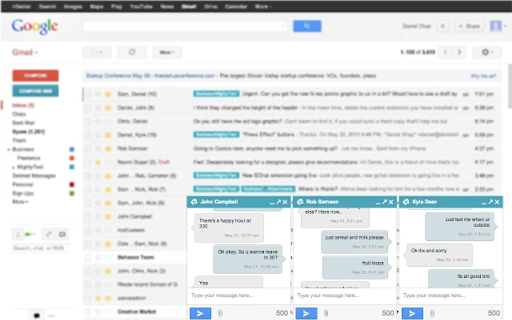
Text using your Android phone # directly in Gmail™ or Facebook™. See your calls & phone battery. SMS, MMS, group messaging, texting ★ Send & Receive SMS Text Messages directly from Gmail™ or Facebook™ on your computer ★ Sync'd with your Android phone ★ 100% Free ★ Uses your CURRENT, existing Android Phone Number ★ NEW! Text directly from Facebook on your computer ★ Send & Receive MMS Picture Messages in Gmail ★ NEW! Get low phone battery alerts and battery status in Gmail™ ★ Get started in less than 60 seconds Step #1: Install our Android App on your phone: https://play.google.com/store/apps/details?id=com.texty.sms Step #2: Link your Google Account and Complete Setup on your phone Step #3: Go to https://mightytext.net/app in Chrome on your desktop Step #4: Sign in to MightyText on your desktop browser with the same Google Account used on your phone Step #5: Install this extension Note - This MightyText Chrome Extension will work only AFTER completing the steps above. Send & receive SMS text messages & MMS from Chrome using your current Android™ phone and number. You can still send/receive texts on your phone as you normally would. *** YOUR text messages or other personal info is *never* shared with Facebook or Gmail. MightyText runs as an independent container and your data is never shared with Facebook or Gmail *** ★ Sync text messages between your Android™ phone and your computer ★ Get SMS Notifications on computer immediately when SMS hits phone ★ Missed call alert, call logs & SMS Popup & SMS Backup ★ SMS from computer ★ SMS Backup, MMS Backup ★ Start texting in under 60 seconds ★ 100% Free (no additional charge from what your Carrier charges you) ★ Group Messaging ★ Send Emoji and Emoticons! By clicking "Install", you agree to these Terms of Service: Android Phone with version 4.4 or above Working and active mobile data or wi-fi connection Background Data must be enabled on your phone Phone must have battery charged and be on, since all texts are routed through the phone Portions of this page are modifications based on work created and shared by Google and used according to terms described in the Creative Commons 3.0 Attribution License.

Backup and Sync Google Drive to other clouds
Export Google Docs and Sheets to other clouds with one click With this browser extension you can save your Google Docs or Google Sheets directly to other cloud account. Just click on on "Save to" button in upper right corner of your Google Docs or Google Spreadsheet documents and you will promoted to select destination cloud service. And after save, you can setup you can setup real-time sync, backup or migration of your Google Drive™ folder with some other cloud services: with no complicated downloads. You can also synchronize any folder in your Google Drive with other cloud storage solutions such as Amazon S3, Dropbox, Egnyte, SharePoint, etc. To do this, open the folder in your Google Drive and click on "Sync this folder" to initiate the synchronization wizard. You can learn more about cloudHQ solutions here: cloudHQ website: https://www.cloudhq.net/ Pricing: https://www.cloudhq.net/pricing Support page: https://support.cloudhq.net/ Blog: https://blog.cloudhq.net Gmail, Google Shared Drive, Google Drive, and Google Workspace are trademarks of Google LLC. Use of these trademarks is subject to Google Permissions.

Shortcuts for Google™ Products
The "Shortcuts for Google Products" extension lists all Google products in your browser's toolbar popup. Clicking on an icon will open the product in a new tab. Operation: Click: Opens in a new active tab next to the current tab Shift + Click: Opens in a new window Ctrl + Click or Command + Click: Open in a background tab next to the current tab Updates: 1. Drag & drop to re-arrange your icons. 2. Re-size popup and also icons. 3. Add a new custom product to the list Notes: 1. In order to change the popup width, please enter an integer value from 5 to 24 in the designated space. This value represents the number of columns in the popup. 2. In order to change the icon's size, please enter an integer value from 16 to 64 in the designated space. This value represents the icon size in pixels. 3. in order to see the new icons after each update (not for the first install), you need to reset the toolbar popup once. To do so, open the toolbar popup, click on the settings icon at the bottom left corner, and then click on the reset button.

Checker Plus for Google Drive™
Quickly browse your Google Drive files without opening a webpage and get notifications of modifications to your shared documents • Browse, open, search or delete your files and documents right from a browser button (without waiting for Google Drive's page to open) • Get desktop notifications when any of your files/documents are modified or updated by a shared user Click "Website" or visit jasonsavard.com for more info.

ActiveInbox: Organize Gmail™ tasks
Overwhelmed by too many to-dos in your inbox? Turn Gmail into an effortless task manager to never forget anything. Turn Gmail into a task manager, and take control of all your conversations. Our mission is simple really... we want to give all of us the tools to achieve meaningful happiness. Our business supports this by making elegant software, infused with proven psychology, to help us all absorb the shocks of life and become truly effective. DESIGNED FOR EXECS, MANAGERS & FOUNDERS ActiveInbox has a free trial to get a taster of being in control. It's "A 'must try' if you want to easily keep yourself on track in an undoubtedly busy world" - Richard Gaspar ActiveInbox works where you already do: in Gmail and on mobile. There's no need to adopt a new tool to accomplish... Stop emails sinking into the inbox swamp by turning them into tasks with due dates and adding them to projects. Don't 'send and pray' emails you spent precious time writing. Deliver at the time they'll be read and let ActiveInbox track them to completion. Achieve inbox zero, then glide through your day, by having just one place to focus on emails and tasks, and breaking your Today list into digestible chunks. Oh, and we're the original Gmail plugin - ActiveInbox has been supporting customers since 2006.
