
iejcbdponpipehjlchccknbmnkonnmji
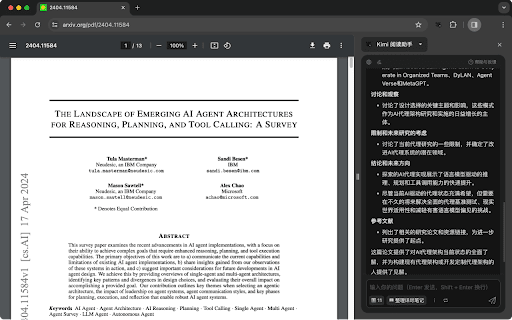
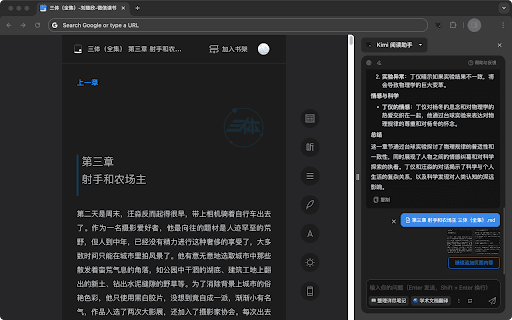
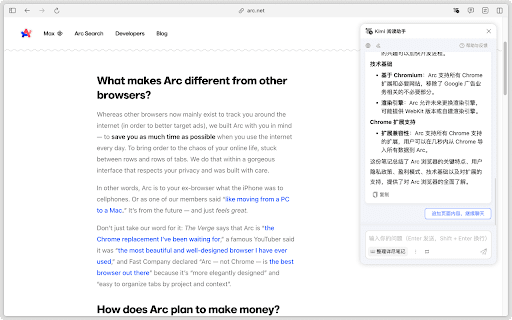

享受 AI 辅助阅读的乐趣~ ## 功能介绍 * 使用 Kimi.ai 辅助阅读任何你能浏览的网页(windows 快捷键 Ctrl+Shift+E, Mac 快捷键 Command+Shift+E) * 支持与本地文件对话 * 适配了部分常用网站,包括小红书图文笔记、微信读书、京东商品详情、淘宝商品详情、B 站字幕总结等 * 支持常用语排序,可在多轮对话中快速使用 * 支持划词提问、支持保存对话内容到浮墨笔记 * 支持 Arc 浏览器及暗色主题 ## 说明: * 需要 Chrome 116 及以上版本才能正常使用扩展 * 欢迎提交意见及建议(会第一时间回复):https://support.qq.com/products/642015

Douban Book+
Only 1-click from Douban to your favorite ebook platforms

Circle Reader
An extension that provides immersive reading to make you fall in love with reading on the web The best free reading assistant (reader mode) that enhances the web page reading experience. Ads are too distracting, the colors are too ugly, the fonts are too small to see clearly, the typography is too messy to find the text, does it really need to be so difficult to read the web? With just one click, Circle gives you the purest reading experience, escorting you to better reading. Circle reading assistant can extract the content of the webpage and rearrange the layout into a more suitable interface for reading. Using self-developed analysis engine and typesetting engine, the recognition effect and typesetting ability are smarter, faster and more friendly. If you are looking for a lightweight and intelligent reading aid product, you might as well try Circle Reading Assistant-the best reading aid of its kind! The reading assistant browser extension Circle, which is more powerful than the Safari reading mode, is an extension and improvement of the browser's own reading mode; it is the only magical tool for computers to read web pages, read novels, and watch news; it has shortcut key support, custom styles, Custom fonts, custom themes, automatic scrolling, automatic loading of the next page, reading aloud, article outline (outline), back to the top, reading by column, printing the formatted webpage in reading mode, supporting browser translation, etc. Reading auxiliary functions. The self-developed analysis engine provides faster analysis and smarter analysis capabilities. The self-developed typesetting engine automatically blocks advertisements and noise on html, and says goodbye to the format escape. The Circle reading assistant browser extension developed by pure js has been launched on Google Chrome browser, Firefox browser, Edge browser, 360 browser, Opera browser, etc. ★ Several distinctive functions of Circle Reading Assistant: ➤ Self-developed recognition engine: With the help of self-developed recognition engine, Circle's recognition effect is smarter and the recognition speed is faster. ➤ Self-developed typesetting engine: With the help of self-developed typesetting engine, Circle's typesetting effect is more friendly and the typesetting speed is faster. ➤ Letter paper effect: a reading experience like reading a letter. ➤ Multi-page analysis: On a page with a link to the next page, the content of the next page is automatically parsed and displayed on the current page. ➤ Reading by column: Originally read the webpage by column, the welfare of large-screen users, without wasting every inch of screen space. ➤ Read aloud: Tired of reading? Why not try the content! Free your hands to do other things. With the help of "multi-page analysis", what kind of bicycle is needed for listening to novels? ➤ Preset 5 colorful themes: simple white, eye-protecting green, elegant dark gray, and deep dark. Circle has always been what you like. ➤ Custom gradient background or picture background: The preset theme is not on your aesthetic point? It's ok! Customize themes as you splash ink. ➤ Customize various styles: Just reading is not possible, I have the final say on the style of the web page! The font size is bigger, the font is thicker, and the line spacing is higher. Circle does everything for you to read. ➤ Follow the system to switch themes: only support custom themes? nonexistent. How about switching different themes at different times? . ➤ Custom css: You don't have the effect I want, you are awesome ugly! Customize css to help you, understand that css Circle is your person. ★ Keep abreast of the trends of Circle's reading assistant ➤ Subscription account 👉🏻 Senior Ranhe ★ Description of required permissions ➤ contextMenus: Use this permission to implement the right-click menu module, you can quickly access the function of Circle in the right-click menu ➤ : This permission allows Circle to access webpages, thereby realizing the recognition and layout of webpage content, as well as access to screenshots and exporting as pictures and other functions ★ Contact and discussion ➤ Contact me by email 👉🏻 wenguang.fe@gmail.com If you approve of my work, please have a cup of coffee to show encouragement and support 👉🏻 https://circlereader.com/donate The source code is hosted on github 👉🏻 https://github.com/hewenguang/circle Installing Circle means you accept our user agreement (https://circlereader.com/docs/agreement.html) and privacy policy (https://circlereader.com/docs/privacy.html)

AI课代表 - B站学习助手, 视频总结, 字幕列表, GPT-4
Bilibili 视频总结插件~ “AI课代表” 是您在B站最专业的人工智能助手 🤖 基于GPT4的“知识提问"+“视频总结”+“字幕搜索” 支持Bilibili、Youtube! 🎉🎉🎉每日刷新免费额度🎉🎉🎉 选择“AI课代表”的三大原因: 🧠帮你汲取B站5亿视频的“精华内容” ✅ 解决问题:“知识提问”直接回答你的问题! ✅ 快速定位:字幕搜索帮你快速定位“关键点”! ✅ 筛选视频:内容摘要帮你识别“标题党”! 🤓帮你成为人见人爱的“课代表” ✅ 无情吸赞:把“摘要+时间戳”发到评论区! ✅ 学霸人设:把宝藏视频的“链接+摘要”分享给朋友! ✅ 专栏大佬:公开发布AI笔记到B站的“笔记本”! 最重要的是: 🗣 您的声音至关重要,我们将以“3天1更”的速度持续改进!

千问-语音转文字,实时字幕,划词翻译,网页速读
千问是阿里巴巴推出的AI对话助手,基于通义千问Qwen最新最全的大模型,致力于提供高效流畅的智能体验。 实时记录:实时语音识别,AI字幕翻译,智能总结。网课、追剧追番、线上会议必备。Record, transcribe, translate and summarize online courses&meetings from any web page。 阅读助手:总结网页PDF内容、划选解读翻译问答,AI帮你一键速读网页文档。Read, summarize, highlight, interpretate, translate webpages&documents with one click. 安装千问浏览器插件: 1. 在当前页面将千问添加至Chrome 2. 在扩展程序中打开千问,注册并登录(安装后初次使用需要刷新页面) 点击开启「实时记录」: 1. 选择需要记录的Chrome标签页并点击「分享」,即可开始记录 2. 点击「结束录音」,完成记录 3. 前往千问网页版 查看转写结果和音频,以及全文概要、章节速览、发言总结等总结内容 点击开启「阅读助手」: 1. 点击“command+shift+k”按钮,可以快捷启动千问浏览器插件。 2. 划选浏览器中的网页或者PDF某段内容,可以解读、翻译、对话。 3. 前往千问网页版,查看智能速读结果和网页PDF,以及对话、导读、思维导图、笔记等内容。
