
jgilkmapjeaikiboajahmeiadceioobc

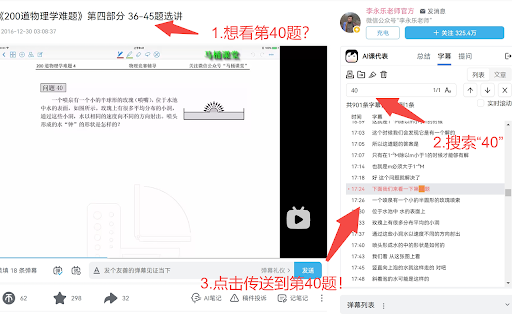
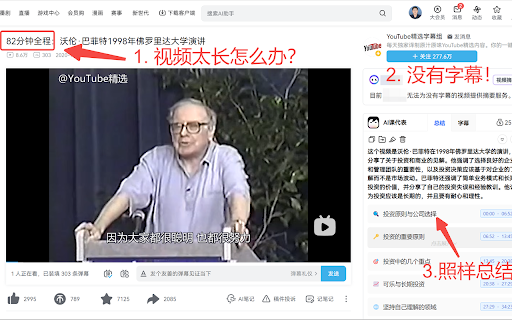
Bilibili 视频总结插件~ “AI课代表” 是您在B站最专业的人工智能助手 🤖 基于GPT4的“知识提问"+“视频总结”+“字幕搜索” 支持Bilibili、Youtube! 🎉🎉🎉每日刷新免费额度🎉🎉🎉 选择“AI课代表”的三大原因: 🧠帮你汲取B站5亿视频的“精华内容” ✅ 解决问题:“知识提问”直接回答你的问题! ✅ 快速定位:字幕搜索帮你快速定位“关键点”! ✅ 筛选视频:内容摘要帮你识别“标题党”! 🤓帮你成为人见人爱的“课代表” ✅ 无情吸赞:把“摘要+时间戳”发到评论区! ✅ 学霸人设:把宝藏视频的“链接+摘要”分享给朋友! ✅ 专栏大佬:公开发布AI笔记到B站的“笔记本”! 最重要的是: 🗣 您的声音至关重要,我们将以“3天1更”的速度持续改进!

Bilibili Summary with ChatGPT OpenAI
The best summary tool for Bilibili with Chat GPT.One-click summary of Bilibili video content. Chat GPT can provide you with summaries of Bilibili videos, allowing you to quickly access the content of the videos in order to save time and learn quickly. The tool combines the latest ChatGPT smart AI to support one-click video summary generation, allowing users to quickly access the key information of the video content. Features ● Summary Paragraph: Summarize the key content of different paragraphs of the video ● Save time: Video summary loads quickly with waiting ● Easy to use: One-click summary generation, you can also copy the content How to use 1. Install the extension 2. Simply go to bilibili.com 3. Select the video you are interested in 4. Click the button to generate a summary of the video content 5. You can also go to the settings page to configure the parameters according to your needs

BiliScope - Bilibili插件,你的B站小助手
可以显示视频的AI内容总结,在B站的各类网页上显示用户的详细信息,包括关注数、粉丝数、投稿数、签名、投稿词云等等。还可以给UP主做备注和标签! 当浏览B站时,把鼠标悬停到up主的链接上,会出现上图所示的信息卡片。 目前在卡片中显示的信息有 * up主的ID * up主的等级 * 与up主的关注关系 * 快速关注/拉黑up主的按键 * up主是否在直播 * 给up主的备注 * up主的关注数,粉丝数,投稿数 * up主的标签(默认是最常投稿的分区) * up主的认证 * up主的签名 * up主全部投稿标题和描述生成的词云 把鼠标悬停到视频上,会显示上图所示的AI内容总结。点击总结中的章节可以跳转到对应时间的视频。 自动显示动态和视频评论区的IP属地。 备注说明 在每个up主主页的右下角会有备注栏,可以填写备注。也可以在信息卡片上直接点击up主的名字打开备注栏。 备注的第一行(以` `为界限)会显示在up主的卡片上。其余部分只会显示在主页备注栏。 在备注的任何地方可以添加`#标签名#`的标签,如果up被备注了任何标签,up主卡片上就不再会显示最常投稿区,而会显示在备注中的标签。 你可以在B站以`#标签名`为关键词进行用户搜索,可以搜索到标签对应的up主。 在设置(点击浏览器扩展栏上的Biliscope图标)中可以添加标签对应的颜色,也可以开启让up主的名字显示成标签对应的颜色的功能。

vCaptions – Video Caption List
Add smart captions lists to any website video. Supports YouTube and Bilibili with translation, chapters and AI summaries. vCaptions is the ultimate AI video assistant and subtitle translator. It transforms how you watch online videos by generating interactive transcripts, providing AI-powered summaries, and enabling dual-language subtitles for effective learning. Whether you are a researcher, a student learning a new language, or just want to save time, vCaptions helps you digest video content 10x faster on YouTube, Bilibili, and any website with HTML5 video. ⭐ Key Features - Interactive Video Transcript: View the full subtitle list alongside playback. Click any caption line to instantly jump to that specific timestamp. - AI Summary & Chat (ChatGPT powered): Don't have time to watch the whole video? Get instant video summaries, key takeaways, and ask the AI questions about the content directly. - Dual Subtitles & Translation: Break language barriers with real-time subtitle translation. Enable dual captions (native + translated) for seamless language learning and comparison. - Smart Chapter Extraction: Automatically detect topics and generate video chapters for easy navigation, even if the creator didn't add them. - Subtitle Downloader: Easily copy captions to your clipboard or export subtitles as .SRT, .VTT, or .TXT files for offline use. - Flexible Layouts: Choose your preferred viewing mode — Sidebar, Floating Window (Picture-in-Picture style), or Embedded mode. The floating panel is fully resizable and draggable. - Customizable UI: Full Dark Mode support and font size adjustments for comfortable reading. 🎯 Optimized for Major Platforms - YouTube: Best-in-class support for YouTube videos, embedded players. - Bilibili: Optimized experience for Bilibili videos. 🚀 Use Cases - For Language Learners: Watch videos with bilingual subtitles to improve listening and vocabulary. - For Content Creators: Quickly download transcripts to repurpose video content into blog posts. - For Professionals: Use AI summarization to quickly grasp the main points of long webinars or tutorials. ❓ FAQ Q: Can I download YouTube subtitles with this extension? A: Yes! You can export captions in .srt or .vtt formats with one click. Q: Does it support translation? A: Yes, vCaptions provides translation to convert subtitles into your preferred language.

Summary for Bilibili
当你在观看长视频时,你是否感到疲惫,希望可以快速了解视频的主要内容,而无需花费大量时间观看整个视频?那么我们的Chrome插件就是为你而设计的! 这个插件支持按照时间线总结视频内容,即使是长视频也不在话下。通过使用ChatGPT或者API… 当你在观看长视频时,你是否感到疲惫,希望可以快速了解视频的主要内容,而无需花费大量时间观看整个视频?那么我们的Chrome插件就是为你而设计的! 这个插件支持按照时间线总结视频内容,即使是长视频也不在话下。通过使用ChatGPT或者API Key,您可以在插件中获得最新的语言模型支持,从而更加准确地总结视频内容。除此之外,我们还提供了一些配置选项,例如压缩参数,您可以根据自己的需求进行设置,以便更好地为您节省token。 登录B站,点击视频,然后点击图标,即可开始生成视频摘要。 使用我们的Chrome插件,你不仅可以大大提高观看效率,还可以避免错过视频中的重要信息。现在就来下载我们的插件,开始享受更高效的观看体验吧!
