
epadnmckjchpoedgecdghpmaicnklagd
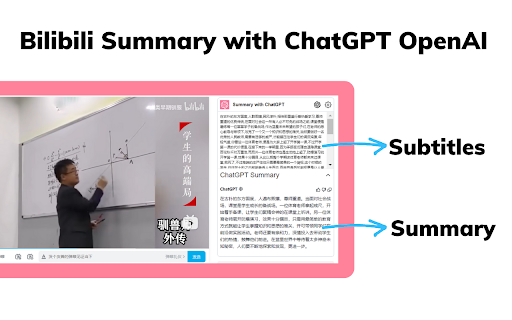
The best summary tool for Bilibili with Chat GPT.One-click summary of Bilibili video content. Chat GPT can provide you with summaries of Bilibili videos, allowing you to quickly access the content of the videos in order to save time and learn quickly. The tool combines the latest ChatGPT smart AI to support one-click video summary generation, allowing users to quickly access the key information of the video content. Features ● Summary Paragraph: Summarize the key content of different paragraphs of the video ● Save time: Video summary loads quickly with waiting ● Easy to use: One-click summary generation, you can also copy the content How to use 1. Install the extension 2. Simply go to bilibili.com 3. Select the video you are interested in 4. Click the button to generate a summary of the video content 5. You can also go to the settings page to configure the parameters according to your needs

VideoSeek: AI Video Summarizer for YouTube & Transcripts
VideoSeek: Instantly summarize YouTube/BiliBili/TikTok Key points, mind maps & subs. For students/creators Try free! VideoSeek AI: Smart Video Summaries for YouTube, Bilibili & Transcript Generator Cut through video fluff and get to the good stuff We get it - you've got better things to do than watch hour-long tutorials. VideoSeek helps students, creators, and professionals quickly extract what matters from YouTube and Bilibili videos. Get key takeaways as either a quick summary, visual mind map, or translated transcript. Perfect for when you need to: • Prep for exams using lecture videos • Research competitor content strategies • Turn long videos into social-ready clips Why It Works for You • Video Focus: Summarize YouTube/Bilibili videos with timestamp navigation • Tailored Summaries: Adjust length and customize prompts to match your needs • Learn Smarter: Jump to key moments or export transcripts for research • Language Flexibility: Process content in multiple languages What makes VideoSeek different Instead of just another AI summary tool, we help you actually work with video content: → Timestamp navigation: Jump straight to key sections → Visual mapping: Turn complex explanations into editable diagrams → Bilingual support: View subtitles in 20+ languages or translate them → Video Q&A: Ask "What did they say about [topic]?" and get instant answers How it works in practice Install our free browser extension Open any YouTube/Bilibili video Click the icon to get: Concise summary with key timestamps Full transcript export (SRT/TXT) Visual mind map of concepts Use the AI chat to dig deeper into specific points Get Started for Free VideoSeek is free to start, with no credit card required. Our free plan includes a limited number of credits to get you going. Each summary, transcript, or mind map generation consumes credits, so you can manage your usage accordingly. For users who need more power, we offer flexible paid plans: Monthly Plan: Pay monthly for continuous access and additional credits. Annual Plan: Save up to 30% by paying annually, with a full year of access and more credits. One-time Payment: Pay once for a year of access without auto-renewal, perfect if you prefer not to commit long-term. Our paid plans provide more credits, allowing you to process more videos and access advanced features fully. For detailed pricing and to upgrade, visit our pricing page. Rest assured, we respect your privacy and do not sell your data. We make money from our paid plans, not from your personal information. Coming up next Based on user requests, we're working on: ✓ TikTok/小红书 video support ✓ Podcast summarization (Google Podcasts first) ✓ Team collaboration features ✓ Niche dialect translations ✓ PDF/article support (prototyping phase) Need help or have ideas? We're real people who actually respond: 📩 support@videoseek.ai 📱 WeChat: videoseek P.S. Start using VideoSeek for free today - no credit card required. Upgrade to a paid plan when you're ready for more features and credits.

BiliPlus - Bilibili 加大杯,细节从大杯做起
专门为细节控的人群使用,只要在B站上设计不合理的地方,都可以加入到大杯中。 功能: 1. 首页干净模式 2. 首页 “换一换” 回溯功能 3. 显示视频封面 AI 总结 4. 显示视频观看人数 5. 隐藏某个用户的所有评论 6. 隐藏搜索框中 bilibili 热搜 7. 无级调节视频速度 8. 解决无法使用 Esc 键退出图片预览问题 欢迎来提交功能建议,只要需求不离谱,不出意外可以火速上线。 https://github.com/0xlau/biliplus/issues

Kimi Copilot - 网页总结助手
用Kimi AI一键总结网页内容 安装后,在浏览网络文章时点击插件图标,或使用快捷键 Ctrl/Cmd+Shift+K,即可一键召唤Kimi.ai总结网页内容 特点: 1. 免费,登录Kimi账号即可无限使用 2. 得益于Kimi的长文本大模型,总结更全面 3. 极简,除了一键总结没有其它花里胡哨的功能 4. Kimi无法访问的网站也能总结 5. 支持总结YouTube和B站视频 6. 支持总结PDF页面(试试arXiv论文吧!) 7. 支持暗黑模式 8. 支持自定义总结时使用的prompt 注意: 1. 本插件为第三方爱好者开发,不是Kimi.ai或月之暗面官方产品 2. 由于技术限制,本插件无法在Arc等非原生Chrome浏览器使用

AI Watch Later
Save videos to watch later with AI summaries
