
dhpfcgilccfkodnhbllpiaabofjbjcbg

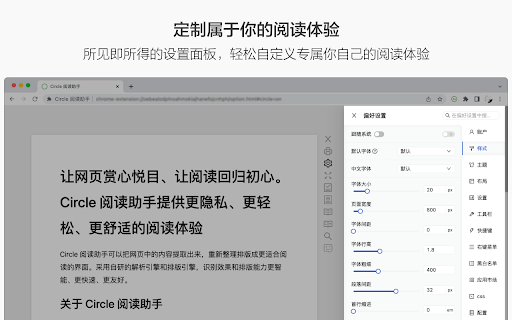


An extension that provides immersive reading to make you fall in love with reading on the web The best free reading assistant (reader mode) that enhances the web page reading experience. Ads are too distracting, the colors are too ugly, the fonts are too small to see clearly, the typography is too messy to find the text, does it really need to be so difficult to read the web? With just one click, Circle gives you the purest reading experience, escorting you to better reading. Circle reading assistant can extract the content of the webpage and rearrange the layout into a more suitable interface for reading. Using self-developed analysis engine and typesetting engine, the recognition effect and typesetting ability are smarter, faster and more friendly. If you are looking for a lightweight and intelligent reading aid product, you might as well try Circle Reading Assistant-the best reading aid of its kind! The reading assistant browser extension Circle, which is more powerful than the Safari reading mode, is an extension and improvement of the browser's own reading mode; it is the only magical tool for computers to read web pages, read novels, and watch news; it has shortcut key support, custom styles, Custom fonts, custom themes, automatic scrolling, automatic loading of the next page, reading aloud, article outline (outline), back to the top, reading by column, printing the formatted webpage in reading mode, supporting browser translation, etc. Reading auxiliary functions. The self-developed analysis engine provides faster analysis and smarter analysis capabilities. The self-developed typesetting engine automatically blocks advertisements and noise on html, and says goodbye to the format escape. The Circle reading assistant browser extension developed by pure js has been launched on Google Chrome browser, Firefox browser, Edge browser, 360 browser, Opera browser, etc. ★ Several distinctive functions of Circle Reading Assistant: ➤ Self-developed recognition engine: With the help of self-developed recognition engine, Circle's recognition effect is smarter and the recognition speed is faster. ➤ Self-developed typesetting engine: With the help of self-developed typesetting engine, Circle's typesetting effect is more friendly and the typesetting speed is faster. ➤ Letter paper effect: a reading experience like reading a letter. ➤ Multi-page analysis: On a page with a link to the next page, the content of the next page is automatically parsed and displayed on the current page. ➤ Reading by column: Originally read the webpage by column, the welfare of large-screen users, without wasting every inch of screen space. ➤ Read aloud: Tired of reading? Why not try the content! Free your hands to do other things. With the help of "multi-page analysis", what kind of bicycle is needed for listening to novels? ➤ Preset 5 colorful themes: simple white, eye-protecting green, elegant dark gray, and deep dark. Circle has always been what you like. ➤ Custom gradient background or picture background: The preset theme is not on your aesthetic point? It's ok! Customize themes as you splash ink. ➤ Customize various styles: Just reading is not possible, I have the final say on the style of the web page! The font size is bigger, the font is thicker, and the line spacing is higher. Circle does everything for you to read. ➤ Follow the system to switch themes: only support custom themes? nonexistent. How about switching different themes at different times? . ➤ Custom css: You don't have the effect I want, you are awesome ugly! Customize css to help you, understand that css Circle is your person. ★ Keep abreast of the trends of Circle's reading assistant ➤ Subscription account 👉🏻 Senior Ranhe ★ Description of required permissions ➤ contextMenus: Use this permission to implement the right-click menu module, you can quickly access the function of Circle in the right-click menu ➤ : This permission allows Circle to access webpages, thereby realizing the recognition and layout of webpage content, as well as access to screenshots and exporting as pictures and other functions ★ Contact and discussion ➤ Contact me by email 👉🏻 wenguang.fe@gmail.com If you approve of my work, please have a cup of coffee to show encouragement and support 👉🏻 https://circlereader.com/donate The source code is hosted on github 👉🏻 https://github.com/hewenguang/circle Installing Circle means you accept our user agreement (https://circlereader.com/docs/agreement.html) and privacy policy (https://circlereader.com/docs/privacy.html)

Just Read
A feature-packed, customizable reader extension. Just Read is a feature-packed and customizable reader view. With one click (or less!), you can remove distractions like: - The page's styling - Ads - Popups - Comments And read the article in a customizable, simplified format - like a read mode but better! Users can: - Summarize the article using AI. - Use the default white and dark themes. - Modify their theme using a graphical editor or CSS. - Use a theme someone else has made (found at https://goo.gl/Z59SM4 ). - Use their very own custom styling. - Auto-run the reader format on specific sites. - Auto-run summarization. - Use a keyboard shortcut to run the reader. - Print the custom-styled version of the article. - Use the selection mode to choose exactly which text they want to select for reading. - Use the deletion mode to remove any unwanted content after selection. - Edit incorrect meta information generated. - Control which options the reader uses. - Go straight to the next chapter from the reader view. Just Read Premium has even more features! - Permanently save the reader version of pages - Share the reader version of pages with others - Link directly to a section of the page within the shared reader view - Highlight and annotate pages - Add comments - Use a custom scrollbar - Auto-scroll the article - Apply domain-specific selectors, which give ultimate control to the content auto-selection Just Read collects zero data from users by default. If you sign up for an account, only your email address is stored. No analytics are sent to anyone else. Any data that is stored is safely secured and private. Just Read is completely open source and can be found on GitHub here https://github.com/ZachSaucier/Just-Read Please read the README in the GitHub link above for more details!

Clearly Reader - Your AI Reading Assistant
A browser extension with reader mode for optimal experience. Features copy, translate, speech, and PDF and Markdown export. Clearly Reader - Redefine Your Web Reading Experience 【Key Features】 ✦ One-Click Reader Mode (Shortcut: Alt/Option + R) ✦ AI Article Assistant: Summarize/Translate/Chat With Article ✦ TTS: Read any article text to speech ✦ Cross-Device Sync & Cloud Storage ✦ Export Article to PDF, Word, and Markdown, etc. ✦ Add Article to: Pocket/Craft/Raindrop/Instapaper/Obsidian etc. 1️⃣ Ultimate Reading Experience • Remove ads, popups and distractions intelligently • Support dark mode & custom themes • Adjustable font, line height & page width • System fonts & custom CSS support • Unique book layout mode

Pixie Reading Ruler: Boost Reading Focus Tool
Enhance your online reading experience with an adjustable on-screen ruler. Improve focus, pace, and comprehension effortlessly! 🔍🎯📖 Take charge of your digital reading with Pixie Reading Ruler: Focus & Comprehension Tool. Designed to streamline your reading process, our extension provides an adjustable on-screen ruler to optimize your reading journey. 🚀📚🚀 Ready to boost your reading proficiency? Pixie Reading Ruler allows you to guide your reading path, maintain pace, and enhance comprehension. Now, online reading becomes more effective and enjoyable, no matter the content! 🎯💻⭐ Stay on Track with Reading Ruler: Avoid losing track of lines or skipping words with our adjustable reading ruler. Customize its height, brightness, and color to match your preferences and let it guide you line by line through the text. 📖🎯🔍 Improve Comprehension: The Reading Ruler keeps your focus sharp, which can improve comprehension and information retention. Make the most of your reading time! 💫📚💫 Pixie Reading Ruler is perfect for anyone looking to improve their digital reading experience. Whether you're a student seeking to improve study efficiency, a professional researching online, or an avid reader who loves web novels, our tool is designed to meet your needs. Try Pixie Reading Ruler today and experience the joy of a tailored, focused, and productive digital reading experience! 📨 📨 📨 Support Email: support@oziku.tech ✉️ Translations are done via a translator; for incorrect translations, please contact us. ✉️ For bugs or feature requests, please don't hesitate to email us.

Slick RSS by users
A full featured RSS reader that's fully contained within the browser. A full featured RSS reader that's fully contained within the browser. Full source code is still available on github. No account is required and this extension is entirely free. There are no trackers, tracking or advertisements. To search feed inside page, you can use extension "Get RSS Feed URL for Slick RSS" https://chrome.google.com/webstore/detail/odocamobgglamolbifdmdlhglgmkpfag V3.17 Fix "show all feeds" and change scrollbar V3.16 Fix CSS to hide comment and author when feed is condensed, add notification and management categories to filter or change color of feed. V3.15 Fix issue with more complex feed, add media management of audio, add category and link to comments found in feed V3.14 fix issue with unread and remove reload page with "mark read all" and "Open all unread" V3.13 can add feed's url from API and add option to don't mark read feed when click on link. V3.12 improve unread count and catch error if feed's format is wrong. V3.11 fix issue with deprecated function 's parameter in chrome to open page in background and add icon to open one feed in tab to save feed. V3.10 add import/export for options, improve charset detect, some minor css change and fix some background errors. V3.9 Can use summary, add icon on feed updated and fix issue when opening all feeds unread. V3.7 speedup loading feeds, improve thumbnail search and show some feeds with less big space. New version is finally compatible with manifest V3. Web development is not my specialty and if you want to rework design (CSS and HTML), code (javascript), translations, ... do not hesitate to do PR or start discussions on github. List of changes V3.017: - Fix "show all feeds" to take into account all feeds even with no group - Add CSS to modify scrollbar List of changes V3.016: - Change sound notification by notification in browser - Add categories management (setup color, allow filter by category, add import and import caterogies setup) - Secure from error web page - Fix css to hide comment and author when feed is condensed List of changes V3.015: - Fix issue to find root of feeds - Apply max Items with groups and all feeds - Fix loading in "All Feeds" group - Add source audio support for media - Sandbox and remove script in error page - Add category and comments from feeds - Fix issue when formating year with 2 digits - Add link to "Get RSS feed URL for Slick RSS" in option - Add link to tool to find feeds on viewer with option to enable - Fix issue on refresh viewer List of changes V3.014: - Fix issue with unread - Remove reload page with "mark read all" and "Open all unread" List of changes V3.012: - Catch error when feed has wrong format - Fix unread count - Clean and optimize code List of changes V3.011: - Update default options (Dark mode, enable iframe, No limit on height) - Fix background error when group exist and option "all feeds in one" is enabled - Fix issue to show group feeds - Fix issue due to new chrome change when open tab - Add icon to open one feed in tab to save feed List of changes V3.010: - Add options import/export - Fix error when background and viewer are not correct sync - Fix error when viewer ask to update feeds and viewer's tab is closed - Improve render of page that is not a feed - Improve detect charset - Some changes in css List of changes V3.008: - Find date for feed without date for ordering - Fix unread count in left menu - Don't create new item in left menu if already exist - Optimize update after read item - Optimize unread info on badge List of changes V3.007: - Add new way to find thumbnail - Remove long space before or after img in style - Prevent error in service worker - Show HTML page when feed in HTML - Option to show unread fixed - Add API to add feed from another extension (not tested yet) - Add option to log into console to help optimization - Optimize to fetch feeds in parallel (update speedup with a lot of feeds)
