
bgojfhndbiggndbooboponhfoepaknkd
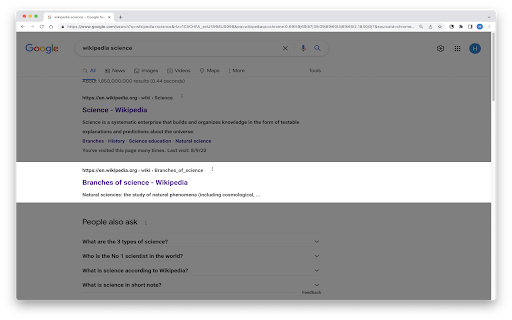
Enhance your online reading experience with an adjustable on-screen ruler. Improve focus, pace, and comprehension effortlessly! 🔍🎯📖 Take charge of your digital reading with Pixie Reading Ruler: Focus & Comprehension Tool. Designed to streamline your reading process, our extension provides an adjustable on-screen ruler to optimize your reading journey. 🚀📚🚀 Ready to boost your reading proficiency? Pixie Reading Ruler allows you to guide your reading path, maintain pace, and enhance comprehension. Now, online reading becomes more effective and enjoyable, no matter the content! 🎯💻⭐ Stay on Track with Reading Ruler: Avoid losing track of lines or skipping words with our adjustable reading ruler. Customize its height, brightness, and color to match your preferences and let it guide you line by line through the text. 📖🎯🔍 Improve Comprehension: The Reading Ruler keeps your focus sharp, which can improve comprehension and information retention. Make the most of your reading time! 💫📚💫 Pixie Reading Ruler is perfect for anyone looking to improve their digital reading experience. Whether you're a student seeking to improve study efficiency, a professional researching online, or an avid reader who loves web novels, our tool is designed to meet your needs. Try Pixie Reading Ruler today and experience the joy of a tailored, focused, and productive digital reading experience! 📨 📨 📨 Support Email: support@oziku.tech ✉️ Translations are done via a translator; for incorrect translations, please contact us. ✉️ For bugs or feature requests, please don't hesitate to email us.

Pixie Reader: Text-to-Speech, TTS, PDF, Web Highlight & OpenDyslexic
Text-to-Speech (TTS) reader with web highlighter & OpenDyslexic font. Perfect for dyslexia, studying & making web content accessible 🌟 Pixie Reader: The Ultimate All-in-One Accessibility & Productivity Suite 🌟 Transform your web browsing experience with Pixie Reader - the only extension that correctly reads mathematical equations with Text-to-Speech (TTS). Whether you're a student dealing with complex STEM content, a professional seeking enhanced productivity, or someone who values accessibility, Pixie Reader adapts to your unique needs. ✨ WHAT MAKES PIXIE READER UNIQUE ✨ • Industry-first: The only Text-to-Speech that correctly reads mathematical equations • Available in 54 languages with many options for reading voices • Seamlessly integrates with your web browser side panel for distraction-free accessibility • Privacy-focused with minimal data collection and GDPR Complaince • Full support for ePub files with all accessibility features enabled 🔊 Advanced Text-to-Speech (TTS) • Revolutionary math equation reading capability • Customizable speed, pitch, and volume • Paragraph highlighting and word underlining • Multiple reading voices across 54 languages • Floating controls for easy access 📝 Smart Text Configuration • 10 dyslexia-friendly fonts including OpenDyslexic • Flexible text size adjustment • Bold and italic formatting options • Multiple text alignment choices • Custom text and background colors • Advanced spacing controls for lines, words, and letters 👁️ Visual Comfort Tools • Innovative Screen Shader with color customization • Smart Reading Ruler with adjustable height and color • High contrast and saturation controls • Customizable color schemes • Eye strain reduction features 📚 Enhanced Reading Experience • Distraction-free Reader View • Built-in ePub reader with full accessibility support • Persistent settings across all tabs, windows, and sessions • Web browser's side panel integration • Multiple theme options 📏 Advanced Reading Ruler Two versatile modes: 1. Focus Mode: Dims surrounding content while highlighting reading area 2. Highlight Mode: Emphasizes current reading line • Customizable ruler height • Adjustable colors and transparency • Mouse-following functionality 📚 Enhanced Reading Tools • One-click Reader View • Full ePub support • Custom reading environments • Distraction elimination • Cross-page persistence 💫 Innovative Color Control System Our unique color slider includes: • Integrated off state • Black and white presets • Full rainbow gradient • Transparency adjustment • Persistent settings across sessions 📱 Seamless Integration • Works directly in web browsers' side panel • Settings persist across all tabs, windows and sessions • No special configuration needed • Instant activation and deactivation • Website-specific controls 🎓 PERFECT FOR EDUCATION 🎓 • Math equation reading support • ePub textbook compatibility • Dyslexia-friendly features • Multi-language support • Distraction reduction tools 💼 IDEAL FOR PROFESSIONALS 💼 • Productivity-enhancing features • Eye strain reduction • Custom reading environments • Privacy-focused design 🌐 GETTING STARTED 🌐 1. Install Pixie Reader 2. Pin the extension to your browser 3. Choose your preferred theme 4. Customize your settings 5. Start enjoying a more accessible web! 💫 WHY CHOOSE PIXIE READER? 💫 • The only TTS that correctly reads math equations • Comprehensive accessibility suite • Intuitive user interface • Regular updates and improvements • Dedicated support team 🎯 WHO IS IT FOR? 🎯 • Students dealing with STEM content • Professionals requiring accessibility tools • Users with dyslexia or special needs • Language learners • Anyone seeking a more comfortable reading experience 📨 SUPPORT & FEEDBACK 📨 We're here to help! Reach out to us at "hello@mail.accsio.ai" for: • Technical support • Feature requests • General questions • Feedback and suggestions 🌍 MORE INFORMATION 🌍 For further information, visit our website at https://accsio.ai/ Join thousands of satisfied users who have transformed their web browsing experience with Pixie Reader. Install now and discover a more accessible, productive, and comfortable way to interact with online content! ✨ Try Pixie Reader Today - Your Personal Reading Assistant! ✨

ReadingLine
Acts as a reading ruler, helping to keep an eye on a line of text with a mouse. - Does the extension collect any user data? - No, the Reading Ruler does not collect any kind of data. - Does the extension track users? - No, the Reading Ruler does not track users. - Does the extension send data to any server? - No, the Reading Ruler does not use any kind of server connection. All the processing is doing locally. - Why does the extension need 'read and change websites' permission? - Because the Reading Ruler needs the information of website elements to calculate and render the ruler.

OneLine
Focus on the words that matter. Have you ever been lost in a sea of words while reading online? OneLine is a reading aid for the web that increases your focus and reading efficiency by highlighting a single row of words. OneLine can be used on any website. If you have trouble reading, OneLine can help. OneLine comes preset with recommended colors proven to increase reading strength for dyslexic readers and allows you to customize the color of the highlighted line. Features: * Three recommended highlight colors proven to increase reading strength * Full RGB color picker * Set and save your favorite colors. Favorites are saved and synced to your Google account. * On/Off Toggle switch Using OneLine: * Click on the highlight icon in Chrome to view OneLine settings. * To change color, click color settings, select the color from the picker or recommended buttons then click the bookmark button to save your favorites. * Move OneLine up and down with the arrow keys (or 'W' an 'S') to keep track of where you are. Report issues on the OneLine website: https://useoneline.com/#contact

Easy Reader
Focus on the content; as little or as much as you'd like. This extension acts as a digital reading ruler. It allows you to stay focused by blocking distractions while reading online.
