
idhghjodolinkdhibgfgfoceackpcjfl
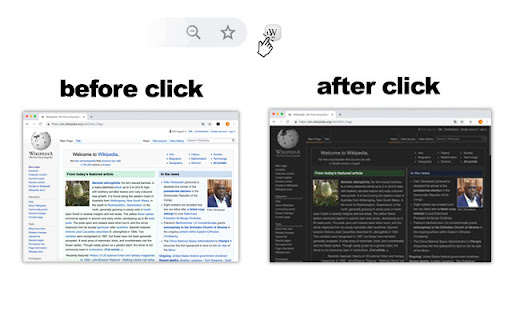
Wikipedia night mode allows you to work more comfortably on the Wikipedia website in the dark or in low light The dark Wikipedia theme or Wikipedia Night mode changes the background of the Wikipedia website to dark and the font to light. A dark theme for Wikipedia turns on / off by clicking on the extension icon. It is convenient to use at night or in poor lighting, helps your eyes read text more comfortably.

Darkipedia Dark Mode for Wikipedia
Make your Wikipedia pages dark and easy on the eyes. 🚀 What's New in Darkipedia v1.1.0 Welcome to the ultimate reading experience! Version 1.1.0 transforms Darkipedia from a simple theme switcher into a fully customizable productivity suite for Wikipedia. We've rebuilt the styling engine to give you total control over how you consume knowledge. ✨ Major Features * Custom Color Suite: Don't settle for "just black." Use our new precision color pickers to choose your own Main Background, Menu Background, Text Color, and Secondary Background for math and images. * Zen Mode (Focus Reading): One click to nuke the noise. Hide sidebars, headers, and distracting menus to center your article in a beautiful, wide-screen layout designed for deep focus. * Eye-Saver Image Dimming: Save your vision during late-night research. Use the new brightness slider to dim all photographs. Want to see a detail? Simply hover your mouse over any image to instantly restore it to full brightness. * Typography Control: Choose the font that fits your brain. Switch between Modern Sans-Serif, Classic Serif, or a Dyslexia-Friendly font option to reduce reading fatigue. 🎨 Design & UI Polish * Secondary UI Highlighting: No more "invisible" elements. Complex math formulas, SVGs, and transparent assets now sit on a customizable secondary background, ensuring every detail is perfectly legible against your dark theme. * Refined Search UI: The search bar and dropdown menus now blend seamlessly with your custom colors—no more white-screen flashes when you go to find a new topic. ☕ Support the Developer If Darkipedia makes your research easier or saves your eyes, consider supporting my work! Buy me a coffee here : https://buymeacoffee.com/yigitsrdev ⭐ Love the extension? Please leave a 5-star rating! It helps more people discover a better way to read the world's knowledge.

Wikiwand - Wikipedia Modernized
Wikipedia, beautifully redesigned. Timelines, top questions, fact-checking, and more. AI built in. As featured on TechCrunch, Lifehacker, Gizmodo, Fast Company, and The Next Web: Wikipedia holds the world's knowledge. Wikiwand gives it the interface it deserves. The extension works quietly in the background - every Wikipedia link opens in Wikiwand's clean, modern reader instead. No setup, no configuration. Just Wikipedia, the way it should look. ⭐🕒 Timelines: Every article with a story gets a visual timeline. Because some things are best understood from the very beginning. ⭐🤔 Top Questions: A lightning-fast, accurate, and complete picture of any topic - right alongside the article. ⭐💬 Chat: A reading copilot that understands exactly what you're reading and can answer any question with depth and accuracy. ⭐✅ Fact Check: Validate Wikipedia's claims. Compare language versions, cross-reference with live sources, and get to the truth. ► Clean, modern layout built for deep reading ► Timelines, top questions, and chat for every article ► Beautiful typography with dozens of theme options ► Fixed table of contents, always within reach ► Quick keyboard navigation for search, languages, bookmarks, and AI panel ► Maps for locations ► Quality score for every article ► Instant article previews on hover ► Multi-language search with thumbnails ► Immersive, full-width cover photos ► Larger images and an improved media gallery ► Full personalization: colors, fonts, and layout ► Dozens more improvements Q: How do I use Wikiwand? A: Install the extension and keep browsing Wikipedia as usual. Wikiwand opens automatically on every Wikipedia article. Q: How does it work? A: Simple - the extension replaces Wikipedia links with the same article on Wikiwand. Nothing changes except how it looks and what you can do with it. Q: Can I still read the original article on Wikipedia? A: Always. Click the "Read in Wikipedia" icon at the top of any article.

Darktheme for google translate
Makes the background dark and changes the leading color A simple yet powerful extension for Google Translate, designed for those who work long hours and need seamless translation support. Now, with a brand-new feature, you can instantly open Google Translate from any website by selecting the text you want to translate—no more copying and pasting! Compatible with all Google domains, not just '.com'. You can also customize the leading color through the extension's popup to match your preferences. The extension is completely free and does not alter any Chrome settings. If you find using this extension useful, please consider leaving some stars.

Modern for Wikipedia
Enhance your Wikipedia experience with a beautiful, clean, modern design that's fully customizable. Once installed, Modern will simply apply the new look and features to existing Wikipedia article pages, without you having to do anything. All current features on Wikipedia are supported, this extension simply builds upon the existing interface to offer many improvements, including: ✔ Themes (light, dark, sepia, slate, black) ✔ Fonts (sans, serif, change font size) ✔ Styles (column width, line height) ✔ Languages (menu to switch, fully translated interface) ✔ User accounts (all wikipedia account features accessible from menu) ✔ History (quickly jump to articles you've previously viewed) ✔ Search (powerful autocomplete with preview text & images) ✔ Trending (see today's most read articles) ✔ Contents (fixed to left side for easy navigation, can be hidden) ✔ Editing (full editing controls, history, watch etc) ✔ Switch back to the old design (if needed) with one click ✔ More improvements planned for upcoming releases! If you have any questions, need help or have any suggestions, please get in touch: support@modernwiki.app Note: If you're logged into Wikipedia, you must use the default skin for the extension to work. ---------- Wikipedia™ is a registered trademark of the Wikimedia Foundation, Inc. This extension is not endorsed by, affiliated with, or sponsored by Wikipedia™. v1.40 - Listen to articles with new text-to-speech feature - Fixed redirect bug on wikipedia home page v1.23 - Fix for mobile wikipedia pages (redirect to non-mobile version) - Fixes for image viewer - Style fixes for Italian articles - Scrollbar style fixes for dark themes on mac - New icon v1.22 - Contents sidebar settings (set font size, line height & width) - Better support for large screens (more width settings) - New settings --- Auto dark theme (changes to your last used light/dark theme) --- Fixed header (turn off to hide when scrolled down) --- Open links in new tab --- Hide article links --- Justify text --- Show bullet points on contents - Fixed bugs with article width / centering - Brought back red links for articles that don't exist v1.20 - Search box for languages menu - Nicer scrollbar styles - Centered article text when contents hidden (removed left padding) - Added left padding to article text when contents visible - Fixed french dark theme + languages menu - Fixed user menu for non-english languages - Fixed font size not changeable for Chinese, Japanese, and Korean - Removed system-ui font (fix for east-asian windows fonts) - Fixed display of math equations in dark mode - Made search box usable at narrow widths
