
nmcamjpjiefpjagnjmkedchjkmedadhc
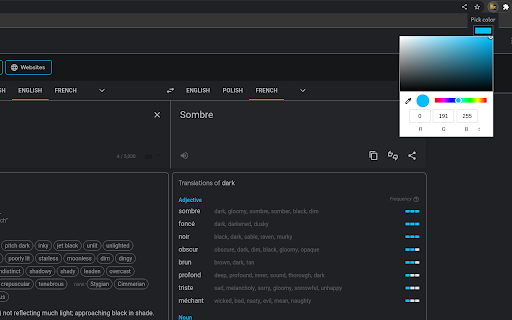
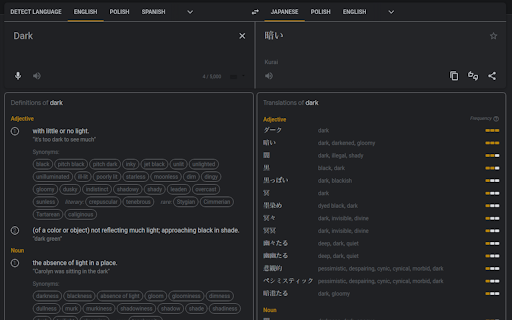


Makes the background dark and changes the leading color A simple yet powerful extension for Google Translate, designed for those who work long hours and need seamless translation support. Now, with a brand-new feature, you can instantly open Google Translate from any website by selecting the text you want to translate—no more copying and pasting! Compatible with all Google domains, not just '.com'. You can also customize the leading color through the extension's popup to match your preferences. The extension is completely free and does not alter any Chrome settings. If you find using this extension useful, please consider leaving some stars.

Gmail Dark Mode
Gmail Dark Mode allows you quickly to enable a dark theme for Gmail. Gmail Dark mode is a simple yet powerful extension that does not simply invert the colors of the page. It uses the powerful algorithm of Night Eye to properly convert the Gmail theme into a smooth and eye-caring dark theme. Why do you need Gmail dark mode? Dark mode can reduce eye strain, allow you to be more productive, and, most importantly, give you another layer of protection for your eyes. As we are spending more and more time in front of the screen, our eyes suffer the most from this. Obviously, there is no turning back; we will be spending most of our waking hours staring at screens. Thus something must be done to lift the heavy burden we are putting on our eyesight. The fact is that we are sending more and more emails, and pretty much all communication is done via email. E-mail is one of those online activities that can literally eat up half of your day. This is why improving how you handle email is a good starting point to minimize the pressure you put on your eyes every day. Does Gmail dark mode read my emails? Absolutely not! The extension only analyzes the colors of your page and converts them. It does not read, process, store, or do anything with your content. Can I enable dark mode on other websites? Gmail dark mode is specifically made for those who only want to have a dark theme on Gmail. To enable dark mode on any website, please check our other extension - Night Eye - www.nighteye.app Our website: https://nighteye.app/gmail-dark-mode Follow us on Twitter: https://twitter.com/nighteye_ext Like us on Facebook: https://www.facebook.com/night.eye.extension

Google Translate Dark Mode Switcher
Enhance your Google Translate experience by effortlessly toggling between light and dark modes with a single click. "Google Translate Dark Mode Switcher" is an essential Chrome extension for users who frequently use Google Translate and prefer a visually comfortable interface. This innovative tool allows you to seamlessly switch between light and dark modes on Google Translate, ensuring that you can customize your viewing experience to suit your needs, whether you're working late at night or browsing during the day. Our extension is designed with simplicity and ease of use in mind, making it accessible for everyone. With just one click, you can activate dark mode, reducing eye strain and enhancing text readability in low-light conditions. This feature is especially beneficial for users who spend extended periods on translation tasks and are looking for ways to decrease visual discomfort. Key Features: • One-Click Activation: Quickly toggle between light and dark modes directly from your browser toolbar. • User-Friendly Interface: Enjoy a clean, intuitive design that doesn’t complicate your workflow. • Compatibility: Works seamlessly with the latest version of Google Translate, ensuring a smooth and consistent user experience. • Eye Comfort: Dark mode reduces the luminance emitted by your screen, minimizing eye strain and making text easier to read. Whether you're a professional translator, a student, or someone who frequently interacts with foreign languages, the "Google Translate Dark Mode Switcher" enhances your productivity and comfort. Install our extension today and transform your Google Translate experience into one that’s easier on the eyes and better suited to your digital lifestyle. Optimize your translation process and reduce eye strain with the Google Translate Dark Mode Switcher. Try it now and experience the difference!

Google Docs Dark Mode
Dark mode for Google Docs! Dark mode for those long nights working on Google Docs! This extension changes the style of Google Docs to a dark theme that is easier on the eyes and looks cooler :) The dark mode and page color can be toggled from the controls on the top right of the page. 1.5.1 Update: - Controls are now draggable, no more getting in your way! - Improved visibility for top bar icons and word count window. - Striving to be a better person, each day. If you found this extension useful you can also try my extension for dark mode on google drive: https://chrome.google.com/webstore/detail/google-drive-dark-mode/mhlhbpejnmlkaiaggagblklodbbldmmc Thank you kindly for all your donations

Dark Mode for Chrome
Dark mode for all websites. Use dark theme for night and daily browsing with dark reader. Night shift mode. Dark Mode and Dark Reader makes all the websites you browse into dark/night mode so that you can browse the internet without straining your eyes. It is an extremely useful chrome extension for those who use internet especially at night. The Dark theme extension. Works with all websites! You need to refresh all the tabs, which were opened BEFORE the dark reader was installed. You can also restart the Chrome to refresh all the tabs at once. Otherwise, dark mode and night shift mode will work only with the newly opened tabs. If the website has built-in night theme, you can control it directly from extension and if it doesn't like Gmail, Google Docs, Office Online, GitHub and millions others, we will convert the colors to provide you with smooth transition on dark mode. What will you get from Dark Reader extension: 1. An easy way to create dark mode on every website. In addition, you can customize your black theme visual from Brightness, Contrast, to Saturation. 2. A Night Shift mode which changes the website's color to warmer, making it much more pleasing to watch. You can choose to use either dark theme or night shift mode, or both. You can also quickly activate these modes with simple keyboard shortcuts. 3. You can set up schedule for each dark theme and night shift mode, and decide when you want to auto-activate dark theme. Also Dark for YouTube extension converts YouTube theme to a highly customizable dark charcoal/blue theme. This extension is built on top of the default YouTube theme, so it is very light-weighted compare to using themes injected by stylish or stylus extensions Note: Remember to disable any similar Night Theme extension to prevent compatibility issues! We hope you enjoy it.
