
ikaphgfmnjpnaieoipkclkgbbpkhgjdd
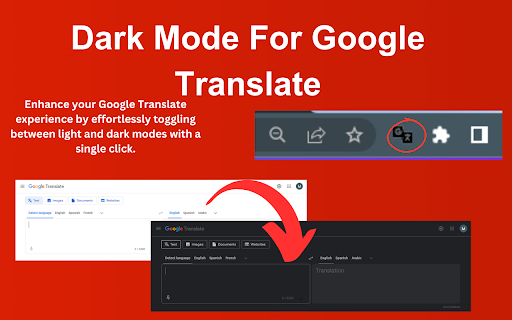
Enhance your Google Translate experience by effortlessly toggling between light and dark modes with a single click. "Google Translate Dark Mode Switcher" is an essential Chrome extension for users who frequently use Google Translate and prefer a visually comfortable interface. This innovative tool allows you to seamlessly switch between light and dark modes on Google Translate, ensuring that you can customize your viewing experience to suit your needs, whether you're working late at night or browsing during the day. Our extension is designed with simplicity and ease of use in mind, making it accessible for everyone. With just one click, you can activate dark mode, reducing eye strain and enhancing text readability in low-light conditions. This feature is especially beneficial for users who spend extended periods on translation tasks and are looking for ways to decrease visual discomfort. Key Features: • One-Click Activation: Quickly toggle between light and dark modes directly from your browser toolbar. • User-Friendly Interface: Enjoy a clean, intuitive design that doesn’t complicate your workflow. • Compatibility: Works seamlessly with the latest version of Google Translate, ensuring a smooth and consistent user experience. • Eye Comfort: Dark mode reduces the luminance emitted by your screen, minimizing eye strain and making text easier to read. Whether you're a professional translator, a student, or someone who frequently interacts with foreign languages, the "Google Translate Dark Mode Switcher" enhances your productivity and comfort. Install our extension today and transform your Google Translate experience into one that’s easier on the eyes and better suited to your digital lifestyle. Optimize your translation process and reduce eye strain with the Google Translate Dark Mode Switcher. Try it now and experience the difference!

Google Classroom Dark Mode
Bug Fixes: - Fixed Service Worker not initializing. This was due to an issue when converting the manifest version from V2 to V3. No more flashbang when you first load Google Classroom! - Fixed more theming issues that are becoming more prevalent. Everything should be fully functional (as of Oct. 28th, 2025). Let me know if you see any other bugs! Feel free to shoot me an email, open a bug report or leave a review! The extension does not collect any of your data. It uses the storage function to save your selected colour mode on the extension, or if you have it disabled, so the next time you come to classroom your settings are saved and reapplied. All the code used for the dark mode is original, therefore there will be bugs and areas that are not the correct colour, style, etc. Please let me know if there is something that is does not look visually correct.

Google Calendar Dark Mode
Enhance Google Calendar with dark mode. Reduce eye strain with dark mode google calendar. Easy Google Calendar Dark Mode Transform your daily planning routine with Dark Mode, the ultimate extension for a more comfortable and visually appealing scheduling experience. The chrome extension for google calendar dark mode is very popular. Designed to reduce eye strain and improve usability, this extension is perfect for those who prefer a night theme for their online device. Many users prefer using dark mode google calendar for a comfortable viewing experience. 💠 Easy-to-Activate Theme: Activate theme effortlessly with just one click. Switch between light and night modes seamlessly. Enhanced visual comfort for prolonged use. It's easy to enable google calender dark mode with the right settings. 📆 Improved Usability: Sleek and modern interface. There is an option for dark mode for google calendar in the settings. People often ask, does google calendar have a dark mode? Yes. Customizable to fit your personal preferences. 🌐 Wide Compatibility: Works across various devices including desktops and laptops. Compatible with all major browsers. Ensures a consistent look and feel across platforms. 💡 Why Use this Extension? 🔹 Reduced Eye Strain: Themes are known to minimize eye strain, making it easier to focus on your tasks for longer periods. You can use google calendar dark mode desktop for your PC. 🔹 Better Battery Life: Especially useful for laptops, this mode can help extend battery life by reducing the amount of light emitted from your screen. 🔧 Easy Installation: 1️⃣ Visit the Chrome Web Store. Use the chrome extension for google cal dark mode. 2️⃣ Search for this mode. 3️⃣ Click on "Add to Chrome" to install the extension. 📲 User-Friendly Design: ➤ Simple and intuitive interface. ➤ Quick access to all features directly from your browser. ➤ No complicated setup required. 🚀 Enhanced Productivity: 1️⃣ Improved focus with a dark background. 2️⃣ Better contrast for viewing events and appointments. Consider switching to google calendar dark theme for a different look. 3️⃣ Customizable settings to suit your needs. If you need help on how to make google calendar dark, check the FAQs. 🌍 Global Appeal: ◆ Available for users worldwide. ◆ Supports multiple languages. ◆ Ideal for both personal and professional use. 🔒 Secure and Reliable: 🔹 Regular updates to ensure compatibility with the latest browser versions. 🔹 No data tracking or privacy concerns. 🔹 Dedicated support team to assist with any issues. 🎨 How to make google calendar dark mode: 1️⃣ Choose from various shades of themes. 2️⃣ Adjust brightness and contrast to your liking. 3️⃣ Personalize your style. 🔔 Notifications and Alerts: 🔸 Receive alerts in dark mode without switching themes. 🔸 Customize notification settings to avoid interruptions. 🔸 Stay on top of your schedule with minimal distractions. 📊 Detailed Analytics: ◆ Track your productivity with built-in analytics. ◆ Gain insights into your scheduling habits. ◆ Make informed decisions based on your data. 👥 Community and Support: 🔹 Join a growing community of users who prefer dark mode. 🔹 Access helpful tips and tricks from other users. 🔹 Receive prompt support from our dedicated team. 💼 Professional Use: 🔸 Perfect for office environments where dark mode is preferred. 🔸 Maintain a consistent look across all your professional tools. 🔸 Enhance your productivity with a more comfortable viewing experience. 📅 Get Started Today! Transform your scheduling experience with Dark Mode. Download now and enjoy a more comfortable, efficient, and aesthetically pleasing way to manage your time. 🛠️ FAQs: 🔹 How do I switch to dark mode? Simply install the extension and activate it with one click. 🔹 Will it affect my existing settings? No, it will only change the appearance to dark mode without altering your existing settings.

Night Mode for Wikipedia
Switch your Wikipedia site mode to dark or light with just one click. Do you like using Wikipedia on your computer? Try installing this extension to protect your eyes when you use Wikipedia on your desktop computer at night time. Night Mode for Wikipedia allows you to rest your eyes when you use the Wikipedia website at night. It allows you to change the background to black and the text is changed to white color. This would reduce the stress on your eyes when you are surfing Wikipedia at night. To turn dark mode on and off for the Wikipedia website, just click on the extension icon when you're on the Wikipedia website. You can toggle the dark mode/night mode for Wikipedia to be on and off. Please note this extension is NOT created by Wikipedia and is created by a team of independent developers. We're constantly updating this extension and you can e-mail us if the extension is not working as Wikipedia updates their desktop website and can cause our extension to break.

Dark Mode for Google Meet™
Give your eyes a rest by turning Google Meet dark mode. Our FREE Dark Mode for Google Meet™ allow you to quickly enable/disable Dark Mode for your meeting Allow your eyes to rest when you use dark mode while having a Google Meet call at night time. ✔ Dark Mode Turn dark mode on for Google Meet
