
lgjhepbpjcmfmjlpkkdjlbgomamkgonb
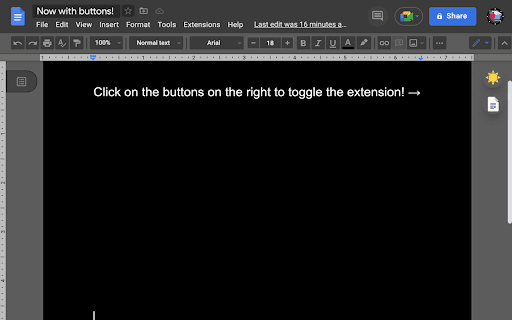

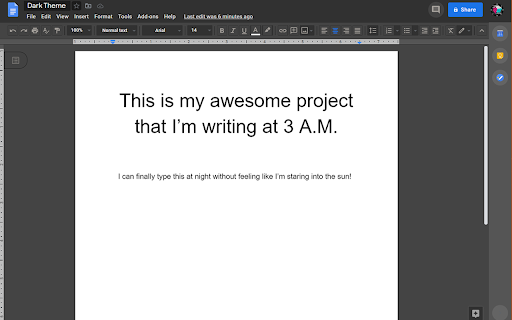

Dark mode for Google Docs! Dark mode for those long nights working on Google Docs! This extension changes the style of Google Docs to a dark theme that is easier on the eyes and looks cooler :) The dark mode and page color can be toggled from the controls on the top right of the page. 1.5.1 Update: - Controls are now draggable, no more getting in your way! - Improved visibility for top bar icons and word count window. - Striving to be a better person, each day. If you found this extension useful you can also try my extension for dark mode on google drive: https://chrome.google.com/webstore/detail/google-drive-dark-mode/mhlhbpejnmlkaiaggagblklodbbldmmc Thank you kindly for all your donations

Google Drive Dark Mode
Dark mode for Google Drive! Dark mode for Google Drive is here! Simply install and the extension will automatically give google drive a slick dark theme. You can toggle the dark mode on and off by clicking on the button next to the drive logo. 1.0.4 update: - Fix extension not working on the newest Chrome version. - Improved visibility for the storage warning.

Dark mode for Google™ Docs
Thoughtful dark mode for Google™ Docs — theme presets, focus mode, and auto-schedule. In 2026, long hours on Google Docs don’t have to mean strained eyes. Quickly turn on Dark mode for Google Docs to minimize eye fatigue and improve your overall productivity in low-light conditions while working on documents. This extension replaces the current bright white background of Google Docs with a more calming dark background, offering an effective bid to combat the blue light reduction effect. It also applies dark mode styling across all websites, including Google Docs, Gmail, Medium, GitHub, and more. Key Features of Dark Mode for Google Docs Reduce Eye Strain: The primary benefit of Dark mode for Google Docs is that it reduces the production of blue light, thus reducing eye strain on Google Docs and preventing inadvertent eye fatigue for users. Comfortable Long-Term Use: Especially useful for those who spend many hours at work in Google Docs and do not want to strain their vision during extended sessions, offering comfortable document editing. Simple & User-Friendly: Enabling the Google Docs dark theme is easy as it is located in the settings bar on the user interface and browser, making it a convenient dark theme for Chrome extensions. How to Use Dark Mode for Google Docs Install the Extension: To install Dark mode for Google Docs, simply click on the button labeled “Add to Chrome” above. Open Google Docs: Go to any file in Google Docs that you want to make the appearance of the interface as dark as possible. Activate Dark Mode: Navigate to the user icon on the upper right of the browser, and you’ll find the option to enable dark mode Google Docs beside the switch. Enjoy a Comfortable Workspace: Enjoy greatly reduced eye strain, and the overall comfort provided in an environment optimized for successful work, thanks to the Google Docs dark theme Dark Mode transforms the background of Google Docs from bright white to a dark gray or black tone, reducing screen glare and blue light exposure, which can help ease eye strain. To enable Dark Mode, simply install the extension, open Google Docs, click the extension icon in your browser, and toggle Dark Mode on. No, Dark Mode only changes the background for your viewing comfort. It does not alter your document’s formatting, colors, or content when shared or printed.

Google Sheets™ Dark Mode
Activate Google Sheets Dark Mode for improved viewing. Enjoy sheets darkmode and comfort with the spreadsheets dark mode feature. 📌 Advantages: 1. Minimize eye fatigue during extended work sessions. 2. Improve visibility in low-light options with sheets darkmode. 3. Spreadsheets dark mode and OLED display save battery life. 4. Enrich priority through a distraction-free layout. 🚀 Explore a whole new way to work with your information using Google Sheets Dark Mode. Engineered to lower eye strain and boost work rate. A sleek and modern look is now available for your favorite tool with dark mode google sheets offers. 💻 Steps to use tool: ▸ Install google sheets dark mode. ▸ Open spreadsheets site. ▸ Relish the sheets darkmode. 🔨 Swift customization of visual preferences – Enhance contrast in google sheets dark mode to make elements stand out more clearly; – Increase or decrease the overall lightness of the display to suit different lighting environments; 🚀 Don’t let the standard light interface slow you down ➤ Upgrade to google sheets dark mode for a visually workspace. ➤ Enjoy an efficient and comfortable environment. ➤ Perfect for professionals, students, and facts enthusiasts. ➤ A feature tailored to suit all your needs. ⭐ Helpful suggestions for adaptation: • Try it on smaller projects first; • Validate color-coded cells for clarity; • Tweak margins to keep data neat; – Apply a sepia tone in dark mode google sheets for a vintage or reduced-glare appearance; – Increase or decrease color intensity to make visuals more vibrant or subdued; – Shift hue in google sheet dark mode to achieve different color palettes and moods; ⭐ Advantages of google sheets dark mode: • Improved focus for better productivity. • Softer brightness to scale down strain. • Consistent look across all tabs. 📈 Boost productivity with dark mode on google sheets – Experience enhanced clarity and focus. – Benefit from more than aesthetics, maximize productivity. – Enjoy a better viewing experience during late hours. 1️⃣ View google sheets dark mode is ideal for night sessions. 2️⃣ Make darker theme works with most utilities. 3️⃣ Concentrate on data with dark mode google sheets. 4️⃣ Easy to customize extension for personal taste. 💎 The Advantages: 🔹 Subtle aesthetics appeal to those seeking an organized experience. 🔹 Google sheets dark mode provides a balanced design with restful tones and essential highlights. 🔹 Helps maintain focus on crucial figures without distractions. 🔹 Enhances navigation for a smoother and simpler workflow. Sheets darkmode benefits: ➤ Clearer contrast for data visualization. ➤ Reduced glare with google sheets dark mode pc. ➤ Better concentration with understated backgrounds. ⭐ Extension perks: • Flexible hue intensity for personalized coziness. • Fast on/off switch with instant response. • Smoother multi-sheet transitions for seamless navigation. 💼 Ideal for These Use Cases - Late-Night Work Sessions: Keeps your eyes comfortable during nighttime productivity. - Data Analysis: Reduces distraction and keeps focus on critical insights. - Collaborative Projects: Share a professional and visually cohesive workspace. - On-the-Go Productivity: Dark mode enhances visibility on mobile devices in various environments. 1️⃣ Fully compatible with virtually any website, ensuring a smooth and hassle-free experience. 2️⃣ Smart functionality automatically detects the active mode on the site, adapting seamlessly to your preferences. 3️⃣ Advanced fine-tuning options allow you to adjust customization for maximum relaxation, setting priorities eye health and reducing strain. ❓ Does app affect performance? 💡 It can even help conserve battery power and streamline your tools. ❓ Does the extension work on other sites? 💡 You can enable and configure the theme on any website. ❓ How to turn on customization? 💡 Follow the simple instructions that are written in the description. 🚀 By using ext, you’re not only optimization your workflow but also creating a calmer environment for complex tasks. 📦 Start using google sheets dark mode today and transform the way you work. It's time to prioritize comfort, efficiency, and style!

Dark Mode - Night Eye
Dark Mode: Switch to dark reading for night & day browsing. More than dark theme style, it ensures optimal eye protection. The best dark mode extension for Chrome. Enable dark theme on any website and protect your eyes. With Night Eye, you can effortlessly enable dark mode on any website, ensuring optimal readability and reducing eye strain, especially in low light environments. Offering a range of customization options, including brightness, contrast, and saturation adjustments, as well as a blue light filter for added eye protection, Night Eye empowers you to personalize your browsing experience. Moreover, with the ability to control built-in dark themes on supported websites, Night Eye grants you complete control over your online journey. Trusted by over 1,000,000 users across all major browsers, Night Eye stands as the preferred choice for those seeking unparalleled eye comfort. Rest assured, Night Eye is dedicated to providing a seamless experience, with no ads or data mining, and a responsive support team. With regular updates for the past five years and ongoing commitment to future enhancements, Night Eye is the definitive solution for achieving a smooth and consistent dark mode on any website. YOUR PRIVACY, OUR PRIORITY: A Transparent Look at How Our Extension Works When you install our extension, Chrome will warn you that it can read and change your data on the websites you visit. But let's break it down: Our extension works like a pair of sunglasses for your browser. It looks at the colors on a webpage and tweaks them to create a smooth, eye-friendly dark mode. Just like sunglasses need to 'see' the light to filter it, our extension needs to 'see' the webpage colors to adjust them. But here's the key point: we don't collect or store any of your data. Think of us like a paid TV service. You subscribe, enjoy the service (in our case, a great dark mode experience), and that's it. We don't sell your data - your privacy stays intact. Follow us on Twitter to keep up with the latest news around Night Eye and what we are planning ahead - https://twitter.com/nighteye_ext Meet Night Eye Lite, our forever-free version of Night Eye. It offers dark mode for up to 5 websites of your choice, such as Google.com or Gmail.com, with no ads or hidden charges. For more details, visit: [https://nighteye.app/lite-free-dark-mode-extension/](https://nighteye.app/lite-free-dark-mode-extension/) We also offer a free 3-month trial of Night Eye Pro. No credit card or payment required - just install and explore. After the trial, you can opt for Night Eye Pro at $9/year, Pro Max at $14/year for power users, or stick with the free Night Eye Lite. For those seeking a one-time purchase, we have the Ultimate plan at $40. For a comprehensive overview of our pricing, visit: [https://nighteye.app/how-to-start/](https://nighteye.app/how-to-start/) SOME FEATURES ➤ OS/Browser Color scheme integration - sync Night Eye with your macOS/Windows dark themes ➤ Deep integration with websites that have their own built-in dark themes. ➤ Schedule dark mode to turn on and off ➤ Custom dark mode for PDFs ➤ Export/Import data between your browsers AVAILABLE MODES The extension allows you to quickly switch the three available modes ➤ Dark - Go into complete dark mode. All colors, small images and icons will be converted to give you the smoothest dark experience possible. ➤ Filtered - The websites’ colors will not be changed, but you can still adjust brightness, contrast, warmth and more. ➤ Normal - Get back to the normal browsing experience. Any modifications you make such as contrast level adjustment, blue light filter and etc. can be applied to a single website or globally. ➤ Images - Night Eye analyses and converts only the small images and icons in a website to give you even smoother experience. Facebook posts and other significant media is not converted. ➤ Brightness / Saturation / Contrast - Adjust the brightness, the contrast and the saturation to match the recommended healthy levels and protect your eyes. The default setting for each is 50%, but you can customize each to the preferred levels ➤ Blue Light - Take care of your eyes by eliminating the blue light coming from your screen. Highly recommended especially during late night browsing. Simply slide to the preferred level of warmth. ➤ Dim - Extremely useful if you are working in dark space/room and the screen is the only source of light in the room. The default setting is set to 50%, but you can customize it as you please. Built-in support system - we take pride into being available to provide reliable support and help you with any problems or issues you might experience with the extension. CHANGELOG We strive to bring you the best possible dark mode experience. In this update we’ve made several improvements and added one major feature - OS/Browser color scheme integration. You can monitor all our updates and what we do at https://nighteye.app/changelog PRIVACY MATTERS: Here's How We Handle Your Data We believe in transparency and want to explain our approach to privacy in the simplest terms. We don't use third-party analytics like Google Analytics to collect anonymous usage data when you're using our extension. What we do store are your personalized settings for each website you visit using Night Eye. These settings are saved locally on your computer (localStorage), not on our servers. These settings include any adjustments you've made to enhance your browsing experience with Night Eye, such as changes to Colors, Images, Brightness, Contrast, Saturation, Cold/Warm, and Dim. In essence, we only keep track of your visual preferences while you surf the web. These preferences are stored on your computer, ensuring that your data remains in your control. Facebook - https://facebook.com/night.eye.extension/ Twitter - https://twitter.com/nighteye_ext Pinterest -https://pinterest.com/nighteyeextension/
