
idepbkiclomjlbfokmfcjikoipjpdddg

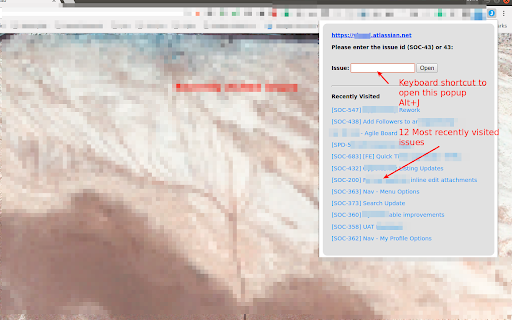
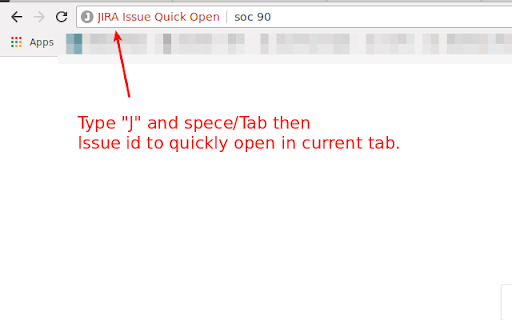


Open issue in Jira by keyboard shortcut or by highlight and right click context menu. Omnibox. Recently visited issues. This extension allow users to open issues in Jira by: 1. Clicking on the extension icon and providing issue id like 56 or SOC-56 2. Choosing option from the context menu by right click after selecting the issue id. This is helpful when the story/issue id is mentioned in email or pull requests etc.. User can just select the issue id and right click to open issue in jira. 3. Supports keyboard shortcuts. (A) Alt+J to open issue opener popup (B) Alt+Shift+J to open the selected/highlighted issue id in jira directly 4. Supports Omnibox. In the address bar type J + TAB then issue id to open issue in current tab. This also suggests matching issues. 5. See recently visited issues. * This extension does not make any api calls to JIRA ** This extension does not share any data with the extension developer

Jira Extension in Chrome
The Jira Extension in Chrome is the ultimate solution to connect your Google Apps with Jira. Jira Extension in Chrome simplifies Jira ticket creation from Gmail, Google Calendar, Drive, Microsoft Edge, and anywhere online. ** Don't forget to download the Google To Jira - GTJ app on your Jira instance from the Atlassian marketplace through this link https://l.linklyhq.com/l/isHY ** This is the ultimate extension to connect Google to Jira, with its fresh and intuitive user experience. Jira ticket creation has now evolved with the ability to create tickets from anywhere! ✔ Need to turn an email into a Jira issue? ✔ A Calendar event into a new task? ✔ Create and attach files from Google Drive? ✔ Find content on Google or ChatGPT that you need to include in a Jira issue? Everything is on the table! It's time for a new way to handle Jira project management and this tool will help you lead the way. You can now: ► Switch between multiple Jira accounts in Gmail ► Link emails to existing Jira issues for better tracking ► Switch to dark mode to reduce eyestrain. ► Create Jira tickets from Google Apps and any content online ► Edit, comment, and log work on tickets ► Create a task/sub-task and view related issues ► Allow customer access to Jira Service Management portal ► Support 3rd party add-ons including Insight, Elements Connect, and Tempo fields with preset configurations ► Support all Jira platforms ► Advanced JQL search ► Arabic and all languages support ► Support custom fields, new labels, and rich media ► Preview, rename and delete attachments ► Upload email attachments and inline images ► Cloud, Server, and Data Center login ► Add email subject as summary and body as description/comment ► Detect Jira issue keys from email subjects ► Detect meetings/event duration with Calendar's time tracking

Capture in Chrome for monday.com and Jira (ex. Issue Creator)
💡 Capture tasks directly from your browser. Take screenshots, annotate, and create items with one click — no more switching tabs. Capture in Chrome for monday.com and Jira (ex. Issue Creator) - the all-in-one Chrome extension for fast visual bug reporting, screen capture, and seamless task creation. ✔ Works with both Jira Cloud and monday.com 🐛Report bugs faster - send visual feedback instantly 📷 Take screenshots & annotate - highlight issues directly on the webpage using pen, shapes, or highlighter tools 🔗 Link visual web elements - connect parts of the page directly to your issues ⚡ Support both Jira and monday.com - use the same extension across platforms Why You Should Try It ► Create tasks 10x faster in monday.com and Jira Skip the tedious copy-paste and manual steps. The app enables you to capture, annotate, and create tasks in seconds, boosting your team’s productivity and enhancing your bug reporting workflow. ► Seamless visual communication Highlight bugs, UI issues, or areas for feedback on any webpage. Submit tasks instantly to your Jira projects or monday.com boards - without leaving the site you’re testing or reviewing. Main features: - Screenshot capture + in-browser annotation - Quick task creation in Jira & monday.com - Smart templates & auto-generated task titles - Draft recovery for unsaved inputs Get the most out of the extension - by adding it to Chrome and installing the connector apps with a 30-day trial for Jira and a 14-day trial for monday.com to see if the app suits you: 🔗 Issue Creator App on Atlassian Marketplace https://marketplace.atlassian.com/apps/1231078/task-compose-for-jira-cloud?tab=overview&hosting=cloud Stop describing bugs. Start showing them - in Jira and monday.com. With Capture in Chrome, visual bug reporting has never been easier.

Jira Snippet
Jira Snippet: Quick copy add-on for customizable issue data. Integrates with Jira Cloud on Chrome, Firefox, Edge. Makes it possible to copy the jira issue id + title with one button Jira Snippet is a browser extension that streamlines your Jira experience by allowing you to quickly copy issue information in a customizable format. It's easy to configure and enables you to choose what data you want to include when copying, such as issue title, ID, status, and more. The add-on integrates seamlessly with Jira Cloud and is compatible with Chrome, Firefox, and Edge browsers.

JIRA ShortCut
Just open your jira ticket and you will see an icon in the address bar, just click on it and text will be copied to your clip board, Want keyboard shortcut? Then use on Windows: Ctrl+J on Mac: Cmd+J, or choose your own in chrome://extensions/ *** Setup *** Before you start you need to add at least one rule in the options: 1. Open options page, chrome-extension://kjofpimpbjninggehnclcgkgniacejha/options.html 2. Click 'Add rule' 3. Click 'Save' 4. Open 'https://issues.apache.org/jira/browse/HADOOP-3629' 5. You should see the icon in the address bar. You also can use this extension with other sites, but you need to configure it. In options you can specify: 1. when to activate the extension - "url pattern" field. 2. what should be copied from the page title - 'tittle patter' and 'out pattern' fields. Example - Github pull requests: Example page with url https://github.com/rails/rails/pull/10676 and title "Add test to counter cache test.rb by tkhr · Pull Request #10676 · rails/rails" Configuration for this page: "url pattern": github.com.*/pull/ 'title pattern": (.*)(· Pull Request #)(\d+).* "out pattern": #$3 $1
