
kjofpimpbjninggehnclcgkgniacejha
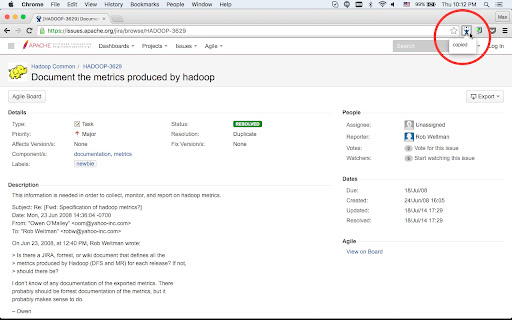

Just open your jira ticket and you will see an icon in the address bar, just click on it and text will be copied to your clip board, Want keyboard shortcut? Then use on Windows: Ctrl+J on Mac: Cmd+J, or choose your own in chrome://extensions/ *** Setup *** Before you start you need to add at least one rule in the options: 1. Open options page, chrome-extension://kjofpimpbjninggehnclcgkgniacejha/options.html 2. Click 'Add rule' 3. Click 'Save' 4. Open 'https://issues.apache.org/jira/browse/HADOOP-3629' 5. You should see the icon in the address bar. You also can use this extension with other sites, but you need to configure it. In options you can specify: 1. when to activate the extension - "url pattern" field. 2. what should be copied from the page title - 'tittle patter' and 'out pattern' fields. Example - Github pull requests: Example page with url https://github.com/rails/rails/pull/10676 and title "Add test to counter cache test.rb by tkhr · Pull Request #10676 · rails/rails" Configuration for this page: "url pattern": github.com.*/pull/ 'title pattern": (.*)(· Pull Request #)(\d+).* "out pattern": #$3 $1

Better Issue Link for Jira - Smart Copy with Templates
Enhance Jira's copy link functionality with customizable HTML and Markdown templates, perfect for Slack and documentation. 🔗 Transform Your Jira Links into Smart, Readable References! Tired of manually formatting Jira issue links for different platforms? Better Issue Link for Jira is your solution! With just one click, get perfectly formatted links that include both the issue key and summary. ✨ Key Features: • One-Click Wonder: Copy both issue ID and summary instantly • Dual Format Support: Get HTML (perfect for Slack!) and Markdown formats simultaneously • Custom Templates: Make your links look exactly how you want them • Live Preview: See how your customized links will look before saving • Works Everywhere: Compatible with all Atlassian Cloud instances 🎯 Perfect for: • Development teams using Slack • Technical writers maintaining documentation • Project managers sharing updates • Anyone who wants to share Jira issues more effectively 💡 Pro tip: Customize your templates in the options page to match your team's style! No more copying and pasting multiple times or manually formatting links. Better Issue Link for Jira makes sharing Jira references a breeze! 🛡️ Privacy First: No data collection, no external services, works entirely in your browser. Made with ❤️ for the Jira community

Jira HotLinker
This extension will show a tooltip when hovering over a jira ticket number on github or a ticket link. The tooltip is enabled on github.com by default, you can add new domains by clicking on the extension icon or in the option menu. - Copy past the ticket title to clipboard thanks to @ https://github.com/kaspars-ozols - Github enterprise support for pull requests ! - Security updates - Title and Link to Jira - Related pull requests - Descriptions - Attachments - Issue type / status / priority - Comment count and plain text comments - Configure domains where the plugin is active by clicking on the extension icon. - Pin a ticket on the screen by dragging the title Privacy Features: - Does not store any user data what so ever - Only requires access to the websites where you want to use the plugin. - Does not ask for your jira password or user name !

Jira Assistant: Worklog, Sprint report, etc
Help to track & upload work done on a Jira Ticket on timely basis and generate Worklog, Sprint and other custom reports. Discover Jira Assistant: Your Ultimate Worklog & Reporting Management Solution! 🚀 Experience the Power of Jira Assistant 🚀 Visit https://www.jiraassistant.com for comprehensive details and alternative browser installation options. Always use latest build of Jira Assistant by using Web version of tool, explore https://app.jiraassistant.com. 🎥 Dive Deeper with YouTube Videos 🎥 Learn about the rich features of Jira Assistant: https://www.youtube.com/watch?list=PLxDBQLgpBhsDGppYrDqARYULukk7XFJPV&v=HsWq7cT3Qq0 📊 Streamline Work Tracking and Reporting 📊 Are you seeking a seamless way to track and upload your progress on Jira Tickets while effortlessly generating Worklogs, Sprint Reports, and Custom Analytics? Look no further than Jira Assistant, your dedicated partner in efficient project management. 🔍 Key Features Overview 🔍 * Effortlessly log work with drag & drop and copy features. * Track time using an integrated timer for precise worklogs. * Bulk import worklogs and issues with CSV files. * Access diverse reports on worklogs, sprints, estimates, and customized insights. * Seamlessly integrate with calendars for automated meeting worklog creation. * Enjoy customization with personalized dashboards, skins, and quick views. * Connect with multiple Jira accounts and switch between instances effortlessly. * Foster team collaboration with inbuilt planning poker. * Export reports in CSV, Excel, and PDF formats. * Gain insights from status-wise time spent reports. * Craft personalized dashboards, add gadgets, and arrange layouts. * Share your custom gadgets and reports with ease. * Reorder gadgets with drag and drop functionality. 🗓️ Calendar and Worklog 🗓️ * Log and upload work on Jira Tickets seamlessly, visualized in a calendar format. * Monitor missing or pending worklogs for better accountability. * Clone and adjust worklogs with drag & drop functionality. * Sync with Google / Outlook Calendar for automatic meeting worklogs. 📅 Simplify Your Menu Experience 📅 * Customize the JA icon menu to show preferred features or dashboards. * Launch selected pages or dashboards with a small popover. 👥 Simplify Team Management with Groups 👥 * Create and link Jira groups, manage team members effectively. * Leverage groups for enhanced reporting and time zone adjustments. 📊 Comprehensive Reporting Options 📊 * Generate day wise reports for user groups, leveraging customized time zones. * Sprint-based reporting with options for multiple boards. * Pivot report with row and column level grouping. * Detailed user project summaries and filters for enhanced insights. * Say-Do-Ratio report for getting insights on Say do ratio, growth in velocity, Status wise time spent on sprint, etc. * Estimate vs. Actual analysis with story points or hours estimation. * Craft custom reports with tailored fields and formatting. ✨ Additional Features ✨ * Dark skin for personalized aesthetics. * Receive Chrome notifications for daily work log reminders. * Stay updated with new Jira comments via notifications. * Enjoy a user-friendly and intuitive interface. 🎥 Setup Assistance 🎥 Follow this video guide for easy setup: https://www.youtube.com/embed/HsWq7cT3Qq0?rel=0&autoplay=1&showinfo=0&cc_load_policy=1 🙌 Support Us 🙌 If you find value in Jira Assistant, consider supporting us with a donation: https://paypal.me/shridhartl 🔥 Elevate your Jira experience, simplify tracking and reporting, and harness the capabilities of Jira Assistant today! 🔥

Open JIRA Ticket
Open JIRA tickets easily using the toolbar. 🚀 Open JIRA tickets instantly from your toolbar or address bar! Tired of manually typing full JIRA URLs? This extension transforms how you access JIRA tickets with lightning-fast shortcuts and smart defaults. ✨ Key Features: • Quick Access - Open tickets directly from toolbar or address bar • Smart Defaults - Set your main project once, then just type ticket numbers • Multi-Project Support - Easily switch between two different JIRA projects • Search History - Never lose track of previously accessed tickets • Address Bar Integration - Type "ojira" + space to search from anywhere • Underscore Support - Works with complex project IDs like A8SIT2_IRM 🎯 Perfect For: • Teams that share ticket numbers instead of full URLs • Developers who frequently access the same JIRA projects • Anyone who forgets to add dashes between project and ticket numbers • Users who need to switch between multiple JIRA instances ⚡ How It Works: 1. Set your default project (e.g., "STACK") 2. Type just the ticket number (e.g., "123" → opens STACK-123) 3. Use the toolbar for quick access or "ojira" in address bar 4. Switch projects with one click when needed 🆕 Latest Updates: • Enhanced multi-project support with easy toggling • Improved UI with modern design and better user experience • Support for complex project IDs with underscores • Streamlined setup process 💡 Pro Tips: • Use the address bar: Type "ojira" + space + ticket number • Set up secondary projects for different teams or environments • Access your search history by clicking the extension icon • Works with any JIRA instance (Cloud, Server, Data Center) ⚙️ Setup (2 minutes): 1. Enter your JIRA URL (e.g., https://yourcompany.atlassian.net) 2. Set your default project key (e.g., "STACK") 3. Optionally configure a secondary project 4. Start using immediately! ❤️ Why Users Love It: "Finally, no more copying and pasting JIRA URLs!" - Saves 5+ minutes daily "Perfect for our multi-project workflow" - Seamless project switching "Address bar integration is genius" - Faster than bookmarking Perfect for Agile teams, developers, project managers, and anyone who works with JIRA tickets regularly! # Changelog * 3.3.0 * Add work hours feature * Add options scrollbar arrow * Reduce build size * 3.2.0 * Add underscore support for projects * Revamp options styling * 3.1.2 * Prevent bad toggle state * 3.1.1 * Minor fix for undefined button click * 3.1.0 * Add in secondary jira projects feature * Add in less strict filtering for projects with numbers like R2D2 * We still don't support projects with underscore * Move UTC to a better spot * 3.0.9 * Remove tabs permission again. * Update timezone locations. Remove Arizona and London, replace with Sydney Australia and Los Angeles * 3.0.8 * Allow numbers in default project setup * Add history display preference for those who prefer a more minimal look * 3.0.7 * Fix World Clock * 3.0.6 * Add Q to display * Add fun feature with ranks on usage * Add missing i18n translations * Minor options cleanup * 3.0.5 * Add simple show me what fiscal quarter of the year I'm in option * 3.0.4 * Minor modifications to clock. Disable persistent seconds update (was too slow imo) * Remove seconds indicator * 3.0.3 * Hotfix permission back. Need it to open toolbar with shortcut. Oops! * 3.0.2 * Add World Clock option in toolbar * Remove unnecessary tabs permission * 3.0.1 * Add in omnibox support using new keyword - 'ojira', short for openjira * Avoid conflict with simple search of 'jira' in toolbar * 3.0 * Upgrade to manifest v3 * Update i18n implementation * Remove favorites feature * Disable omnibox support (unable to get it to work in v3 yet) * Add keyboard support for history navigation * Add Japanese, Korean and Chinese language support * Simplify, update and remove cruft * 2.1 * Add favorites feature * Fix minor bugs * 1.1 * Add localization for English, Spanish, French, German and Russian * 1.0 * Full release of Chrome Extension. --- # Disclaimer I am not affiliated with Atlassian in any way. This is not an official Atlassian product.
