
momjbjbjpbcbnepbgkkiaofkgimihbii

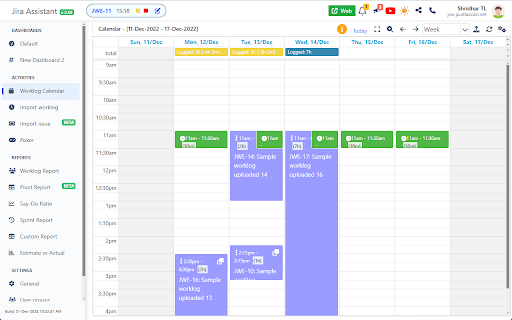


Help to track & upload work done on a Jira Ticket on timely basis and generate Worklog, Sprint and other custom reports. Discover Jira Assistant: Your Ultimate Worklog & Reporting Management Solution! 🚀 Experience the Power of Jira Assistant 🚀 Visit https://www.jiraassistant.com for comprehensive details and alternative browser installation options. Always use latest build of Jira Assistant by using Web version of tool, explore https://app.jiraassistant.com. 🎥 Dive Deeper with YouTube Videos 🎥 Learn about the rich features of Jira Assistant: https://www.youtube.com/watch?list=PLxDBQLgpBhsDGppYrDqARYULukk7XFJPV&v=HsWq7cT3Qq0 📊 Streamline Work Tracking and Reporting 📊 Are you seeking a seamless way to track and upload your progress on Jira Tickets while effortlessly generating Worklogs, Sprint Reports, and Custom Analytics? Look no further than Jira Assistant, your dedicated partner in efficient project management. 🔍 Key Features Overview 🔍 * Effortlessly log work with drag & drop and copy features. * Track time using an integrated timer for precise worklogs. * Bulk import worklogs and issues with CSV files. * Access diverse reports on worklogs, sprints, estimates, and customized insights. * Seamlessly integrate with calendars for automated meeting worklog creation. * Enjoy customization with personalized dashboards, skins, and quick views. * Connect with multiple Jira accounts and switch between instances effortlessly. * Foster team collaboration with inbuilt planning poker. * Export reports in CSV, Excel, and PDF formats. * Gain insights from status-wise time spent reports. * Craft personalized dashboards, add gadgets, and arrange layouts. * Share your custom gadgets and reports with ease. * Reorder gadgets with drag and drop functionality. 🗓️ Calendar and Worklog 🗓️ * Log and upload work on Jira Tickets seamlessly, visualized in a calendar format. * Monitor missing or pending worklogs for better accountability. * Clone and adjust worklogs with drag & drop functionality. * Sync with Google / Outlook Calendar for automatic meeting worklogs. 📅 Simplify Your Menu Experience 📅 * Customize the JA icon menu to show preferred features or dashboards. * Launch selected pages or dashboards with a small popover. 👥 Simplify Team Management with Groups 👥 * Create and link Jira groups, manage team members effectively. * Leverage groups for enhanced reporting and time zone adjustments. 📊 Comprehensive Reporting Options 📊 * Generate day wise reports for user groups, leveraging customized time zones. * Sprint-based reporting with options for multiple boards. * Pivot report with row and column level grouping. * Detailed user project summaries and filters for enhanced insights. * Say-Do-Ratio report for getting insights on Say do ratio, growth in velocity, Status wise time spent on sprint, etc. * Estimate vs. Actual analysis with story points or hours estimation. * Craft custom reports with tailored fields and formatting. ✨ Additional Features ✨ * Dark skin for personalized aesthetics. * Receive Chrome notifications for daily work log reminders. * Stay updated with new Jira comments via notifications. * Enjoy a user-friendly and intuitive interface. 🎥 Setup Assistance 🎥 Follow this video guide for easy setup: https://www.youtube.com/embed/HsWq7cT3Qq0?rel=0&autoplay=1&showinfo=0&cc_load_policy=1 🙌 Support Us 🙌 If you find value in Jira Assistant, consider supporting us with a donation: https://paypal.me/shridhartl 🔥 Elevate your Jira experience, simplify tracking and reporting, and harness the capabilities of Jira Assistant today! 🔥

jira-helper
Jira Helper - adds visual elements for swimlanes, a button for adding a task description template. The latest version added experimental functionality: 1. Limit the number of tasks for swimlanes* 2. Do not consider Expedite swimline WIP limits 3. Limiting the number of tasks to several columns 4. Personal WIP-limit 5. WIP-limit for Cells (intersection of Swimlanes & Columns) 6. WIP-limit for fields values (on Kanban board) 7. WIP-limit for fields values, with count value of field (on Kanban board) 8. WIP-limit for fields values, with sum numbers of field, for sample Story Points (on Kanban board) 9. Use your SLA line (with percentile) in the Control Chart panel 10. Show flag on issue panel 11. Story Point Ruler for Control Chart 12. Blurring of secret data 13. Wip-limits for visible on card custom field 14. The background color of the card matches the stripe color setting 15. New Feature: sub-tasks progress on Kanban Board 16. New Feature: diagnostic tab, which helps to get data for diagnostic *we do not take into account the restrictions on a swimlane for closed tasks

Angular DevTools
Angular DevTools extends Chrome DevTools adding Angular specific debugging and profiling capabilities. You can use Angular DevTools to understand the structure of your application and preview the state of the directive and the component instances. To get insights into the execution of the application, you can use the profiler tab, which shows you the individual change detection cycles, what triggered them, and how much time Angular spent in them. You can also inspect and visualize your application's dependency injection tree to better how understand how and why any token was resolved to a specific service.

Time Tracker by Tempo
Track and visualize your progress on Jira issues Track the duration of your work on Jira issues with real-time browser trackers. Start a tracker and assign it to a Jira issue, or use it for work outside of Jira * Add new trackers and pause or stop them as required * Use as many trackers as you like when working on multiple issues at once * Visualize all active trackers across your browser tabs * Log time from extension or from the Log Time form on Timesheets * Locate trackers easily from the bottom-right of your browser Time Tracker by Tempo is free and available for all Tempo customers on Jira Cloud. UPDATE (v.2.0.10): * Log time directly from the extension, or go to the Log Time form on Timesheets to specify details like Start Time, Account, etc. UPDATE (v.2.0.1): * Trackers are visible across all webpages (not just Jira) * Log time directly from the extension (if your Tempo instance does not require additional worklog attributes) * Edit duration before logging time * Extension icon shows tracker is running * Hide presence of trackers if required

Night Mode for Jira
Take care of your eyes day and night using dark theme for Jira tools and services. Looking for a way to change the color of Jira Service Management UI to black? Atlassian doesn’t offer this out of the box, so we created an extension that can change the white light of the Jira Service Management to black. NEVER STRAIN YOUR EYES AGAIN The dark skin will do what the name implies. But for greater comfort, we added the possibility to tweak the contrast and brightness of the colors. Don’t forget about the Night Shift to save your eyes from straining. Shift the color scheme from blue to warm and minimize the harmful effects on your eyesight. MAINTAIN A HEALTHY SLEEP CYCLE WITH NIGHT SHIFT Excessive exposure to blue light that comes from the computer screen can mess up your sleep. Therefore, we added Night Shift, which you can turn on and off when needed. It will change the blue light to soft, warm tones to reduce the risk of insomnia and other health issues.
