
nlpnopimcnncncmmjdijebhlmkfandpl


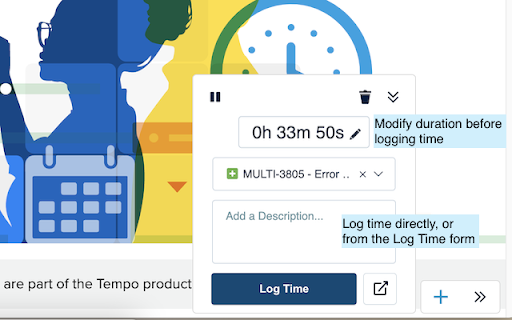
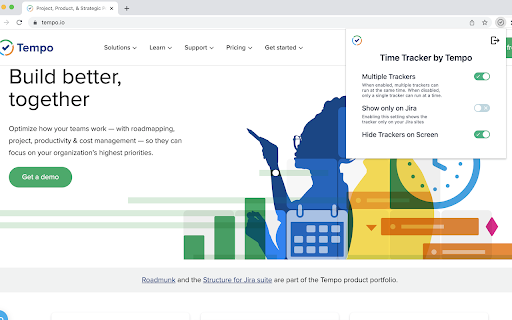
Track and visualize your progress on Jira issues Track the duration of your work on Jira issues with real-time browser trackers. Start a tracker and assign it to a Jira issue, or use it for work outside of Jira * Add new trackers and pause or stop them as required * Use as many trackers as you like when working on multiple issues at once * Visualize all active trackers across your browser tabs * Log time from extension or from the Log Time form on Timesheets * Locate trackers easily from the bottom-right of your browser Time Tracker by Tempo is free and available for all Tempo customers on Jira Cloud. UPDATE (v.2.0.10): * Log time directly from the extension, or go to the Log Time form on Timesheets to specify details like Start Time, Account, etc. UPDATE (v.2.0.1): * Trackers are visible across all webpages (not just Jira) * Log time directly from the extension (if your Tempo instance does not require additional worklog attributes) * Edit duration before logging time * Extension icon shows tracker is running * Hide presence of trackers if required

Jira Extension in Chrome
The Jira Extension in Chrome is the ultimate solution to connect your Google Apps with Jira. Jira Extension in Chrome simplifies Jira ticket creation from Gmail, Google Calendar, Drive, Microsoft Edge, and anywhere online. ** Don't forget to download the Google To Jira - GTJ app on your Jira instance from the Atlassian marketplace through this link https://l.linklyhq.com/l/isHY ** This is the ultimate extension to connect Google to Jira, with its fresh and intuitive user experience. Jira ticket creation has now evolved with the ability to create tickets from anywhere! ✔ Need to turn an email into a Jira issue? ✔ A Calendar event into a new task? ✔ Create and attach files from Google Drive? ✔ Find content on Google or ChatGPT that you need to include in a Jira issue? Everything is on the table! It's time for a new way to handle Jira project management and this tool will help you lead the way. You can now: ► Switch between multiple Jira accounts in Gmail ► Link emails to existing Jira issues for better tracking ► Switch to dark mode to reduce eyestrain. ► Create Jira tickets from Google Apps and any content online ► Edit, comment, and log work on tickets ► Create a task/sub-task and view related issues ► Allow customer access to Jira Service Management portal ► Support 3rd party add-ons including Insight, Elements Connect, and Tempo fields with preset configurations ► Support all Jira platforms ► Advanced JQL search ► Arabic and all languages support ► Support custom fields, new labels, and rich media ► Preview, rename and delete attachments ► Upload email attachments and inline images ► Cloud, Server, and Data Center login ► Add email subject as summary and body as description/comment ► Detect Jira issue keys from email subjects ► Detect meetings/event duration with Calendar's time tracking

TMetric – Time Tracker & Productivity App
Simple time tracking extension which helps you be more productive, complete projects in time and bill your clients correctly. TMetric is a browser-based time tracker built for service teams that need clear visibility into time, costs, and profitability. Start tracking with one click directly from your existing tools and instantly understand where your time is going. Integrations TMetric connects with 50+ popular tools, including Asana, Jira, Notion, and Trello, so your team can track time without leaving the apps they already use. This keeps your data accurate across all projects and gives you a single source of truth for performance and profitability. Project Management Set project budgets, track costs, and monitor profitability in real time. Clear, actionable reports let you quickly see which projects are on track and which ones are eating into your margins. Billing & Invoicing Set billable rates by project, client, or team member. Track billable and non-billable hours, generate accurate invoices, and make sure every hour worked is contributing to revenue. Profitability & Expenses Understand the true cost of your work. Assign hourly costs to team members, compare costs against billable rates, and see profit margins update in real time. Spot unprofitable work early and focus on what actually drives revenue. 1. Sign up and log in to TMetric. 2. Install the extension. 3. Connect your tools. 4. Refresh the page and start tracking.

Jira Product Discovery
Jira Product Discovery Chrome Extension With the Jira Product Discovery Chrome Extension you can: - Attach links to web pages to your Ideas - Add text snippets and images from the web to Jira Product Discovery - Take screenshots - Create new Ideas in place

Apollo Client Devtools
GraphQL debugging tools for Apollo Client. Apollo Client Devtools is a Chrome extension for the open-source GraphQL client, Apollo Client. This extension has 4 main features: 1. A built-in version of the Apollo Studio Explorer that allows you to make queries against your GraphQL server using your app's network interface directly (no configuration necessary). 2. A query watcher that shows you which queries are being watched by the current page, when those queries are loading, and what variables those queries are using. 3. A mutation inspector that displays the mutations made to your Apollo Client application data. 4. A cache inspector that displays your Apollo Client cache data. You can explore the cache through a tree-like interface, and search for specific field keys and values. Code for this extension can be found at: https://github.com/apollographql/apollo-client-devtools
