
mkfhgagoddnhjojmopafgdlllahamifi
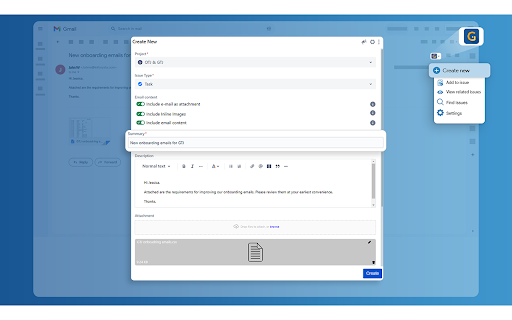


The Jira Extension in Chrome is the ultimate solution to connect your Google Apps with Jira. Jira Extension in Chrome simplifies Jira ticket creation from Gmail, Google Calendar, Drive, Microsoft Edge, and anywhere online. ** Don't forget to download the Google To Jira - GTJ app on your Jira instance from the Atlassian marketplace through this link https://l.linklyhq.com/l/isHY ** This is the ultimate extension to connect Google to Jira, with its fresh and intuitive user experience. Jira ticket creation has now evolved with the ability to create tickets from anywhere! ✔ Need to turn an email into a Jira issue? ✔ A Calendar event into a new task? ✔ Create and attach files from Google Drive? ✔ Find content on Google or ChatGPT that you need to include in a Jira issue? Everything is on the table! It's time for a new way to handle Jira project management and this tool will help you lead the way. You can now: ► Switch between multiple Jira accounts in Gmail ► Link emails to existing Jira issues for better tracking ► Switch to dark mode to reduce eyestrain. ► Create Jira tickets from Google Apps and any content online ► Edit, comment, and log work on tickets ► Create a task/sub-task and view related issues ► Allow customer access to Jira Service Management portal ► Support 3rd party add-ons including Insight, Elements Connect, and Tempo fields with preset configurations ► Support all Jira platforms ► Advanced JQL search ► Arabic and all languages support ► Support custom fields, new labels, and rich media ► Preview, rename and delete attachments ► Upload email attachments and inline images ► Cloud, Server, and Data Center login ► Add email subject as summary and body as description/comment ► Detect Jira issue keys from email subjects ► Detect meetings/event duration with Calendar's time tracking

Jira for Chrome
Quick and Easy access to your work in Jira Cloud How long does it take currently for you to access your work in Jira? 10 seconds? 15 seconds? longer 🤯 ? Now you can access your work in under just 1 second ⚡️ Simply install this extension and hit ⌘J for Mac or Alt+J for Windows to experience lighting fast Jira Issue Navigator Boost your Productivity working with Jira Cloud by enabling quick access to: - Open Issues assigned to your in Jira - Recently viewed issues in Jira - Jira filters you have created in Jira - Shared filters that you have marked as favourite in Jira - Switch between multiple Jira Products (linked to your account) - Your Atlassian profile and Account settings - Create a new Jira issue - Dark mode The following products in Jira Cloud are supported: - Jira Software - Jira Work Management - Jira Service Management - I am not affiliated with Atlassian in any way. - The JIRA logo belongs to Atlassian and is obtained from the AtlasKit.

Jira Assistant: Worklog, Sprint report, etc
Help to track & upload work done on a Jira Ticket on timely basis and generate Worklog, Sprint and other custom reports. Discover Jira Assistant: Your Ultimate Worklog & Reporting Management Solution! 🚀 Experience the Power of Jira Assistant 🚀 Visit https://www.jiraassistant.com for comprehensive details and alternative browser installation options. Always use latest build of Jira Assistant by using Web version of tool, explore https://app.jiraassistant.com. 🎥 Dive Deeper with YouTube Videos 🎥 Learn about the rich features of Jira Assistant: https://www.youtube.com/watch?list=PLxDBQLgpBhsDGppYrDqARYULukk7XFJPV&v=HsWq7cT3Qq0 📊 Streamline Work Tracking and Reporting 📊 Are you seeking a seamless way to track and upload your progress on Jira Tickets while effortlessly generating Worklogs, Sprint Reports, and Custom Analytics? Look no further than Jira Assistant, your dedicated partner in efficient project management. 🔍 Key Features Overview 🔍 * Effortlessly log work with drag & drop and copy features. * Track time using an integrated timer for precise worklogs. * Bulk import worklogs and issues with CSV files. * Access diverse reports on worklogs, sprints, estimates, and customized insights. * Seamlessly integrate with calendars for automated meeting worklog creation. * Enjoy customization with personalized dashboards, skins, and quick views. * Connect with multiple Jira accounts and switch between instances effortlessly. * Foster team collaboration with inbuilt planning poker. * Export reports in CSV, Excel, and PDF formats. * Gain insights from status-wise time spent reports. * Craft personalized dashboards, add gadgets, and arrange layouts. * Share your custom gadgets and reports with ease. * Reorder gadgets with drag and drop functionality. 🗓️ Calendar and Worklog 🗓️ * Log and upload work on Jira Tickets seamlessly, visualized in a calendar format. * Monitor missing or pending worklogs for better accountability. * Clone and adjust worklogs with drag & drop functionality. * Sync with Google / Outlook Calendar for automatic meeting worklogs. 📅 Simplify Your Menu Experience 📅 * Customize the JA icon menu to show preferred features or dashboards. * Launch selected pages or dashboards with a small popover. 👥 Simplify Team Management with Groups 👥 * Create and link Jira groups, manage team members effectively. * Leverage groups for enhanced reporting and time zone adjustments. 📊 Comprehensive Reporting Options 📊 * Generate day wise reports for user groups, leveraging customized time zones. * Sprint-based reporting with options for multiple boards. * Pivot report with row and column level grouping. * Detailed user project summaries and filters for enhanced insights. * Say-Do-Ratio report for getting insights on Say do ratio, growth in velocity, Status wise time spent on sprint, etc. * Estimate vs. Actual analysis with story points or hours estimation. * Craft custom reports with tailored fields and formatting. ✨ Additional Features ✨ * Dark skin for personalized aesthetics. * Receive Chrome notifications for daily work log reminders. * Stay updated with new Jira comments via notifications. * Enjoy a user-friendly and intuitive interface. 🎥 Setup Assistance 🎥 Follow this video guide for easy setup: https://www.youtube.com/embed/HsWq7cT3Qq0?rel=0&autoplay=1&showinfo=0&cc_load_policy=1 🙌 Support Us 🙌 If you find value in Jira Assistant, consider supporting us with a donation: https://paypal.me/shridhartl 🔥 Elevate your Jira experience, simplify tracking and reporting, and harness the capabilities of Jira Assistant today! 🔥

Jira Metrics Plugin - Analytics & Insights
A lightweight analytics plugin that helps you track and analyze your team's performance metrics directly from Jira boards. To get started, click the “Analyze Metrics” button on your Kanban board in Jira. If the button doesn’t appear, open your Kanban board in Jira and simply click the Jira Metrics Plugin icon in your browser’s extensions menu — your board will open automatically in the plugin. ✨ Advanced Analytics Reports - Cycle Time Histogram with percentile analysis - Throughput report with trends and patterns - Aging Chart for work in progress - Cumulative Flow Diagram (CFD) 🔒 Enhanced Security & Privacy - Works locally in your browser - No sensitive data storage - Only tracks task movement timestamps - Completely anonymous data processing - No access to task content or personal information ⚡ Easy Setup & Use - Quick installation as a Chrome extension - No server configuration needed - Works with both Jira Cloud and Jira Server - Automatic integration with your Jira boards - Instant access to analytics Perfect For - Project Managers seeking data-driven insights - Agile teams tracking their performance - Process improvement initiatives - Team leads monitoring workflow efficiency - Organizations focused on continuous improvement Benefits - Make informed decisions based on real data - Identify bottlenecks in your workflow - Track and improve team performance - Reduce lead time and increase efficiency - Save time on manual reporting Compatible With - Jira Cloud - Jira Server - All Chromium-based browsers Start optimizing your team's performance today with clear, actionable metrics. Install Jira Metrics Plugin and transform your Jira data into valuable insights! Need help? Have questions? Contact our support team or check out our documentation for detailed guides and best practices.

Jira Product Discovery
Jira Product Discovery Chrome Extension With the Jira Product Discovery Chrome Extension you can: - Attach links to web pages to your Ideas - Add text snippets and images from the web to Jira Product Discovery - Take screenshots - Create new Ideas in place
