
icmbnkmjhdapliaologdghjfpcmcimln

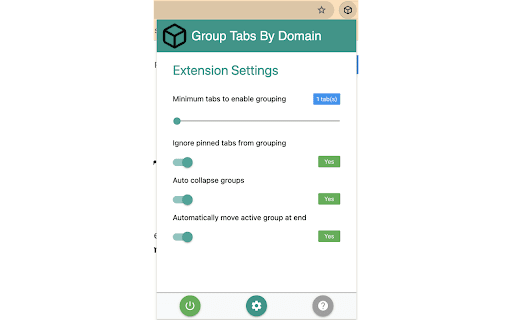
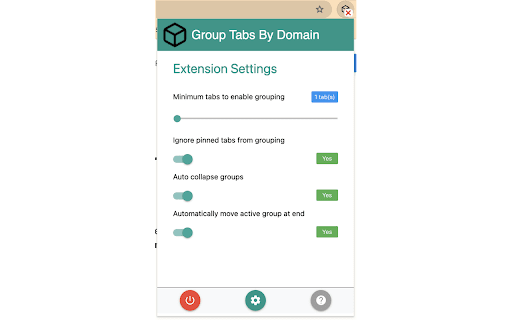
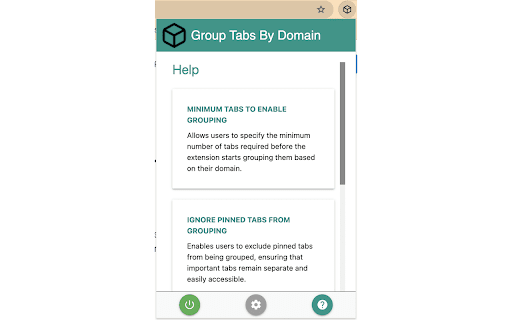
Take charge of your browsing experience with Group Tabs by Domain – the essential Chrome extension designed to streamline your tab management process. Say goodbye to tab clutter and hello to enhanced productivity, all without spending a dime or enduring pesky ads. 🔄 Automatic Tab Grouping: Seamlessly categorize your tabs by website domain, ensuring a clutter-free workspace and effortless navigation. 🎯 Customizable Grouping Threshold: Tailor your experience by setting the minimum number of tabs required before automatic grouping kicks in, providing flexibility to match your browsing style. 📌 Exclude Pinned Tabs: Keep important tabs readily accessible by excluding them from the grouping process, maintaining a clear distinction between vital information and everyday browsing. 📉 Auto Collapse Groups: Maximize screen space and minimize distractions with automatic collapsing of inactive tab groups, creating a cleaner browsing environment. 🔝 Move Active Group to End: Easily locate your most recently used tabs by ensuring the active tab group is always moved to the end of the tab bar, simplifying access to important content. 💡 Temporarily Disable Extension: Gain control over when the extension operates by toggling it on or off as needed, providing flexibility and convenience. ----------------------------------------- Release Note for v0.0.1.1 ----------------------------------------- 🔑 Enhanced Keyboard Binding: Fixed the keyboard binding for quick access to our extension. Now, simply press Ctrl + Shift + K to group tabs. 🚀 Improved Group Navigation: When a group is uncollapsed, the extension will now automatically activate the most recently accessed tab within that group. This enhancement eliminates the need for an extra click and streamlines tab navigation, particularly in groups with multiple tabs, saving valuable time and effort. ----------------------------------------- Release Note for v0.0.1.2 ----------------------------------------- Bug fix for activating last tab within specific group

Auto Tab Groups
Automatically Set Your Tab Groups! This extension allows you to set custom rules that then auto sort your tabs. IT does this using Google Tab Groups. It lets you set up as many rules as you want. To add a new rule click add group button and fill out the TITLE, Domain / URL and COLOR fields. When you open the open extension the TITLE column will be the tab group name. The DOMAIN/ URL column will be the value searched in the website URL field that extension uses to sort the active tab. The COLOR column will be a box that when drop down is clicked allows the user to pick a color for the tab group. These preferences will be saved to users google profile when either the save button is clicked or delete button is confirmed and work across multiple devices with extension under same profile. In order to change or delete a rule you must first check the checkbox for the row and click edit or delete. If deleting values confirm the delete in delete window. If editing values makes sure all fields in rows are checked are not blank, and that color box is not set to grey. Otherwise a warning message will display letting you know to set these fields. The extension works as follows, say you have the value Test1 in Name Column, test1 in URL column, and the box set to Blue. Any website URL you visit with test1 ex.(www.test1thisisatest.com) will be automatically sorted into a group named Test1. You can also specify multiple terms to search with by separating them with commas. For instance, if you assign a group with TITLE column of Colors, and DOMAIN/ URL of blue, yellow, and green; any url you load with those search terms will go in the Tab Group Named Color. The final column COLOR, is the color of this tab group that gets set. By default the following keyboard shortcuts are enabled. You can use Ctrl+Shift+Y, Ctrl+Shift+H, and Ctrl+Shift+U to close, open and toggle tab groups respectively. You can also change this by going to chrome://extensions/shortcuts as well. There is a settings / options page you can get to by clicking the gear in the top right corner. Here you can enable a zoomed in view for larger font size and window for the popup window, change grouping from other windows behavior, and save and load your files from a local file on your computer.

Advance Tab Groups
Auto tab group based on the url or regex An extension helps you manage tab groups better The newly added tab grouping function in chrome is very helpful. however, one of the things it does not allow the user to do is to pre-define rules for tab groups. with this extension user able to config the tab's group based on the tab's URL or regex rules. when a new tab is created it will be added to the corresponding group based on the rules user-defined. An auto group flag in a pop-up view is used to suggest if the extension will auto move the tab when it is created or updated. if this flag is off then the user will group the tab by clicking the “Group all tabs” button.

Tab Groups Extension
Automatically group tabs, save tabs/groups, and provide shortcuts for tabs/groups. 📢 February 2026: Sorry, Chrome 145 has a bug that causes problems with tab group operations (collapse and modify title). This bug will be fixed in Chrome 146. This is a Chrome bug, not an extension bug. All browser extensions with similar functionality are affected. In addition to general tab management functions, this extension specifically enhances the browser built-in "Tab Groups" feature. Features: ● Automatically create group for tabs through custom matching rules. ● Save and restore current tabs or groups (snapshots). ● Opened tabs/groups management: activate, close, expand/collapse, move to other window, modify group name and color, new tab in group. ● Saved tabs/groups management: delete, edit, add, expand/collapse, merge same name groups, data import/export. ● Grouping rules management: add, edit, delete, enable/disable, import/export. ● Keyboard shortcuts: group/ungroup, activate, move, close, pin, duplicate, expand/collapse, auto group by domain.

Auto Group Tabs
Automatically group browser tabs in the background. You… Automatically group browser tabs in the background. You can customize the grouping based on domain or subdomain rules, as well as custom rules. Manual grouping can be triggered using a shortcut key, and you can disable automatic grouping if desired. This extension is open source on GitHub: https://github.com/marwincn/auto-group-tabs
