
mnolhkkapjcaekdgopmfolekecfhgoob

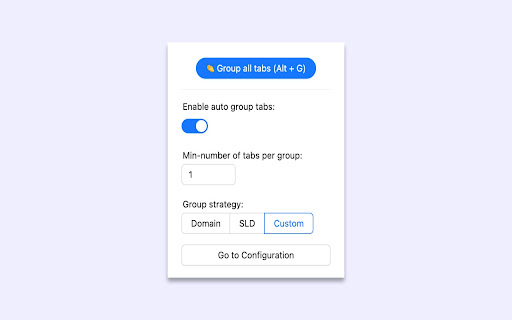
Automatically group browser tabs in the background. You… Automatically group browser tabs in the background. You can customize the grouping based on domain or subdomain rules, as well as custom rules. Manual grouping can be triggered using a shortcut key, and you can disable automatic grouping if desired. This extension is open source on GitHub: https://github.com/marwincn/auto-group-tabs

Tab Manager Auto
Fully Automated Tab Manager Extension Are you tired of having too many tabs open and losing track of which ones belong together? Auto Tab Groups is here to help! This extension promotes ease of use by automatically grouping tabs from the same source domain into organized groups, saving you time and effort. Unlike other tab manager extensions, Auto Tab Groups takes care of the heavy lifting for you, making it easy to navigate through all of your open tabs without introducing extra workload for users. Try Auto Tab Groups and experience the convenience of a well-organized tab system. - Auto Grouping Automatically detect tabs with the same source domain and put them into the same tab group. - Auto Ordering Push the last active tab to the first position of its tab group. Frequently visited tabs would always be found at the left section of the tab group. - Customize Grouping Users can create custom tab groups.

Tab Groups Extension
Automatically group tabs, save tabs/groups, and provide shortcuts for tabs/groups. 📢 February 2026: Sorry, Chrome 145 has a bug that causes problems with tab group operations (collapse and modify title). This bug will be fixed in Chrome 146. This is a Chrome bug, not an extension bug. All browser extensions with similar functionality are affected. In addition to general tab management functions, this extension specifically enhances the browser built-in "Tab Groups" feature. Features: ● Automatically create group for tabs through custom matching rules. ● Save and restore current tabs or groups (snapshots). ● Opened tabs/groups management: activate, close, expand/collapse, move to other window, modify group name and color, new tab in group. ● Saved tabs/groups management: delete, edit, add, expand/collapse, merge same name groups, data import/export. ● Grouping rules management: add, edit, delete, enable/disable, import/export. ● Keyboard shortcuts: group/ungroup, activate, move, close, pin, duplicate, expand/collapse, auto group by domain.

Tabbiy - Auto Group & Sidebar Tab Manager
The ultimate sidebar tab manager! Auto-group, customize titles, save, hibernate & switch tabs fast for a clutter-free browser. 🚀 Tabbiy: The Ultimate Sidebar Tab Manager & Auto-Organizer Tabbiy is an elegant sidebar tab manager designed to end the headache of having too many tabs. By providing a powerful vertical tab list and auto-grouping features, Tabbiy turns your cluttered browser into an organized, high-performance workspace. Whether you want to reduce Chrome memory usage or find a specific page in seconds, Tabbiy is the productivity tool you’ve been looking for. ✅ End Tab Clutter: Transform a messy horizontal tab bar into a clean, searchable sidepanel list. ✅ Smart Auto-Grouping: Automatically group tabs by domain or custom rules to keep related tasks together. ✅ Save Memory & CPU: Hibernate tabs or move idle pages to a "Staging List" to drastically boost browser speed. ✅ Custom Tab Titles: Rename any tab to eliminate vague labels and identify your content at a glance. ✅ Fast Switching: Use shortcuts to jump between current and recent tabs instantly, perfect for cross-page comparison. ✅ Pro Data Portability: Export your tab lists and titles in JSON, HTML, CSV, or Markdown (Pro). 1️⃣ Sidepanel Management (ALT+D): A dedicated vertical interface for grouping, saving, hibernating, and drag-and-drop reordering. 2️⃣ Auto-Grouping: One click to categorize tabs by domain. Pro unlocks 3 sets of custom rules, fixed colors, and unlimited groups. 3️⃣ Tab Hibernation: Suspend active tabs to free up RAM and quickly resume access whenever you need them again. 4️⃣ Tab Staging (Saving): Move temporarily unused tabs to a staging list to clear your interface while maximizing memory release. 5️⃣ Rename Tabs: Easily edit any tab title directly from the list to clear up vague labels. Your custom titles are saved automatically for quick identification. 6️⃣ Multi-Format Export: Free JSON export; Pro version unlocks CSV, HTML, and Markdown for professional backups. 7️⃣ Quick Switch (ALT+E): A lightning-fast shortcut to toggle between your current page and the last opened one. 8️⃣ Dark & Light Themes: Beautifully designed UI that matches your system theme for a comfortable visual experience. 💬 How do I disable auto-grouping? 🌲 Simply click the "Auto" button at the bottom of the sidepanel to turn off grouping and clear all current groups. 💬 How can I group tabs more effectively? 🌴 Go to "Settings" -> "Grouping Rules" to define custom patterns, then click "Apply" to see the magic happen. 💬 Does it support collapsing groups? 🌵 Currently, we focus on a "visible at a glance" design to help you find tabs faster without extra clicks. 💬 Can I use individual features without Auto-Grouping? 🍀 Yes! All features—sidepanel, hibernation, saving, and renaming—work independently to fit your specific workflow. ✅ Added one-click button to close duplicate tabs in the toolbar. ✅ Added an option to view all custom grouping rules in the saved list. ✅ Configure 3 sets of auto-grouping rules and switch freely. Pro.feat ✅ Configure fixed colors for auto-groups, including renaming and recoloring the "Others" group. Pro.feat ✅ Create an unlimited number of custom groups. Pro.feat ✅ Support import/export of all saved links and edited titles; JSON available in free version, and HTML, CSV, Markdown unlocked in Pro. Pro.feat ✅ Optimized:Added skeleton screen for the first screen of the sidebar. ✅ Fixed: When auto-grouping and default selection are enabled, changing the current tab URL may incorrectly trigger the default selection. 🍺 Productivity starts with a clean browser. Tired of messy tabs slowing you down? Install Tabbiy today and refresh your browsing experience! 📨 Questions or Feedback? We’d love to hear from you: support@tabbiy.top

Tab Grouper
Tab grouper is a chrome extension that allows you to automatically group all tabs that match a given URL pattern. You create rules for each website saying which URL pattern to match, the name of the tab group, and optionally a color, and the extension will add matching websites to the appropriate tab groups as you browse to them. For example, you could have all jira tickets in a single group, all amazon pages in another, and all google search results in another. For more details, see https://github.com/mivok/tabgrouper/blob/master/README.md Q: Why do you need the "Can read your browsing history" (or "tabs") permission? A: As you browse, the extension reads the addresses of the sites you, matching them against the rules you write, automatically grouping tabs based on those rules. The extension does not store nor transmit your browsing history anywhere. Q: Why do you need the "View and manage your tab groups" permission? A: The purpose of this extension is to automatically manage your tab groups for you, and so this permission is needed for the extension to work.
