
nplimhmoanghlebhdiboeellhgmgommi
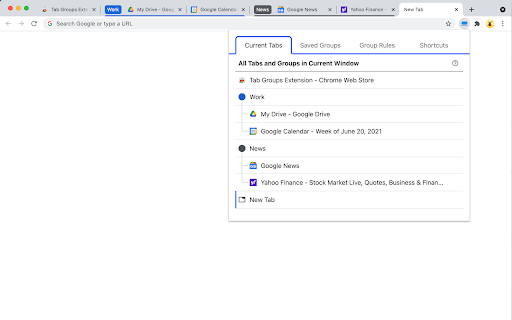

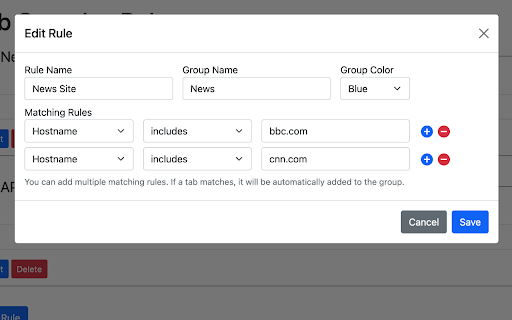
Automatically group tabs, save tabs/groups, and provide shortcuts for tabs/groups. 📢 February 2026: Sorry, Chrome 145 has a bug that causes problems with tab group operations (collapse and modify title). This bug will be fixed in Chrome 146. This is a Chrome bug, not an extension bug. All browser extensions with similar functionality are affected. In addition to general tab management functions, this extension specifically enhances the browser built-in "Tab Groups" feature. Features: ● Automatically create group for tabs through custom matching rules. ● Save and restore current tabs or groups (snapshots). ● Opened tabs/groups management: activate, close, expand/collapse, move to other window, modify group name and color, new tab in group. ● Saved tabs/groups management: delete, edit, add, expand/collapse, merge same name groups, data import/export. ● Grouping rules management: add, edit, delete, enable/disable, import/export. ● Keyboard shortcuts: group/ungroup, activate, move, close, pin, duplicate, expand/collapse, auto group by domain.

Tab Manager Auto
Fully Automated Tab Manager Extension Are you tired of having too many tabs open and losing track of which ones belong together? Auto Tab Groups is here to help! This extension promotes ease of use by automatically grouping tabs from the same source domain into organized groups, saving you time and effort. Unlike other tab manager extensions, Auto Tab Groups takes care of the heavy lifting for you, making it easy to navigate through all of your open tabs without introducing extra workload for users. Try Auto Tab Groups and experience the convenience of a well-organized tab system. - Auto Grouping Automatically detect tabs with the same source domain and put them into the same tab group. - Auto Ordering Push the last active tab to the first position of its tab group. Frequently visited tabs would always be found at the left section of the tab group. - Customize Grouping Users can create custom tab groups.

Tab Group Manager
Tab Group Manager exends the native Tab Groups in Chrome letting you store, sync and resume them anytime and anywhere. Tab Group Manager extension automatically stores the tab groups you create as a bookmark group so you can sync and restore them anytime and anywhere you want. Tab groups are stored under a bookmark folder `Other Bookmarks > Tab Group Manager`. Everytime you open a new tab, close an opened tab or navigate a tab to a new page in the tab group, the stored bookmark gets updated, so they are always in sync. * To change the group name, change the tab group name on Chrome. * To change the group color, change the tab group color on Chrome. * Closing an opened tab in a tab group on Chrome gets automatically synced, but you can also click on a close icon beside the tab in the Tab Group Manager to have the same effect. * Closing an opened tab group on Chrome leaves the group left in the Tab Group Manager, but you can also click on a close icon beside the tab group in the Tab Group Manager to have the same effect. * Remove a stored tab group from Tab Group Manager just by clicking on the trash bin icon beside the tab group. * Quickly search through the stored tab groups and tabs in the Tab Groups Manager using the search bar at the top. * When a tab group stored in Tab Group Manager is out of sync with Chrome's, click on the reload icon at the top right corner of the Tab Group Manager to force resync. * To open a tab group in a new window, click the tab group with "Shift" key in the Tab Group Manager. * To open a tab group without focusing on the opened tab, click the tab group with "Option" key on Mac or "Windows" key on Windows in the Tab Group Manager.

TabPilot - formerly Tab Group Saver
View all your tabs in one place and manage them with AI 🚀 Your AI-powered copilot for managing tabs and decluttering your browser. Get a bird’s-eye view of all your tabs and let AI help you organize them—so you can stay focused. 👁️ Instant Tab Overview — Press Alt+Shift+G to view all your open tabs and windows in one clean, glanceable dashboard. 🧠 AI Suggestions — Understands your tab activity and proposes grouping, moving, or closing tabs based on their context and purpose. 👆 Drag & Drop Tabs — Easily rearrange tabs, moving them between tab groups or windows. 💾 Suspend Tab Groups — Archive tab groups for later and reduce Chrome’s memory usage. Free to use. Unlock higher limits with Pro.

Tabmanager.io - Tab Session Manager
Manage, save and restore your windows, tabs and sessions. Tabmanager.io is an all-in-one session, window and tab manager extension for Chrome that helps you manage your open tabs, tab-groups and windows in one convenient place. ★ Windows & Tabs Our manager empowers you to swiftly navigate through open windows and tabs using either your mouse or keyboard. You can effortlessly switch between tabs and windows, search and filter tabs by title or URL keywords, and efficiently manage various aspects of your tabs such as pinning, sorting, grouping tabs by domain, suspending, identifying tabs with sound, and removing duplicates. Additionally, you have the option to export your tabs and windows as files for backup, save tabs for future use, and synchronize them across multiple devices. Our manager presents a multiple column layout that enables you to gain a comprehensive overview of all your open windows and tabs while providing the flexibility to organize your windows by renaming them. Through simple drag and drop functionality, you can easily move tabs between windows, open them in new windows, or merge entire windows. The tab manager also offers convenient features to save tabs for later restoration. You can save specific tabs within a window, save all tabs within a window, or save the entire session encompassing all open windows. ★ Tab Groups The tab manager comes with built-in support for managing your tab-groups. You can easily create a new tab group, move groups between windows, merge tab groups, rename tab groups and save your tab groups and restore them with the window at a later time. ★ Session Manager The session manager provides a comprehensive view of all your saved sessions, allowing you to effortlessly manage and swiftly restore previously saved sessions. Our intelligent restore feature ensures that opening tabs in a new or existing window does not slow down your computer, as tabs are opened in a suspended state. You can also sync your saved sessions to the cloud, ensuring data integrity and accessibility across all your devices. ★ Session History You can access a timeline overview of your browser sessions, enabling you to easily restore individual windows or tabs from earlier points in time. Save session snapshots from either the manager or the menu, providing you with the flexibility to quit your browser or temporarily use a blank browser without the risk of losing your tabs. Enabling the auto-save session feature helps you track your local browser session history in case of a browser crash. Sessions in the session history is saved on your local machine and are not saved to the cloud. ▪ Overview of active Windows and Tabs ▪ Keyboard navigation support ▪ Rename Windows ▪ Switch between Tabs and Windows ▪ Multiple Window columns for wide screens ▪ Light/Dark theme ▪ Filter Tabs with search ▪ Drag and drop Tabs and Windows ▪ Merge Windows by drag and drop ▪ Group Tabs by domain ▪ Sort Tabs ▪ Remove duplicate Tabs ▪ Suspend/Discard Tabs from memory ▪ Find Tabs playing audio ▪ Mute/Unmute Tab playing audio ▪ Create new Tab-group ▪ Drag and Drop Tab-group ▪ Merge Tab-groups ▪ Save Tab-groups for later ▪ Save Tabs for later ▪ Save Windows for later ▪ Save Session for later ▪ Quickly restore Windows and Sessions ▪ Share Windows by URL ▪ Automatic Sessions history snapshot ▪ Take Session snapshots for easy restore later ▪ Export Tabs, Window or Session as JSON/CSV ▪ Import exported Tabs, Window or Session ▪ Backup & Sync ▪ Cloud Backups ▪ And more... Send us an email at support@tabmanager.io if you need support or have suggestions about missing features.
