
hjicnemefbakbanoigbaonlpgflhggdf
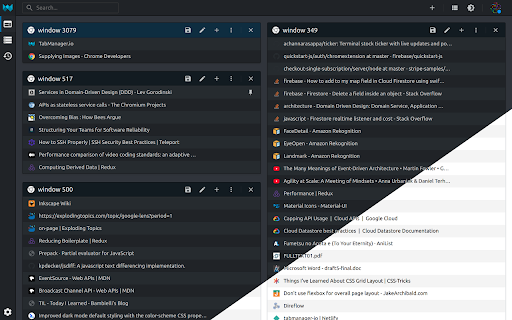

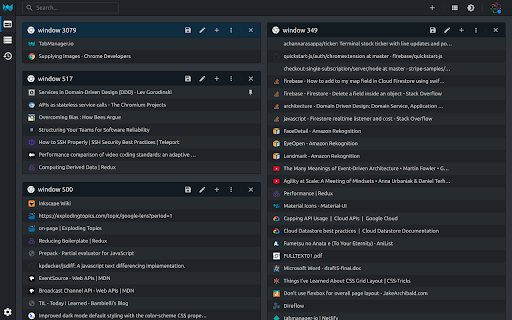

Manage, save and restore your windows, tabs and sessions. Tabmanager.io is an all-in-one session, window and tab manager extension for Chrome that helps you manage your open tabs, tab-groups and windows in one convenient place. ★ Windows & Tabs Our manager empowers you to swiftly navigate through open windows and tabs using either your mouse or keyboard. You can effortlessly switch between tabs and windows, search and filter tabs by title or URL keywords, and efficiently manage various aspects of your tabs such as pinning, sorting, grouping tabs by domain, suspending, identifying tabs with sound, and removing duplicates. Additionally, you have the option to export your tabs and windows as files for backup, save tabs for future use, and synchronize them across multiple devices. Our manager presents a multiple column layout that enables you to gain a comprehensive overview of all your open windows and tabs while providing the flexibility to organize your windows by renaming them. Through simple drag and drop functionality, you can easily move tabs between windows, open them in new windows, or merge entire windows. The tab manager also offers convenient features to save tabs for later restoration. You can save specific tabs within a window, save all tabs within a window, or save the entire session encompassing all open windows. ★ Tab Groups The tab manager comes with built-in support for managing your tab-groups. You can easily create a new tab group, move groups between windows, merge tab groups, rename tab groups and save your tab groups and restore them with the window at a later time. ★ Session Manager The session manager provides a comprehensive view of all your saved sessions, allowing you to effortlessly manage and swiftly restore previously saved sessions. Our intelligent restore feature ensures that opening tabs in a new or existing window does not slow down your computer, as tabs are opened in a suspended state. You can also sync your saved sessions to the cloud, ensuring data integrity and accessibility across all your devices. ★ Session History You can access a timeline overview of your browser sessions, enabling you to easily restore individual windows or tabs from earlier points in time. Save session snapshots from either the manager or the menu, providing you with the flexibility to quit your browser or temporarily use a blank browser without the risk of losing your tabs. Enabling the auto-save session feature helps you track your local browser session history in case of a browser crash. Sessions in the session history is saved on your local machine and are not saved to the cloud. ▪ Overview of active Windows and Tabs ▪ Keyboard navigation support ▪ Rename Windows ▪ Switch between Tabs and Windows ▪ Multiple Window columns for wide screens ▪ Light/Dark theme ▪ Filter Tabs with search ▪ Drag and drop Tabs and Windows ▪ Merge Windows by drag and drop ▪ Group Tabs by domain ▪ Sort Tabs ▪ Remove duplicate Tabs ▪ Suspend/Discard Tabs from memory ▪ Find Tabs playing audio ▪ Mute/Unmute Tab playing audio ▪ Create new Tab-group ▪ Drag and Drop Tab-group ▪ Merge Tab-groups ▪ Save Tab-groups for later ▪ Save Tabs for later ▪ Save Windows for later ▪ Save Session for later ▪ Quickly restore Windows and Sessions ▪ Share Windows by URL ▪ Automatic Sessions history snapshot ▪ Take Session snapshots for easy restore later ▪ Export Tabs, Window or Session as JSON/CSV ▪ Import exported Tabs, Window or Session ▪ Backup & Sync ▪ Cloud Backups ▪ And more... Send us an email at support@tabmanager.io if you need support or have suggestions about missing features.

TabMate
TabMate helps you manage the tab clutter. Easily switch between tabs, save & restore set of tabs or windows, and more. TabMate helps you manage tab clutter and be more productive. Stash a set of tab/windows that you want to save for later and easily restore them when needed. Use quick switcher to search among open tabs and stashes and switch to them. Drag and drop the tabs to rearrange them with in windows or stashes. Name stashes so you can easily remember the purpose for each set of tabs. Easily send tabs to named stashes through right click context menu. Common usages: - Quickly search and switch between all the open tabs and stashes - Save the pages you've visited during your research session and restore all of them later. - Logically group all the pages you visit often and load each group when needed. - Easily manage existing open tabs by saving unnecessary tabs as a session.

TabStacks: tab and history search
View and search through open tabs and browser history. TabStacks is a vertical tab menu that helps you find the content you were looking for. Filter the tabs you have open and TabStacks will list the open tabs that match. If TabStacks can't find an open tab, it searches through your history to see if you had a tab open previously! TabStacks is designed to be keyboard and screen reader accessible. Press [CTRL]+[SHIFT]+[K] to open the menu, start typing to filter your tabs, and use the [DOWN] arrow key to navigate to the tab you want, and [ENTER] to open that tab. You can always use your mouse as well. You can search through your history during a tab search by pressing [CTRL+SHIFT+S]. You can close a tab by highlighting it in the list using the arrow keys or right-click and pressing [DELETE] or by clicking the close button on the tab. TabStacks is a high performance and secure extension for Chrome. TabStacks doesn't download external files, doesn't store any information about your activity. *** UPDATES *** Version 2.0.2 * Fixed bug where the popup doesn't close on tab change * Added a settings item to allow the option to hold the popup open Version 2.0.1 * The default keyboard shortcut for toggling the search is now CTRL+SHIFT+S due to the browser using nearly all possible combinations of CTRL+ a single key. * The keyboard shortcut key is now configurable, you can modify it in the settings page. Click the gear icon at upper right of the popup to access settings. * Minor cosmetic updates to the settings page. Version 2.0 * Tabs shown in the popup are synchronized with the state of the tabs in the browser: * Title updates are reflected in real-time. * New or deleted tabs are reflected in the tab list. * Close tabs using a button on the tab. Close buttons show on hover or focus. * Tabs display an audio icon if playing audio. * For audible tabs, clicking the icon will mute and unmute the tab. * Settings page has been added, click the gear icon top-right to access settings. Version 1.0.8 * Added lazy loading for site icons to speed up rendering * Reduced requested browser permissions Version 1.0.7 * Linux support for launching TabStacks from keyboard with [CTRL+SHIFT+K]. * PopupMenu now has a max-height instead of fixed height. * Fixed bug on Windows where the scroll bar was rendered even if the tabs would not scroll. Version 1.0.6 * Improved search algorithm for both tabs and history. * Searches much longer history time period. * Tabs in the current window always appear at top when popup is opened (User suggestion). * URLs for tabs appear on focus or mouseover (User suggestion). * Engineering improvements under the hood to use Web Components for rendering.

Blixem Tab Manager
Organize, save & share your tabs for easy collaboration with Blixem. Blixem helps you manage your tabs and windows efficiently, reducing distractions and improving performance. Homepage: Your new tab screen shows tabs vertically, gives quick access to favorite sites, and lets you launch Workspaces with one click. Customize with widgets, colors, and backgrounds. Workspaces: Save tabs into Workspaces for easy access, sharing, and collaboration. Customize Workspaces and share them with a few clicks. Collaborate: Share Workspaces by granting view or edit permissions. Teams can add content, comment, and invite others with a link or email. Collaborators don't need the extension installed. Windows: See all open tabs across all Chrome windows from one page. Rearrange, close, or add tabs to Workspaces. Pause tabs and windows to speed up your computer. Widgets: Add widgets like recently closed tabs, frequently visited sites, and top Workspaces to your homepage. Work-Personal Separation: Separate work and personal tabs using Categories. Hide work tabs when off duty and personal tabs during work hours. Blixem Tab Manager helps you control and organize your online life.

Tab Deck - Tab/Tab Group Manager
Your all-in-one tab/tab group manager that helps you effectively manage and organize your tabs/tab groups Tab Deck is a Chrome extension alternative to OneTab/Session Buddy, that allows you to manage your tabs & tab groups in one place. One click to aggregate all tabs & tab groups into one session. - ⚡️ Organise tabs & tab groups efficiently - 🖼️ Master Your Open Windows - ✨ See all your open windows at a glance - 💾 Save tabs into sessions for later access - 🗂️ Save/Restore/Reorganise tabs, even tab groups - in the current window - in a new window - restore and suspend tabs to save memory - 🔄 Synchronizes your browser tabs & tab groups - 🤏 Reorganize tab sessions use Drag & Drop with ease - ⌨️ Command `K` Interface - easily explore the all tabs & tab groups. - 🏷️ Visual Web Bookmark - Turn a link into a visual web bookmark with a beautiful QRCode, that you can share with others. - 💾 Session Backup Solution - 📑 Save your session as a JSON file - 📧 Send your session to your email (Sign-in) - 📥 Support migrating solution - 🔖 Support for migrating tabs data from `OneTab` to `One Tab Group` - 🔖 Support for migrating tabs data from `SessionBuddy` to `One Tab Group` - 🔍 Search all tabs quickly using fuzzy search - 🧹 Suspend open tabs to save memory - ☁️ Auto Cloud Sync with Sign in - ❤️ Bookmark your favorite sessions - ✨ Share Sessions as a link with anyone
