
lajbajamkpmkmldodfbljkjihppdclbm
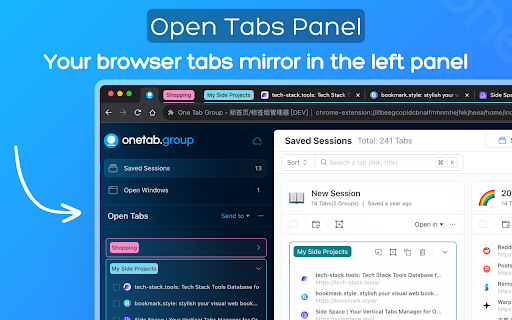
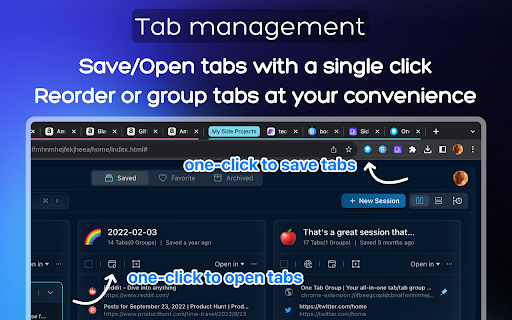
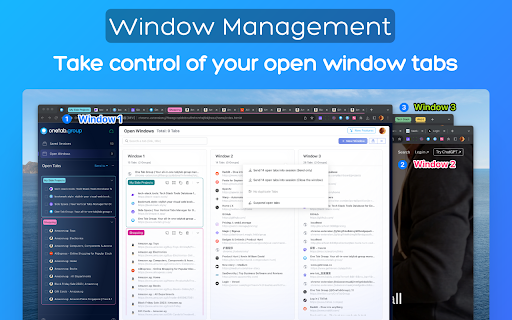

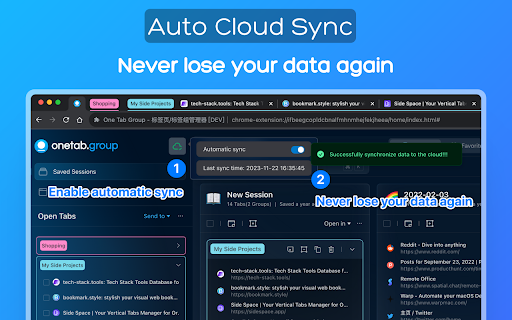
Your all-in-one tab/tab group manager that helps you effectively manage and organize your tabs/tab groups Tab Deck is a Chrome extension alternative to OneTab/Session Buddy, that allows you to manage your tabs & tab groups in one place. One click to aggregate all tabs & tab groups into one session. - ⚡️ Organise tabs & tab groups efficiently - 🖼️ Master Your Open Windows - ✨ See all your open windows at a glance - 💾 Save tabs into sessions for later access - 🗂️ Save/Restore/Reorganise tabs, even tab groups - in the current window - in a new window - restore and suspend tabs to save memory - 🔄 Synchronizes your browser tabs & tab groups - 🤏 Reorganize tab sessions use Drag & Drop with ease - ⌨️ Command `K` Interface - easily explore the all tabs & tab groups. - 🏷️ Visual Web Bookmark - Turn a link into a visual web bookmark with a beautiful QRCode, that you can share with others. - 💾 Session Backup Solution - 📑 Save your session as a JSON file - 📧 Send your session to your email (Sign-in) - 📥 Support migrating solution - 🔖 Support for migrating tabs data from `OneTab` to `One Tab Group` - 🔖 Support for migrating tabs data from `SessionBuddy` to `One Tab Group` - 🔍 Search all tabs quickly using fuzzy search - 🧹 Suspend open tabs to save memory - ☁️ Auto Cloud Sync with Sign in - ❤️ Bookmark your favorite sessions - ✨ Share Sessions as a link with anyone

Focus Tab Groups
Too many tabs? Say hello to effortless organization and seamless multi-tasking. Focus Tab Group keeps your browser organized by automatically highlighting, grouping, and arranging your most active tabs—while quietly minimizing the rest. Keep your browser calm, your mind clear, and your tabs under control. With this tool, you can: 🧘♂️ Stay focused with automatic tab highlighting and minimization—only what matters stays in view 🧠 Jump back in instantly with automatic reactivation of your recently used tabs 🗂️ Organize ideas effortlessly by creating new tab groups with one click or a simple drag-and-drop 📌 Keep your workspace intuitive by automatically arranging your most active tabs exactly where you expect them 🚀 Why Focus Tab Group? Focus Tab Group isn’t just another tab manager—it’s a smarter way to multitask. While other tools slow you down with cluttered menus and extra buttons, Focus Tab Group stays invisible, enhancing your browser’s natural flow without adding any new interface. Whether you’re a developer, a student deep in research, or anyone juggling multiple tasks, this tool helps you stay organized, focused, and in control—all without breaking your rhythm. It just works—quietly, intelligently, and right where you need it. ✨ Try it free and experience what effortless browser organization feels like. ❣️ THANK YOU! We’d love to hear your feedback or feature ideas: - tidytabgroups.github.io - discord.gg/aBdAfNfGEv - x.com/FocusTabGroups

Blixem Tab Manager
Organize, save & share your tabs for easy collaboration with Blixem. Blixem helps you manage your tabs and windows efficiently, reducing distractions and improving performance. Homepage: Your new tab screen shows tabs vertically, gives quick access to favorite sites, and lets you launch Workspaces with one click. Customize with widgets, colors, and backgrounds. Workspaces: Save tabs into Workspaces for easy access, sharing, and collaboration. Customize Workspaces and share them with a few clicks. Collaborate: Share Workspaces by granting view or edit permissions. Teams can add content, comment, and invite others with a link or email. Collaborators don't need the extension installed. Windows: See all open tabs across all Chrome windows from one page. Rearrange, close, or add tabs to Workspaces. Pause tabs and windows to speed up your computer. Widgets: Add widgets like recently closed tabs, frequently visited sites, and top Workspaces to your homepage. Work-Personal Separation: Separate work and personal tabs using Categories. Hide work tabs when off duty and personal tabs during work hours. Blixem Tab Manager helps you control and organize your online life.

Partizion — Tab and Session Manager
Partizion is a tab and session manager that just works. Never worry about losing tabs again. ✦ Magic tab manager — Partizion saves tabs for you ✦ Privacy focused — no ads, no tracking, and we never sell or share your data ✦ Reliable tab session manager — Over 1 Million sessions saved ✦ Used by professionals from Netflix, Google, Shopify, Uber, Spotify, and more ✨ AUTO-UPDATING TAB COLLECTIONS Don’t want to manually update tabs and bookmarks? Partizion’s powerful auto-updating feature will automatically save tabs when you open/close them so that you don’t have to. ✔️ Automatically saves tabs for you (when you open or close them) ✔️ Pick up where you left off — Just open your Partizion collection ✔️ Cloud synced — restore saved groups of tabs from any browser ☁️ CLOUD SYNCED SESSIONS A bullet-proof tab session manager for chrome. With local caching and backups, cloud sync, and a beautiful UI, you never have to worry about losing tabs again. ✔️ Automatically saves sessions for you ✔️ Restore a session or group of tabs anytime ✔️ Sessions are synced to the cloud ✔️ Privacy controls (encryption + auto-delete settings or completely disable syncing) Too many tabs open? Partizion tab manager helps you keep less tabs open by saving backups so that you can safely close any tabs that you don’t need open right now, knowing that you can always find and open them again later. Lost tabs? Partizion automatically saves cloud-synced tab sessions so that you can restore any tabs you may have lost. Want to pickup where you left off? Save groups of tabs, open them later in one-click. Enable auto-update and Partizion will save tabs for you. As a backup, you can always restore tabs from Partizion’s session manager. Organize your tabs Organize tabs into Collections by project, task, client, or anything else then close/reopen later from any browser. Restore tabs Use Partizion’s powerful tab search to search your saved tabs and collections. OR browse your sessions in chronological order to restore sessions that you may have forgotten to save. Custom Views View your saved tabs and collection how you like: Grid View, List View, Kanban View, and a Full view (shows everything). Sort and filter your views to create workflows and dashboards.

Tab Group Manager
Tab Group Manager exends the native Tab Groups in Chrome letting you store, sync and resume them anytime and anywhere. Tab Group Manager extension automatically stores the tab groups you create as a bookmark group so you can sync and restore them anytime and anywhere you want. Tab groups are stored under a bookmark folder `Other Bookmarks > Tab Group Manager`. Everytime you open a new tab, close an opened tab or navigate a tab to a new page in the tab group, the stored bookmark gets updated, so they are always in sync. * To change the group name, change the tab group name on Chrome. * To change the group color, change the tab group color on Chrome. * Closing an opened tab in a tab group on Chrome gets automatically synced, but you can also click on a close icon beside the tab in the Tab Group Manager to have the same effect. * Closing an opened tab group on Chrome leaves the group left in the Tab Group Manager, but you can also click on a close icon beside the tab group in the Tab Group Manager to have the same effect. * Remove a stored tab group from Tab Group Manager just by clicking on the trash bin icon beside the tab group. * Quickly search through the stored tab groups and tabs in the Tab Groups Manager using the search bar at the top. * When a tab group stored in Tab Group Manager is out of sync with Chrome's, click on the reload icon at the top right corner of the Tab Group Manager to force resync. * To open a tab group in a new window, click the tab group with "Shift" key in the Tab Group Manager. * To open a tab group without focusing on the opened tab, click the tab group with "Option" key on Mac or "Windows" key on Windows in the Tab Group Manager.
