
nicjeeimgboiijpfcgfkbemiclbhfnio
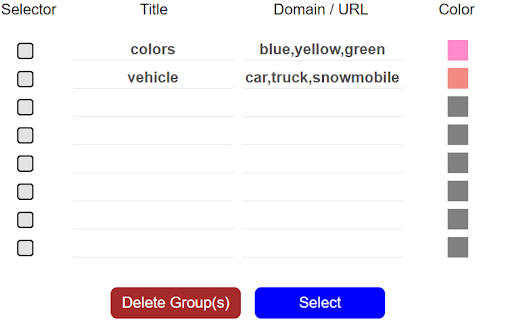
Automatically Set Your Tab Groups! This extension allows you to set custom rules that then auto sort your tabs. IT does this using Google Tab Groups. It lets you set up as many rules as you want. To add a new rule click add group button and fill out the TITLE, Domain / URL and COLOR fields. When you open the open extension the TITLE column will be the tab group name. The DOMAIN/ URL column will be the value searched in the website URL field that extension uses to sort the active tab. The COLOR column will be a box that when drop down is clicked allows the user to pick a color for the tab group. These preferences will be saved to users google profile when either the save button is clicked or delete button is confirmed and work across multiple devices with extension under same profile. In order to change or delete a rule you must first check the checkbox for the row and click edit or delete. If deleting values confirm the delete in delete window. If editing values makes sure all fields in rows are checked are not blank, and that color box is not set to grey. Otherwise a warning message will display letting you know to set these fields. The extension works as follows, say you have the value Test1 in Name Column, test1 in URL column, and the box set to Blue. Any website URL you visit with test1 ex.(www.test1thisisatest.com) will be automatically sorted into a group named Test1. You can also specify multiple terms to search with by separating them with commas. For instance, if you assign a group with TITLE column of Colors, and DOMAIN/ URL of blue, yellow, and green; any url you load with those search terms will go in the Tab Group Named Color. The final column COLOR, is the color of this tab group that gets set. By default the following keyboard shortcuts are enabled. You can use Ctrl+Shift+Y, Ctrl+Shift+H, and Ctrl+Shift+U to close, open and toggle tab groups respectively. You can also change this by going to chrome://extensions/shortcuts as well. There is a settings / options page you can get to by clicking the gear in the top right corner. Here you can enable a zoomed in view for larger font size and window for the popup window, change grouping from other windows behavior, and save and load your files from a local file on your computer.

Tab Grouper
Tab grouper is a chrome extension that allows you to automatically group all tabs that match a given URL pattern. You create rules for each website saying which URL pattern to match, the name of the tab group, and optionally a color, and the extension will add matching websites to the appropriate tab groups as you browse to them. For example, you could have all jira tickets in a single group, all amazon pages in another, and all google search results in another. For more details, see https://github.com/mivok/tabgrouper/blob/master/README.md Q: Why do you need the "Can read your browsing history" (or "tabs") permission? A: As you browse, the extension reads the addresses of the sites you, matching them against the rules you write, automatically grouping tabs based on those rules. The extension does not store nor transmit your browsing history anywhere. Q: Why do you need the "View and manage your tab groups" permission? A: The purpose of this extension is to automatically manage your tab groups for you, and so this permission is needed for the extension to work.

Auto Collapse for Tab Groups
Collapse your unfocused groups. Auto Collapse makes the tab bar less distracting by collapsing all unfocused Tab Groups (the feature introduced in Chrome 89). When you click on an ungrouped tab or a tab within one group, all other tab groups get collapsed.

Group Tabs
This is a Chrome extension that sorts and groups tabs. * Feature: Not group for domain or sub-domain that has only 1 tab. # Access to data This extension access all tabs, but uses only the URL of the site open in the tab. Use this information when sorting or grouping tabs.

Tab Groups Extension
Automatically group tabs, save tabs/groups, and provide shortcuts for tabs/groups. 📢 February 2026: Sorry, Chrome 145 has a bug that causes problems with tab group operations (collapse and modify title). This bug will be fixed in Chrome 146. This is a Chrome bug, not an extension bug. All browser extensions with similar functionality are affected. In addition to general tab management functions, this extension specifically enhances the browser built-in "Tab Groups" feature. Features: ● Automatically create group for tabs through custom matching rules. ● Save and restore current tabs or groups (snapshots). ● Opened tabs/groups management: activate, close, expand/collapse, move to other window, modify group name and color, new tab in group. ● Saved tabs/groups management: delete, edit, add, expand/collapse, merge same name groups, data import/export. ● Grouping rules management: add, edit, delete, enable/disable, import/export. ● Keyboard shortcuts: group/ungroup, activate, move, close, pin, duplicate, expand/collapse, auto group by domain.
