
icgjkfebljaiiccoeeihocdmjnojmeal
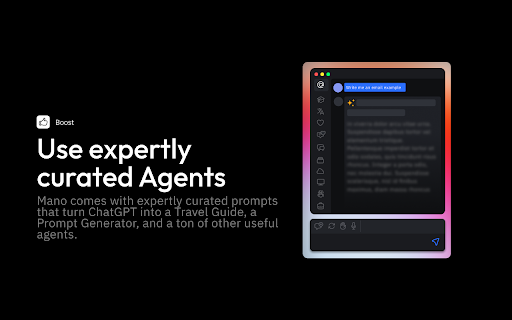
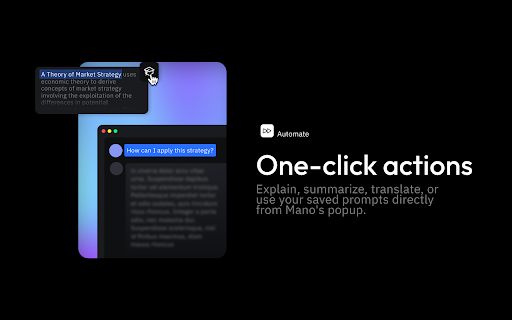

Mano brings the most powerful AI tools directly into any site. Powered by OpenAI. Mano uses the most innovative AI to make your day easier. Simply by pressing ⌥ + m, you'll have all the help you need. Just add to chrome at https://www.usemano.com 🚀 Expert Agents: Mano comes with expertly curated prompts that turn ChatGPT into a Travel Guide, a Prompt Generator, and a ton of other useful agents. Use Agents to automate and speed up your work. 🖱️One-click actions: Explain complicated topics, summarize long articles, and ask questions about any text directly from Mano's popup. You can answer any doubt you have without slowing doing what you are doing. 💌 Search the web Mano can now search the web for any new information you want it to keep in mind. No more having to search and then copy and paste text. 🔍 Access to your screen Grabbing your entire screen with a single click? Now that's what we're talking about. No more loosing context or annoying explanations 👩🏼💻 Summarize Articles Quickly from our Mano sidebar, you can summarize articles at the click of a button. 💌 Write emails like a native speaker Feel confident about your grammar, spelling and writing style. Simply select the text and press ⌥ + m. 🔍 Get human-like answers to your searches Get the answer you need instantly, without searching through pages of Google results. Simply press ⌥ + m. 👍 Boost your social engagement Generate post drafts for your social media in case you are stuck or have run out of ideas. Simply press ⌥ + m. 👩🏼💻 Fix code bugs 10x faster Quickly get code explanations and answers to hard coding issues not answered on StackOverflow. Simply press ⌥ + m. For more information visit https://www.usemano.com If you have any issues reach out to support@usemano.com or https://www.usemano.com/help

Research AI
Research AI - Helps you write marketing content, blog articles, website copies, ecommerce product descriptions and more 10x faster. Research AI is AI-powered copywriting software that helps you to write copy that sells. It produces original and plagiarism-free content for your business. All you have to do is choose a tool and describe what you are writing, and our software will do the rest. With Research AI’s chrome extension, you can write social media posts, brainstorm ideas for your blog articles, personalized emails, and more. Whether you are writing product copies on your Shopify store or blog articles on your WordPress/Medium page, you can generate amazing content without leaving your workspace. Write product descriptions, titles, and features for your e-commerce products Brainstorm marketing ideas, blog ideas, and content ideas Create attention-grabbing social media posts for LinkedIn, Facebook, and Instagram Create amazing hooks for your YouTube videos Write persuasive ad copies, website copies, and more Research AI is a perfect writing tool for marketers, entrepreneurs, and agencies. Get rid of writer’s block and start writing amazing content that drives results.

Chat with Desksense AI Powered by GPT4
The Ultimate AI Assistant with GPT-4 powered responses. Answers any queries, summarize articles, create emails, content & AI images. Desksense ChatGPT AI app provides Free Chat GPT & GPT-4 access, AI writer for Email, Blogs, Articles, Tweets, Linkedin posts, Facebook Posts, Replies and more. Desksense AI uses OpenAI ChatGPT to summarize Youtube videos & Blog in one-click. Desksense AI app revolutionizes your online search experience by integrating Open AI ChatGPT alongside your Google search engine. With Desksense you can access instant AI-generated responses, providing valuable insights and information right alongside the search results you're browsing. With just a CMD+ I OR CTRL+ I Desksense makes it easy for you to access the ChatGPT on any website. Use "Shortcuts" for Advanced users. 👉👉 Save ANY ChatGPT, GPT-4, Claude3 OR Genini Pro response to your Desksense Account in one-click. 👉 [New Update] Desksense comes with new Chat GPT models like; GPT-4-o-mini and other LLM's like Claude3, Gemini Pro & Llama 3version. 👉 [New Update] Desksense comes AI Image Analyzer 👉 Desksense iOS App is now live in App Store. 👉 New AI Summarizer is now live with upload file feature. 👉 AI Writer for ANY content with ChatGPT-4, GPT-4-o-mini, Claude 3 & Gemini Pro option (Emoji, character limit included with a different lanuage model.) 👉 FREE AI Chatbot integrated with ChatGPT & GPT-4 in web app 👉 Get ChatGpt AI response or replies with 'Tone' and 'Emoji' 👉 Unlimited AI response on Google Search 👉 One-click AI summarizer for Youtube videos 👉 One-click AI summarizer for ANY website 👉 ChatGPT AI Image generator using Dall-E 👉 Save ChatGPT response in your account for later use. 👉 Save your frequently used prompt(s) 👉 List of 100+ preset prompts and option to edit and save in your account. 👉 Easy Access with CMD + I OR CTRL + I on ANY website 👉 Grow your Social Media presence using Desksense AI response in LinkedIn posts, Twitter & Facebook posts. 👉 Write faster and smarter emails on Gmail, Tweets, Linkedin Posts and Facebook posts 👉 Generate online content, video script, hashtags & keywords and topics for blog posts, articles and socials using Desksense AI ChatGPT App. 👉 Share your saved response to social media using our Desksense Web App 👉 Copy to clipboard, Save, Favorite and add tags to ChatGPT responses as Card. 👉 Desksense Chat GPT & GPT 4 Android Mobile App 👉 Auto Dark/light mode 👉 Change the Tone of your response and include emoji when needed. 👉 AI Chatroom Collaboration with your Team 👉 AI Chatbot in Extension 👉 AI Content Generator - AI Email Writer, AI Article Writer using ChatGPT, GPT-4, GPT-4-o-mini, Claude3 and Gemini Pro., AI Code Generator, AI Social Media Post Generator and more... Are you a busy professional juggling multiple tasks? A student striving for academic excellence? Or someone seeking to optimize their daily routines? Look no further! Desksense is here to revolutionize your digital experience. Desksense is a powerful chrome extension that leverages the ChatGPT API to enhance your productivity. It provides a range of AI applications, including ChatGPT & GPT-4 AI chatbot, summarizers, AI writers, and more, accessible on any website. Yes, Desksense is completely free to download and use. Every free user gets 5000 Word limit for month. No, you do not require a separate ChatGPT account. Simply sign up for free at Desksense.com to access the extension. Yes, Desksense chrome extension works seamlessly in all countries, ensuring that users worldwide can benefit from its features. To install Desksense on your browser, you will need to follow these steps: 1) In your browser open the browser's app store or extension store 2) Search for the Desksense in the browser's app store or extension store (or click for : Google Chrome | Edge) 3) Click on the "Add to Browser" or "Install" button to begin the installation process. 4) Follow the prompts to give the extension permission to access certain parts of your browser, if prompted. 5) Once the installation is complete, you will be redirected to our onboarding page 6) That’s it ! you are done :) Please pin the ext. on top bar to get on-time updates. If you have any questions, please feel free to reach us at support@desksense.com === VERSION 1.0.13 ==== * NEW FEATURE: AI Writer for ANY content with newest version of GPT models (Emoji, character limit included with a different lanuage model.) * NEW FEATURE: AI Image Analyzer that analyses any image and gives you response describing the image. * File Summarizer: Upload any file & summarize in one-click * Minor Bug fixes

PromptStorm - ChatGPT, Gemini, Claude Prompts
We give you loads of skillfully crafted engineered prompts that you can use with ChatGPT, Google Gemini and Claude. We give you loads of free skillfully crafted engineered prompts at your fingertips that you can use with ChatGPT, Google Gemini, and Anthropic's Claude. A simple-to-use free Google Chrome plugin extension that unlocks all the potential of this revolutionary artificial intelligence technology. We give you loads of skillfully crafted engineered prompts at your fingertips that you can use with Chat GPT 3, 4 & 4o, Gemini, and Claude AI chatbots in just a few clicks by adding in just a bit of information. It’s a free Chrome extension that hooks into the right side of your ChatGPT, Gemini, and Claude screen. Learn anything - Unearth the answers you seek on any subject you can think of. Utilize ChatGPT, Gemini, and Claude to acquire new knowledge. Master your productivity - From Articles, to Blogs, to Emails, to Reports, to plans for your new business, you can quickly craft written content that's easy to understand. Become a marketing guru - Comprehensively layout your digital marketing, social media, and SEO plans. Develop your projects faster - Effortlessly bring your computer coding ideas to life and test them with ease. Get expert advice - Turn ChatGPT, Gemini, and Claude into a job coach, therapist, marketing manager, fitness trainer, trivia master, and even a travel guide. Become a ChatGPT, Gemini, and Claude AI expert. Increase your productivity and knowledge with Prompt Storm.

ChatSider AI Copilot : ChatGPT & Claude
ChatSider: GPT & Claude Sidebar is an assistant for AI writing, translating, ChatGPT for Bing and more. ChatSider is a ChatGPT & Claude sidebar and AI co-pilot software. This remarkable AI co-pilot software is proficient in solving any of your questions or inquiries. Its capabilities are not limited to answering questions, but it can also improve essays or articles, generate work reports, translate content in any language, provide entertainment through interactive games, and much more based on your requirements. ChatSider AI Copilot uses OpenAI's ChatGPT3.5, GPT - 4, Claude to provide you with advanced AI intelligence, and here are its highlight features: 🔜 Sider Sidebar Response: the ChatSider will be displayed in the sidebar of your browser at all times, making it easy for you to get quick answers to a variety of questions while browsing any page, currently powered by the official ChatGPT-3.5, GPT - 4, Claude . 🏷 Quick Response for Selected Text: When you select text on a web page, you can quickly perform translation, expand text, answer, touch-up, etc. without spending time opening a new page. 📄 Intelligent optimization of articles: essays, blogs, social media platform posts, and almost any type of article can be optimized and expanded in one click with ChatGPT's content touch-up feature. ✒️ authentic translation: you can use ChatSider's intelligent translation function to translate authentic foreign language content recognized by locals, say goodbye to machine translation and be more accurate than translation software! 📝Study Helper: Whether you are an elementary school student, a secondary school student or a college student, you can get detailed answers to your homework problems with the help of ChatSider. 📚 A must-have for working people: work daily weekly reports, video scripts, PPT outlines are generated in one click, resume optimization, brainstorming to solve inspiration depletion. 🔍 Enhanced Search Page: Support for All Popular Search Engines (Google, Bing, DuckDuckGo, etc.). ChatGPT for Bing, ChatGPT for Google How to use ChatSider:Free ChatGPT Sidebar&AI Copilot❓ 1⃣️ Click the extension button to show the ChatGPT sidebar and ask ChatGPT questions at any time; 2⃣️ Select the built-in useful templates to generate answers in one click. You can also customize your own template! 3⃣️ Check the text on the page to quickly enable the AI Copilot. Why use ChatSider:Free ChatGPT Sidebar&AI Copilot❓ 🌟ChatSider will always be present in the browser sidebar to take care of issues for you. 🌟 ChatSider can help you write, translate, summarize, rewrite, explain or answer any question with one click. 🌟 Built-in more than ten commonly used templates help you get higher quality answers. 🌟 No need to log in to your ChatGPT(OpenAI) account, return answers as fast as ChatGPT Plus. 🌟 Supports viewing chat history to avoid losing useful answers. 📝ChatSider:Free ChatGPT Sidebar&AI Copilot's feature list: Sidebar function that can be turned on at any time 1. You can chat with ChatGPT in any website at any time. support use of GPT-3.5, GPT - 4, Claude ; 2. You can customize the prompts to ask GPT-3.5, GPT - 4, Claude questions. 3. Support all history chat queries. Quick processing functions 1. Optimize, translate, expand, etc. text selected in a web page; 2. Small browser memory footprint and lag-free Chatgpt experience. Built-in super templates 1. Built-in more than ten kinds of practical templates, support for thesis touch-up, resume optimization, code interpretation, etc.. 2. If you are not satisfied with the official templates, you can also customize the templates to serve you better. All the above features support GPT-3.5, GPT - 4, Claude , you are completely free to use. Frequently used questions: Q: What is the relationship between ChatGPT Sidebar&AI Copilot and ChatGPT? A: ChatGPT Sidebar&AI Copilot and ChatGPT helps you use the official Openai's ChatGPT feature in the browser sidebar. Q: Will more AI models be added in the future? A: Yes, we will try to develop more AI models online, such as Bard, New Bing ...... ChatSider:ChatGPT Sidebar&AI Copilot is free to use anytime and is a great alternative to Monica. We utilize OpenAI's ChatGPT service to help you with your daily life, studies, work and more.
