
gkcdaooannhlioejchebhpkllbcackig
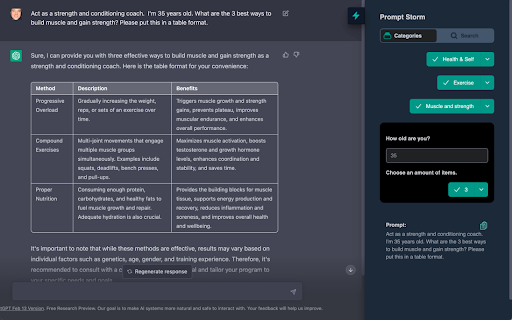
We give you loads of skillfully crafted engineered prompts that you can use with ChatGPT, Google Gemini and Claude. We give you loads of free skillfully crafted engineered prompts at your fingertips that you can use with ChatGPT, Google Gemini, and Anthropic's Claude. A simple-to-use free Google Chrome plugin extension that unlocks all the potential of this revolutionary artificial intelligence technology. We give you loads of skillfully crafted engineered prompts at your fingertips that you can use with Chat GPT 3, 4 & 4o, Gemini, and Claude AI chatbots in just a few clicks by adding in just a bit of information. It’s a free Chrome extension that hooks into the right side of your ChatGPT, Gemini, and Claude screen. Learn anything - Unearth the answers you seek on any subject you can think of. Utilize ChatGPT, Gemini, and Claude to acquire new knowledge. Master your productivity - From Articles, to Blogs, to Emails, to Reports, to plans for your new business, you can quickly craft written content that's easy to understand. Become a marketing guru - Comprehensively layout your digital marketing, social media, and SEO plans. Develop your projects faster - Effortlessly bring your computer coding ideas to life and test them with ease. Get expert advice - Turn ChatGPT, Gemini, and Claude into a job coach, therapist, marketing manager, fitness trainer, trivia master, and even a travel guide. Become a ChatGPT, Gemini, and Claude AI expert. Increase your productivity and knowledge with Prompt Storm.

Search Everywhere with Google Bard/Gemini
Install Search Everywhere with Google Bard/Gemini Chrome Extension and get AI responses along with Google search results. Search everywhere with Bard for google chrome extension 🌐 enables users to easily integrate Bard AI 🤖 with the browser and access conversational responses 💬 alongside your Google search results 🔍. Whether you're looking for quick answers ❓ or engaging in more complex conversations 🗣, Bard AI's natural language capabilities are designed to provide you with human-like responses 🙋♂️ that help you find the information you need 📚. Key Features 🔑: >>Conversational responses that engage in natural language conversations with users 💬 >>Open-ended responses that generate creative and unique ideas 💡, suggestions, or opinions 🤔 >>Uses LAMDA version, known for its high-quality natural language responses 🌐 >>Can understand and respond to both easy and complex questions ❓❔ >>Uses advanced Natural Language Processing (NLP) techniques 📖 to understand and respond to natural language input >>Can be used for a variety of applications, including customer service 📞, chatbots 🤖, and personal assistants 🙋♂️ >>Supports multiple languages 🌍, making it accessible to a broader audience >>Provides personalized responses based on the user's input and preferences 💁♀️ Why Is It Useful? 🌟 >>Provides quick and easy access to natural language conversational responses 💬 >>Helps users find information more quickly and efficiently ⚡ than traditional search methods 🔍 >>Provides unique ideas, suggestions, and opinions 🎨 >>Supports multiple languages 🌏, making it accessible to users all over the world >>Provides personalised responses based on user input and preferences ❤️ Notes from the Developer 🛠: >> This extension is neither developed by Google nor affiliated to their services ❌🌐. >> We are offering Bard AI to integrate in the search results along with Chat GPT search results 🤖💬 >> For more details, you can view our open source code on Github 🖥️ >> Please do share your suggestions and feedbacks by sending an email to 💌 bardplugin@gmail.com Version 2.0.4 🆕 ◉Bug fixes 📂 Version 1.2.2 🆕 ◉Minimize button added in search and doc page 📂 Version 1.1.5 🆕 ◉Fix no result for bard ❌🎵 Version 1.0.8 🆕 ◉Dark mode: Browse the web in a more comfortable and stylish way with new dark mode 🌙. ◉Added search engines: Bard for google now supports a wider range of search engines 🔍. ◉Conversation dialog: Have a more natural and engaging conversation with its new conversation dialog feature 💬. Version 1.0.5 🆕 ◉ Fixed bug with google map 🗺️ ◉ Added functionality so that extension work on other google domains 🌍 ◉ Added popup for easier accessibility ⬆️ Version 1.0.3 🆕 ◉ Added extension in context menu, for easier access wherever required 🖱️. Please note that this extension is independently developed and maintained, with no official affiliation or endorsement from Google ❌🌐.

Help me with - Search Gemini Anywhere
Search Gemini AI from Anywhere with Help me with Introducing Help me with, the chrome extension that brings the power of Google's new ChatBot LLM to your fingertips. With just one click, you can access the most advanced AI-powered search language models available today, without leaving the page you're on. Help me with is designed to be simple and straightforward. The extension opens up a search box on any page, allowing you to submit your queries to Bard and get the most accurate and relevant results for your search. With zero complicated settings configure, Help me with is easy to use and incredibly intuitive. Thanks to its seamless integration with the Google's Bard, Help me with delivers the most accurate and relevant results for your search queries. Whether you're looking for news, articles, products, or services, Help me with makes it easy to find what you need, fast. In summary, Help me with is the ultimate productivity tool for anyone who wants to search smarter, not harder. Install Help me with today and experience the power of AI and Language models at your fingertips. Features: - Search Bard Anywhere with Alt+H - Customize the Keyboard Shortcut - Display Results from inside the UI - Click on the Browser Icon to Search - Right Click to Search - Type 'Help' in your URL bar and hit tab to Search! Disclaimer: Bard is trademark of Google, LLC. The browser extension Help me with, is in no way shape or form related to Bard or Google, LLC. It is an unofficial Extension which is developed and maintained independently by its author.

MaxAI: Ask AI anything as you browse (GPT, Gemini, Claude, Grok, etc.)
Save time with your AI assistant that helps you read, write, and search faster wherever you work online. MaxAI for Chrome offers a complete set of powerful AI tools in a clean, minimalist interface designed to boost your productivity online, no matter what task you're working on. ➤ How it works MaxAI adds an AI sidebar and an AI context menu to your browser. With the AI sidebar, you can ask questions about the webpage you're viewing, such as summarizing content, finding information, analyzing data, or getting answers to your questions. The AI context menu lets you select any text online and have the AI improve your writing, translate, explain, or answer the selected text with a single click. ~ Free The free version of MaxAI includes basic AI features designed to help you read, write, and search more quickly and effectively. • Ask AI anything in the AI sidebar • Ask about webpages and your files • AI web search • AI writing assistance • AI reading assistance • AI reply (emails, social media, messages) • AI translate • Create reusable prompts ~ Pro MaxAI Pro includes everything available for free, plus an expanded range of AI features designed to help you get more accurate answers and produce higher-quality results that make an impact. • Choose a smarter AI • 5x more web search sources • In-depth content and data analysis • Advanced reasoning • Customizable responses • Voice input • Ask multiple AI models at once • Image generation ➤ AI models MaxAI is powered by the latest top AI models from OpenAI, Anthropic, Google, and others. ~ Powered by OpenAI • GPT-4.1 / GPT-4o • o4-mini • GPT-Image-1 (the image generation model in ChatGPT) • DALL·E 3 ~ Ask AI anything • Get answers • Search the web • Extract text from images • Create images • Generate and debug code • Generate diagrams and flowcharts • Compare answers from different AI models ~ AI reading assistance • Summarize • Find information • Explain complex concepts • Analyze content and data • Translate sentences • Translate the entire webpage ~ AI writing assistance • Clarity-focused sentence rewrites • Improve writing • Adjust tone • Translate sentences • Improve vocabulary (word choice, formality level) • Check grammar • Check spelling • Check punctuation • Quickly reply to emails, social posts, and messages • Create a draft ➤ Works where you work MaxAI is designed to work seamlessly in your browser—no copying or pasting required. Use it in Google Docs, email clients, social media, and across the web. MaxAI for Chrome works across: • Google Docs • YouTube • Gmail • LinkedIn • And more! ➤ Our mission We're a small, independent team of highly talented individuals based in Silicon Valley, California. Our mission is to make generative AI accessible and useful for everyone. ➤ Important notes • Make sure to reload/refresh the webpage after installing the extension to ensure its proper functionality. • For security reasons, the extension will not work on any Chrome Web Store pages. ➤ Terms and Conditions By installing the extension, you agree to and acknowledge: https://www.maxai.co/terms/ https://www.maxai.co/privacy/

Superpower Chat
Superpower Chat is a browser extension trusted by over 400,000 people. Save and reuse your multi-step prompts, organize chats into folders and subfolders, search past conversations instantly, organize and search your images in the gallery, save notes for each conversation, bulk delete/export/archive your chats in a few clicks, and many more. It helps you keep ChatGPT organized, productive, and easier to use every day. ⭐️⭐️⭐️⭐️⭐️ New Pro Feature: ✨ Prompt Optimizer: Optimize your prompts with one click 📚 Advance Prompt Manager: Manage all your prompts in one place with NO LIMIT 📝 Notes: Save notes for each chat and access them later. Synced across devices and can be searched 🌉 Image Gallery: Now you can see all your images in one place. Read the prompt, search images, download all images, and more... 🔄 Automatic folder: Automatically create folders for conversations created with Custom GPTs 🔊 Side-by-side Voice mode: Use the Advanced Voice mode from ChatGPT in a side-by-side view while looking at the conversation. 🖱️ Right-click menu: Easily access and run all your custom prompts on any website from the right-click menu. 🌉 Send screenshot with right click: Use the right click menu on any page to quickly send the screenshot to ChatGPT 🤑 Enhanced GPT Store. Discover over 100,000 custom GPTs and try them with one click! 🔗 Reference Conversations: Easily reference one or more conversations from your history inside the current conversations 🔁 Auto Delete and Auto Archive: Option to automatically delete or archive old messages after a certain number of days 🎧 Download audio: Option to download the audio for ChatGPT responses 📥 Select and export individual messages from a conversation ⭐️⭐️⭐️⭐️⭐️ ★ Chat Management for ChatGPT: • 🗂 Folders and subfolders for your chats: Create folders easily and organize your chats in folders and subfolders. Assign different colors and images to each folder. Drag and drop conversations to add/remove them from folders. Favorite folder at the top. • 🗺️ Minimap. See a reduced overview of the entire conversation on the left edge of the screen • 📥 Export: Select and Export any number of your chats from ChatGPT into multiple formats (PDF, .txt, .json, .md) • 🔎 Search and Highlight: Search through all your previous chats on ChatGPT and highlight results for quick review • 📌 Pinned Messages: Pin important messages in each conversation and quickly access them using our quick navigation sidebar • 🗑️ Group Deletion: Select and delete a group of chats on ChatGPT • 🕰️ Timestamps: Timestamps for all chats and individual messages ★ Prompt Management for ChatGPT: • ⛓️ Prompt Chains: Save and run a series of prompts with one click. • ⚡️ Auto Complete Menu: Simply type / to open a menu of all your prompts right above the input box • 🔙 Recent Prompt: Your recent prompt saved privately on your computer. • 🔼🔽 Quick Access: Just use the Up/Down Arrow key in the input box to go through your previous prompts • ⭐ Favorite prompts: Mark your prompts as favorite in your prompt history • 📄 Prompt templates: Put words inside {{double curly brackets}} in your prompt to create variable in your prompts • 🔍 Search Function: Easily search through your prompt history and thousands of public prompt examples from the ChatGPT community • 📜 Public Prompts: Get inspiration from thousands of other prompts created by the community and share your prompts too. Upvote, downvote, and report prompts, and sort them by the most used or most upvoted. Filter prompts by category and language • 🔗 Prompt Sharing: Easily share a direct link to the community prompt on ChatGPT with a single click ★ Language and Style for ChatGPT: • 🌍 Language Selection: Change the response language with one click (Supports over 190 different languages) • 🎭 Tone and Writing Style: Change the Tone and the Writing style of the Response ★ Utilities for ChatGPT: • ❌ Block ads on ChatGPT • ⮐ Disable Enter to submit prompt. Instead, use CMD/CTRL + ⮐ to submit prompts. • 👥 Custom Instruction Profiles: Why create only one Custom Instruction on ChatGPT when you can easily create and save multiple profiles and quickly access them with a click of a button • ✂️ Auto Splitter: Automatically split your long input into smaller chunks and send them to ChatGPT individually. • 🗒 Auto summarize: Using the power of auto-splitter, your long text will be summarized into a shorter version so you can ask questions • 📏 Custom Conversation Width: Adjust the width of the conversation on ChatGPT to your liking • 🔄 Smart Replace: Automatically replace pre-defined phrases with longer text as you type prompts • 🖱️ Auto Click: Automatically click on the default favorite prompt button at the end of each response • 📊 Word and Character Count: Add the word and character counters to both the user input and the responses • 🎛 Model Switcher: Easily change the model (GPT-5.2, GPT-4, GPT-3.5, etc.) in the middle of the conversation. Simply hover over the avatar icon to see what model was used for each response • 📋 Copy and Paste: Easily copy each chat with a click of a button and keep the formatting (support plain text, markdown, and HTML format) • 🕶️ Copy Mode: Setting to copy either both user input and response or only the chat response • ⌨️ Short keys: Quickly access your most used features using our growing list of short keys • ⏫⏬ Scroll to the top/bottom or scroll one message at a time • 🗄️ Newsletter Archive: Access the newsletter archive and read all the previous versions ____________________________________________________________ ▶️ Watch our YouTube Channel for Tutorials and Tips https://youtube.com/@spchatgpt 🤑 Become an Affiliate (Link to our affiliate program is also provided in the extension) https://spchat.co/affiliate/ 📜 Try Snipman extension: https://chromewebstore.google.com/detail/snipman/obpihkiilednknalffilmhopfifnbbha
