
mhnlakgilnojmhinhkckjpncpbhabphi

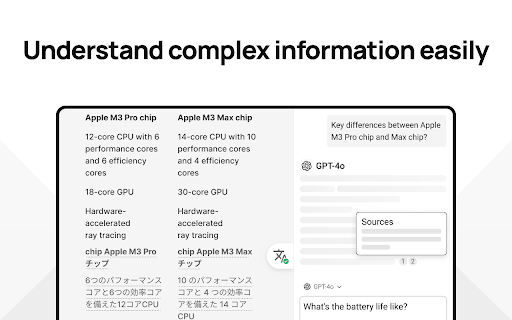


Save time with your AI assistant that helps you read, write, and search faster wherever you work online. MaxAI for Chrome offers a complete set of powerful AI tools in a clean, minimalist interface designed to boost your productivity online, no matter what task you're working on. ➤ How it works MaxAI adds an AI sidebar and an AI context menu to your browser. With the AI sidebar, you can ask questions about the webpage you're viewing, such as summarizing content, finding information, analyzing data, or getting answers to your questions. The AI context menu lets you select any text online and have the AI improve your writing, translate, explain, or answer the selected text with a single click. ~ Free The free version of MaxAI includes basic AI features designed to help you read, write, and search more quickly and effectively. • Ask AI anything in the AI sidebar • Ask about webpages and your files • AI web search • AI writing assistance • AI reading assistance • AI reply (emails, social media, messages) • AI translate • Create reusable prompts ~ Pro MaxAI Pro includes everything available for free, plus an expanded range of AI features designed to help you get more accurate answers and produce higher-quality results that make an impact. • Choose a smarter AI • 5x more web search sources • In-depth content and data analysis • Advanced reasoning • Customizable responses • Voice input • Ask multiple AI models at once • Image generation ➤ AI models MaxAI is powered by the latest top AI models from OpenAI, Anthropic, Google, and others. ~ Powered by OpenAI • GPT-4.1 / GPT-4o • o4-mini • GPT-Image-1 (the image generation model in ChatGPT) • DALL·E 3 ~ Ask AI anything • Get answers • Search the web • Extract text from images • Create images • Generate and debug code • Generate diagrams and flowcharts • Compare answers from different AI models ~ AI reading assistance • Summarize • Find information • Explain complex concepts • Analyze content and data • Translate sentences • Translate the entire webpage ~ AI writing assistance • Clarity-focused sentence rewrites • Improve writing • Adjust tone • Translate sentences • Improve vocabulary (word choice, formality level) • Check grammar • Check spelling • Check punctuation • Quickly reply to emails, social posts, and messages • Create a draft ➤ Works where you work MaxAI is designed to work seamlessly in your browser—no copying or pasting required. Use it in Google Docs, email clients, social media, and across the web. MaxAI for Chrome works across: • Google Docs • YouTube • Gmail • LinkedIn • And more! ➤ Our mission We're a small, independent team of highly talented individuals based in Silicon Valley, California. Our mission is to make generative AI accessible and useful for everyone. ➤ Important notes • Make sure to reload/refresh the webpage after installing the extension to ensure its proper functionality. • For security reasons, the extension will not work on any Chrome Web Store pages. ➤ Terms and Conditions By installing the extension, you agree to and acknowledge: https://www.maxai.co/terms/ https://www.maxai.co/privacy/

Superpower Chat
Superpower Chat is a browser extension trusted by over 400,000 people. Save and reuse your multi-step prompts, organize chats into folders and subfolders, search past conversations instantly, organize and search your images in the gallery, save notes for each conversation, bulk delete/export/archive your chats in a few clicks, and many more. It helps you keep ChatGPT organized, productive, and easier to use every day. ⭐️⭐️⭐️⭐️⭐️ New Pro Feature: ✨ Prompt Optimizer: Optimize your prompts with one click 📚 Advance Prompt Manager: Manage all your prompts in one place with NO LIMIT 📝 Notes: Save notes for each chat and access them later. Synced across devices and can be searched 🌉 Image Gallery: Now you can see all your images in one place. Read the prompt, search images, download all images, and more... 🔄 Automatic folder: Automatically create folders for conversations created with Custom GPTs 🔊 Side-by-side Voice mode: Use the Advanced Voice mode from ChatGPT in a side-by-side view while looking at the conversation. 🖱️ Right-click menu: Easily access and run all your custom prompts on any website from the right-click menu. 🌉 Send screenshot with right click: Use the right click menu on any page to quickly send the screenshot to ChatGPT 🤑 Enhanced GPT Store. Discover over 100,000 custom GPTs and try them with one click! 🔗 Reference Conversations: Easily reference one or more conversations from your history inside the current conversations 🔁 Auto Delete and Auto Archive: Option to automatically delete or archive old messages after a certain number of days 🎧 Download audio: Option to download the audio for ChatGPT responses 📥 Select and export individual messages from a conversation ⭐️⭐️⭐️⭐️⭐️ ★ Chat Management for ChatGPT: • 🗂 Folders and subfolders for your chats: Create folders easily and organize your chats in folders and subfolders. Assign different colors and images to each folder. Drag and drop conversations to add/remove them from folders. Favorite folder at the top. • 🗺️ Minimap. See a reduced overview of the entire conversation on the left edge of the screen • 📥 Export: Select and Export any number of your chats from ChatGPT into multiple formats (PDF, .txt, .json, .md) • 🔎 Search and Highlight: Search through all your previous chats on ChatGPT and highlight results for quick review • 📌 Pinned Messages: Pin important messages in each conversation and quickly access them using our quick navigation sidebar • 🗑️ Group Deletion: Select and delete a group of chats on ChatGPT • 🕰️ Timestamps: Timestamps for all chats and individual messages ★ Prompt Management for ChatGPT: • ⛓️ Prompt Chains: Save and run a series of prompts with one click. • ⚡️ Auto Complete Menu: Simply type / to open a menu of all your prompts right above the input box • 🔙 Recent Prompt: Your recent prompt saved privately on your computer. • 🔼🔽 Quick Access: Just use the Up/Down Arrow key in the input box to go through your previous prompts • ⭐ Favorite prompts: Mark your prompts as favorite in your prompt history • 📄 Prompt templates: Put words inside {{double curly brackets}} in your prompt to create variable in your prompts • 🔍 Search Function: Easily search through your prompt history and thousands of public prompt examples from the ChatGPT community • 📜 Public Prompts: Get inspiration from thousands of other prompts created by the community and share your prompts too. Upvote, downvote, and report prompts, and sort them by the most used or most upvoted. Filter prompts by category and language • 🔗 Prompt Sharing: Easily share a direct link to the community prompt on ChatGPT with a single click ★ Language and Style for ChatGPT: • 🌍 Language Selection: Change the response language with one click (Supports over 190 different languages) • 🎭 Tone and Writing Style: Change the Tone and the Writing style of the Response ★ Utilities for ChatGPT: • ❌ Block ads on ChatGPT • ⮐ Disable Enter to submit prompt. Instead, use CMD/CTRL + ⮐ to submit prompts. • 👥 Custom Instruction Profiles: Why create only one Custom Instruction on ChatGPT when you can easily create and save multiple profiles and quickly access them with a click of a button • ✂️ Auto Splitter: Automatically split your long input into smaller chunks and send them to ChatGPT individually. • 🗒 Auto summarize: Using the power of auto-splitter, your long text will be summarized into a shorter version so you can ask questions • 📏 Custom Conversation Width: Adjust the width of the conversation on ChatGPT to your liking • 🔄 Smart Replace: Automatically replace pre-defined phrases with longer text as you type prompts • 🖱️ Auto Click: Automatically click on the default favorite prompt button at the end of each response • 📊 Word and Character Count: Add the word and character counters to both the user input and the responses • 🎛 Model Switcher: Easily change the model (GPT-5.2, GPT-4, GPT-3.5, etc.) in the middle of the conversation. Simply hover over the avatar icon to see what model was used for each response • 📋 Copy and Paste: Easily copy each chat with a click of a button and keep the formatting (support plain text, markdown, and HTML format) • 🕶️ Copy Mode: Setting to copy either both user input and response or only the chat response • ⌨️ Short keys: Quickly access your most used features using our growing list of short keys • ⏫⏬ Scroll to the top/bottom or scroll one message at a time • 🗄️ Newsletter Archive: Access the newsletter archive and read all the previous versions ____________________________________________________________ ▶️ Watch our YouTube Channel for Tutorials and Tips https://youtube.com/@spchatgpt 🤑 Become an Affiliate (Link to our affiliate program is also provided in the extension) https://spchat.co/affiliate/ 📜 Try Snipman extension: https://chromewebstore.google.com/detail/snipman/obpihkiilednknalffilmhopfifnbbha

ChatGPT Prompts
This is a collection of prompt examples to be used with the ChatGPT model. The ChatGPT model is a large language model trained by OpenAI that is capable of generating human-like text. By providing it with a prompt, it can generate responses that continue the conversation or expand on the given prompt. In this extension, you will find a variety of prompts that can be used with ChatGPT. Enter "https://chat.openai.com/chat". Thanks to this plugin, you will see ready prompts prepared for you on the homepage. We hope you find these prompts useful and have fun using ChatGPT!

AI Prompt Genius
Unleash the Power of AI with Prompt Genius To get started, install the extension and click the extension icon. **NEW - Access your prompts with an on demand search using a custom keyboard shortcut** 📢 Enhance your AI interactions with custom prompts 📁 Seamlessly organize your prompts with customizable tags and folders. Enhance with custom themes 🔍 Effortlessly navigate your collection with search 💡 Infuse your AI interactions with a spark of creativity with our prompt variables feature 📱 Keep your AI prompts effortlessly synchronized across multiple devices using our Google Sheets integration 🌐 Experience the versatility of this extension across a wide range of AI agents ↔ Easily import and export your AI prompts, ensuring compatibility and accessibility across different platforms 🌎 Communicate with AI in a language that resonates with you. AI Prompt Genius supports 12 languages, empowering you to interact with AI seamlessly. 🆓 Embrace the power of AI without limitations. AI Prompt Genius is free and open-source, providing you with the ultimate flexibility.

Webpilot - Copilot for All, Free & Open
Web copilot for all, free & open-source! WebPilot is a super easy tool that helps you chat and QA with any webpage. It can even help you with tasks like responding to emails, writing in forms, and solving quizzes. Note: You need to login your Google account when first using. How to use: Step 1: Press Ctrl+` to active on any webpage (The key before 1) Step 2: Confirm your instruction (e.g., summarize this page.) Then....Everything done 🙏💡👂 - We'd be grateful for any feedback or suggestions to help us make it better.
