
fmnhdkfoogelicfgjoidhpbljplebmjo
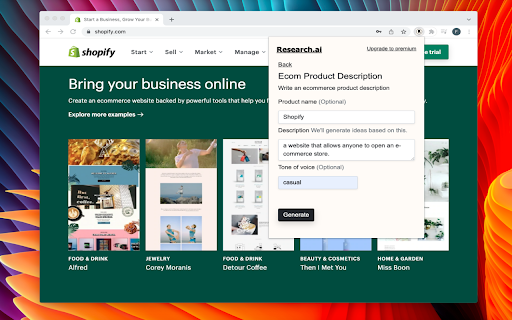


Research AI - Helps you write marketing content, blog articles, website copies, ecommerce product descriptions and more 10x faster. Research AI is AI-powered copywriting software that helps you to write copy that sells. It produces original and plagiarism-free content for your business. All you have to do is choose a tool and describe what you are writing, and our software will do the rest. With Research AI’s chrome extension, you can write social media posts, brainstorm ideas for your blog articles, personalized emails, and more. Whether you are writing product copies on your Shopify store or blog articles on your WordPress/Medium page, you can generate amazing content without leaving your workspace. Write product descriptions, titles, and features for your e-commerce products Brainstorm marketing ideas, blog ideas, and content ideas Create attention-grabbing social media posts for LinkedIn, Facebook, and Instagram Create amazing hooks for your YouTube videos Write persuasive ad copies, website copies, and more Research AI is a perfect writing tool for marketers, entrepreneurs, and agencies. Get rid of writer’s block and start writing amazing content that drives results.

Definio AI: Multi-Modal AI Sidebar
Definio runs every LLM model from one sidebar. Throw your question at any of them, switch on a whim, never open a new tab. Definio AI is a powerful AI assistant that brings multiple language models together in a single browser extension—helping you explore, reason, and research faster, directly within your browsing flow. 🚀 CHAT WITH THE TOP AI MODELS – ALL IN ONE PLACE: Models from all major providers. 🧠 ASK BETTER QUESTIONS, GET SMARTER ANSWERS: Select any text on a page and start a conversation with multiple AI agents at once. Cross-check facts, get diverse insights, or bring specialised models into the discussion—right from your browser sidebar. ⚡ BUILT FOR DEEP THINKING AND FAST WORK: Use AI to break down dense content, summarize complex topics, compare perspectives, or brainstorm ideas—all without switching tabs. Definio adapts to your browsing context for precise, real-time assistance. 📷 COMPUTER VISION & SCREENSHOTS: Capture the active tab or snip a region with one click and drop it straight into the chat. Vision-capable models read the screenshot for you—ask "what does this chart say," "translate this menu," "what's broken in this UI," or "summarise the page I just captured." You can also drop in your own image files (PNG, JPG, WebP) and combine selected text, screenshots, and typed questions in the same message for richer prompts. ⌨️ CHAT SHORTCUTS – TYPE "/" TO RUN COMMANDS: - /new — start a new chat - /model — switch the AI model mid-conversation - /search — toggle web search on or off - /think — toggle extended thinking on or off - /theme — flip between dark and light mode - /capture — screenshot the visible tab - /snip — screenshot a region you draw Plus Alt+Shift+O (Option+Shift+O on Mac) to open the side panel from anywhere—rebindable in chrome://extensions/shortcuts. 🔄 YOUR AI WORKFLOW, SUPERCHARGED: Whether you're a student, researcher, or professional, Definio helps you turn questions into knowledge. Use customizable shortcuts to boost productivity—summarize articles, extract key points, or auto-respond to content. 💡 WHY DEFINIO? Unlike traditional AI chatbots, Definio lets you bring multiple minds into the room. It's not about one model's opinion—it's about reaching clarity through comparison, consensus, and control. 📝 Whether you're researching, learning, or need quick explanations — Definio AI Chat is your intelligent companion right in your browser. Multiple Access Options: - Keyboard Shortcut: Press Alt+Shift+O (default shortcut, customizable in Chrome extensions settings) to open the AI Chat side panel instantly - Right-click Menu: Right-click anywhere on any webpage and select "Open Chat" to launch the AI Chat side panel - Extension Icon: Click the Definio AI extension icon in your browser toolbar to open the side panel Quick Access Methods: - Once the side panel is open, you can select any text on the page to automatically send it to the AI Chat for analysis or questions - Use the right-click "Open Chat" option for instant access without needing to select text first - The side panel stays open as you navigate between different websites, keeping your chat history accessible Chrome Limitations: - ⚠️ The extension does not work with PDF files viewed in the browser - ⚠️ For best experience with text selection, open the side panel first and then select the text you want to discuss with AI - Privacy First: Unlike popup extensions, Definio AI works in its own dedicated space without injecting content into web pages - Non-Intrusive Design: The side panel never covers or alters the content you're reading - Better Workflow: Ask questions about what you're reading without losing your place in the text or having floating boxes interrupt your flow - Persistent Chat: Keep your AI conversation visible while continuing to read and navigate the web - Seamless Integration: Instantly discuss any text you encounter while browsing

ChatGPT: Prompt Mate
A powerful tool for generating high-quality prompts for ChatGPT in seconds. Looking for an effortless way to generate conversation prompts and increase your productivity? Look no further than GPT Prompt Mate, the AI-powered Chrome extension that generates conversation prompts tailored to your needs. With GPT Prompt Mate, you can easily communicate with ChatGPT and receive multiple prompts based on previous conversations. Our intuitive interface allows you to select from a range of categories, adjust the tone, and set the desired length of your prompts. Whether you're looking to spark creative ideas or simply need help generating conversation topics, GPT Prompt Mate has got you covered. With its powerful AI technology, GPT Prompt Mate takes the guesswork out of generating engaging prompts, saving you time and boosting your productivity. Don't settle for lackluster conversations - install GPT Prompt Mate today and start generating high-quality prompts that will keep the conversation flowing smoothly. In summary, GPT Prompt Mate is a powerful and intuitive Chrome extension that will help you generate prompts for communicating with ChatGPT using AI. With the ability to customize categories, tones, and length of your prompts, GPT Prompt Mate is the perfect tool to increase your productivity and spark your creativity.

Rytr - AI powered writing assistant
Rytr is an AI copywriting tool that helps you create high-quality content, in just a few seconds, at a fraction of the cost. ✍️ With Rytr's browser extension, it's never been easier to create stunning copy — whether you're working on Gmail, Facebook, or Wordpress, Rytr will save you time and ensure your content is always up to snuff! - Access 30+ use cases & templates - Supports 30+ languages and 20+ tones - Write sales & marketing emails that get replies - Discover ideas & write engaging content for blog - Generate creative, catchy copies for social media - Write product, job, profile, video descriptions - Generate interesting caption ideas for Instagram post - In-built native plagiarism checker (powered by Copyscape) - Workflow and team management features Generate killer content, effortlessly Never face writer's block again — from blogs to emails to ad copies, auto-generate catchy, original, and high-converting copies in popular tones & languages in just a few seconds. Just pick a use case, enter some context, and boom...your copy is ready! Craft your masterpiece to perfection Use powerful editing operations to go from raw ideas to a polished piece in no time — takes just about 15 mins to write a 1,000 word piece! Reword, shorten and do much more to improve the content quality before hitting that submit button. Seamlessly manage your writing workflow Relieve the stress of juggling multiple projects by providing seamless collaboration, team billing and robust project management features — all without the hefty price tag! With Rytr, it's easy to get back to what matters: running your business and making sure everything runs smoothly. Rytr combines state-of-the-art AI with industry best practices and templates to write engaging copy that is guaranteed to perform. It's blazing fast and fully mobile-optimized too so you can write and edit on the go, without missing any important deadline. ⚠️ Note: The extension is still in Beta, so we expect a few compatibility issues with some websites/apps. Apologies in advance as we iron out any kinks in the experience. 🔥 What's new: v1.1 - Added new command menu for creating new content v1.0 - New and improved interface - Added 'My Voice' support which allows you to set specific tone profiles that customize the content Rytr generates to sound like you, your team, or your client-ensuring that all the content you create in Rytr sounds exactly the way you want it to. - Add ability to change the tone of selected text - Added preview window to edit/regenerate/approve generated content v0.8 - Added Continue Ryting to make your long-form Ryting smoother & more comprehensive. - Text editing operations Expand, Shorten and Append are now also added. v0.7 - You can now control the creativity level, from 'max' level to 'none' i.e. no creativity. v0.6 - Added option to copy variants to clipboard for use-cases output. v0.5 - Now you can make use of various use-cases (eg Blog, Email, etc.) via extension v0.4 - You can now set position of the Rytr toolbar (ribbon) to either top or bottom. This can help you to avoid interference with any other extension or in cases when the typing area is in extreme bottom or top. - You can now set how many variants you want to generate (maximum 3).

Crammer: Save time using AI
Provides text analytics to the webpage using artificial intelligence to quickly find what you are looking for and save time We read on average 15 articles a day but how much do we take from each of them. We often lose interest quickly and don't read the part of the article that matters. Crammer is a Chrome extension tool that uses Artificial Intelligence to analyse and find the key phrases of an article you are reading online. It then shows you the locations of key phrases you select so you can quickly find what you are looking for. ⚡ Think of it as a way of having a contents or glossary for a web page. 🔎 A popup appears over the web page once the text analytics has completed. The great part is that this popup is fully re-sizable and can be dragged anywhere when clicking on the 'Key Phrases' title. If it is getting in the way at all, there is a toggle switch button to hide and show the popup window. BONUS #1 🎁: Able to perform analysis in 7 languages 🌍 and many more languages are on the way! BONUS #2 🎁: Now shows a badge for each phrase displaying how many times it is mentioned on the web page!
