
cpnnabpklgnhjopaenljbbmkejamagel

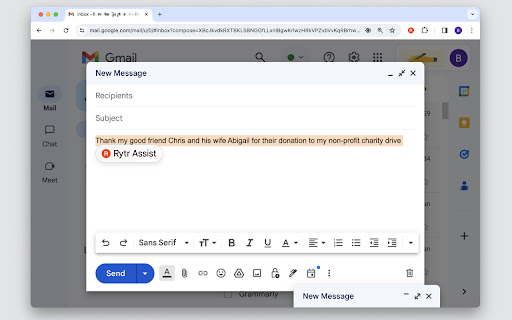
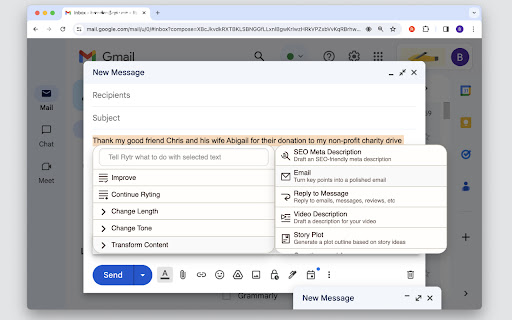
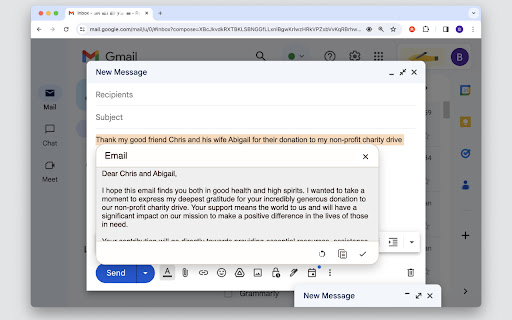
Rytr is an AI copywriting tool that helps you create high-quality content, in just a few seconds, at a fraction of the cost. ✍️ With Rytr's browser extension, it's never been easier to create stunning copy — whether you're working on Gmail, Facebook, or Wordpress, Rytr will save you time and ensure your content is always up to snuff! - Access 30+ use cases & templates - Supports 30+ languages and 20+ tones - Write sales & marketing emails that get replies - Discover ideas & write engaging content for blog - Generate creative, catchy copies for social media - Write product, job, profile, video descriptions - Generate interesting caption ideas for Instagram post - In-built native plagiarism checker (powered by Copyscape) - Workflow and team management features Generate killer content, effortlessly Never face writer's block again — from blogs to emails to ad copies, auto-generate catchy, original, and high-converting copies in popular tones & languages in just a few seconds. Just pick a use case, enter some context, and boom...your copy is ready! Craft your masterpiece to perfection Use powerful editing operations to go from raw ideas to a polished piece in no time — takes just about 15 mins to write a 1,000 word piece! Reword, shorten and do much more to improve the content quality before hitting that submit button. Seamlessly manage your writing workflow Relieve the stress of juggling multiple projects by providing seamless collaboration, team billing and robust project management features — all without the hefty price tag! With Rytr, it's easy to get back to what matters: running your business and making sure everything runs smoothly. Rytr combines state-of-the-art AI with industry best practices and templates to write engaging copy that is guaranteed to perform. It's blazing fast and fully mobile-optimized too so you can write and edit on the go, without missing any important deadline. ⚠️ Note: The extension is still in Beta, so we expect a few compatibility issues with some websites/apps. Apologies in advance as we iron out any kinks in the experience. 🔥 What's new: v1.1 - Added new command menu for creating new content v1.0 - New and improved interface - Added 'My Voice' support which allows you to set specific tone profiles that customize the content Rytr generates to sound like you, your team, or your client-ensuring that all the content you create in Rytr sounds exactly the way you want it to. - Add ability to change the tone of selected text - Added preview window to edit/regenerate/approve generated content v0.8 - Added Continue Ryting to make your long-form Ryting smoother & more comprehensive. - Text editing operations Expand, Shorten and Append are now also added. v0.7 - You can now control the creativity level, from 'max' level to 'none' i.e. no creativity. v0.6 - Added option to copy variants to clipboard for use-cases output. v0.5 - Now you can make use of various use-cases (eg Blog, Email, etc.) via extension v0.4 - You can now set position of the Rytr toolbar (ribbon) to either top or bottom. This can help you to avoid interference with any other extension or in cases when the typing area is in extreme bottom or top. - You can now set how many variants you want to generate (maximum 3).

Quillbot: AI Writing Assistant to Grammar Check, Paraphrase & Translate
Write better emails, essays and messages with Quillbot's Grammar Checker, Paraphrasing Tool, Generative AI, Summarizer and more! Quillbot for Chrome: AI Writing Assistant, Grammar Checker, and Paraphrasing Tool Quillbot is a multilingual writing assistant extension that helps you write clearly, quickly, and with more control, right where you work. This AI writing assistant combines a Grammar Checker, paraphrasing tool, and AI writing tool to improve your writing in real time. From quick emails to full drafts, Quillbot helps you say what you mean without overthinking it. ➤ How It Works Install the extension and keep writing like you normally do. Quillbot works in the background, ready when you need it. Write in any text field across the web, then highlight text or open the toolbar to get instant suggestions. You can fix grammar, use the sentence rewriter to adjust phrasing, or generate new text with the AI text generator. Everything happens in one place, so you don’t have to copy, paste, or switch tabs. ➤ Privacy and Data Safety Your writing is personal. We treat it that way. Quillbot processes only what’s needed to provide suggestions and does not sell your data. Our systems are designed with modern security standards in mind, and we continuously improve how we handle and protect user information. You stay in control of what you write and what gets changed. ➤ Key Features A writing productivity tool that does more than just fix typos; it helps you communicate better. ✓ AI Writing Assistant Get real-time suggestions as you write. Improve clarity, tighten structure, and keep your ideas moving without stopping to edit. ✓ Grammar Checker Catch grammar, spelling, and punctuation issues instantly. Get clean, readable writing immediately to improve communication. ✓ Paraphraser Rewrite text to sound clearer, more concise, or more natural. Adjust tone without losing your original meaning. ✓ Sentence Rewriter Quickly reshape awkward or unclear sentences into communication that reads smoothly and lands the point. ✓ AI Cursor Access Quillbot’s AI tools directly where you write. Use the AI Cursor to generate text, refine drafts, and take action without leaving the page. ✓ AI Text Generator Draft emails, outlines, or full responses in seconds when you need a starting point—or a reset. ✓ Tone and Clarity Suggestions Understand how your writing comes across. Make it more direct, more polished, or more conversational as needed. ✓ Multilingual Writing Tool Write and edit across languages, including English, Spanish, French, German, Portuguese, and Dutch. ✓ Translation Translate text as you write or edit, helping you communicate clearly across languages. ✓ In-Page Editing Make changes directly in emails, docs, and forms. No switching tabs or breaking your flow. ✓ GIF Insertion Drop in relevant GIFs directly from the editor to add context or personality to your messages. ✓ AI Image Generation Create images from prompts without leaving your workflow—useful for quick visuals, drafts, or ideas. ✓ Custom Modes Tailor writing style to your needs, whether that’s formal, simple, or aligned to your voice. ➤ Use Cases Quillbot works for anyone who writes—and wants fewer rewrites. ✓ Professionals Send emails and updates that get to the point faster and don’t need a follow-up to clarify. ✓ Students and Researchers Turn rough drafts into clear, structured writing without losing your original ideas. ✓ Marketers and Creators Adjust tone across channels without rewriting everything from scratch. ✓ Multilingual Writers Write confidently across languages with built-in support and suggestions. ➤ Why Quillbot? Quillbot focuses on improving your writing—not replacing it. It works directly where you write, so you don’t lose time switching tools. Suggestions are fast, practical, and easy to apply. You get more than surface-level fixes, with support for tone and clarity when you need it. And with frequent updates, the extension keeps getting better at helping your writing do its job. ➤ Free vs Premium Start with the essentials. Upgrade when you want more control. ✓ Free Plan Includes: • Grammar checker and basic corrections • Limited paraphrasing tool access • Core writing suggestions • Multilingual writing support ✓ Premium Unlocks: • Full paraphrasing and rewriting capabilities • Expanded modes for tone and style • Advanced tone and clarity insights • More detailed, sentence-level suggestions ➤ Supported Languages Quillbot supports writing and editing in English, Spanish, French, German, Portuguese, and Dutch, with continued expansion to additional languages over time. Get Started Install Quillbot in seconds and start improving your writing immediately. Write faster. Say it better. Keep your voice intact.

WriteMe.ai - AI powered writing assistant
Prepare to witness the next big transformation in your writing experience on your favorite Browser, using WriteMe.Ai Google Chrome Extension. WriteMe.Ai’s Google Chrome Extension Features: We have got some amazing features in WriteMe.Ai Google Chrome Extension for a better, smoother and more streamlined writing experience using AI. Next Line Suggestions to incorporate fresh, new ideas in your text Built-in Grammar Checker to edit, polish and perfect your text Write Complete Article to create long form content in a jiffy Popular Use Cases to write unique content for certain use cases in minutes How to Setup WriteMe.Ai’s Google Chrome Extension: All you will need to do is: Download the WriteMe.Ai Google Chrome Extension Pin the WriteMe.Ai Google Chrome Extension to Your browser Launch the WriteMe.Ai Google Chrome Extension and Log In After Downloading Here are the next steps you need to follow to use WriteMe across all websites to use WriteMe.ai’s extension Step 1: Once you have successfully installed the extension, go to your extensions settings Pin WriteMe.Ai extension on your browser. Create a new document to start using WriteMe.Ai or go straight to the web app. You can also set your preferences for using WriteMe.Ai on different websites by going to the Extensions Settings page. Step 2: Move your cursor over the text and select any text between 30 to 300 characters length. WriteMe.Ai icon will appear under the highlighted text. Click on the WriteMe.Ai icon to open the toolbar (ribbon). Step 3: The ribbon will show you available actions you can take. Choose any option to get Next Line Suggestions, view Use Cases, use Grammar Tools, or Write Complete Article using WriteMe.Ai. Chrome Extension Launched Access 40+ use cases & templates Supports 30+ languages and 20+ tones Write sales & marketing emails that get replies Discover ideas & write engaging content for blog Generate creative, catchy copies for social media Write product, job, profile, video descriptions Generate interesting caption ideas for Instagram post In-built native plagiarism checker (powered by Copyscape) Workflow and team management features WriteMe Extension is now Draggable New “WriteMe” Button to get text answers for anything Now Data is copied auto on Click Using Append Function* Input Unlimited Text Utilize the capabilities of GPT-3.5 and GPT-4 now. Drag and Drop Extension: Take the extension anywhere with you! Drag and drop the extension anywhere on the page and continue making edits. Enjoy more writing freedom! "WriteMe" button can help you with emails, social media posts, ad copies, and more! You don't have to waste time searching for the right use case; just use the WriteMe option to get something written for you. Use the new WriteMe button to find text-based.

Eskritor: Smart Writing Assistant
Smart Writing Asistant. Automatically generate text with artificial intelligence (AI) content writer. Automatically generate text with artificial intelligence (AI) content writer. Eskritor provides best AI powered results for your needs. Eskritor takes some info about your needs and gives you the best results for you. Eskritor Chrome extension is easy to use. Press create new file for any needs and select one of the use cases and let Eskritor do its magic. You can use Eskritor for more than 30 use cases for any kind of needs. How to Use Eskritor? 1-Download the Eskritor Chrome extension. 2-Pin the Eskritor extension as it is shown when it is downloaded. 3-Press the create new file button in the extension. 4-Select the most appropriate use case for your needs in the pop-up page. 5-Add some input and keywords for your content. 6-Then click on generate button and wait for the best results. 7-After receiving results, edit them in the text editor. 8-Save the file and download the text to use in the future.

AI Paragraph Generator
Write text smarter with AI Paragraph Generator: Your go-to AI sentence generator for content creation and essay rewriter tool needs. AI Paragraph Generator is a versatile tool designed to make content creation easier than ever. Whether you're looking for help in crafting new sentences or rewriting existing ones, this tool leverages the power of AI to provide fast, accurate results. With AI generated paragraph technology, you can produce high-quality text in seconds, making it perfect for any writing project. 📌 What is AI Paragraph Generator? The tool uses advanced machine learning algorithms to create text that fits your specific needs. Whether you're working on an essay, article, or any other type of content, this tool helps you generate or rewrite text effortlessly. From introductions to conclusions, it covers all the bases, ensuring you get the right content, at the right time. 💎 Key Features are: 1️⃣ Quickly generate new sentences with the power of an AI text generator 2️⃣ Improve your existing article 3️⃣ Easily create generated text for essays, blogs, or articles 4️⃣ Use the text generator for creating compelling introductions or conclusions 5️⃣ Rephrase and reword your content with the artificial intelligence sentence rewriter ❓Why Use AI Paragraph Generator? 🔹 Efficiency: Save time by automating your writing tasks. 🔹 Quality: Ensure your text is well-written and coherent, thanks to writing generator technology. 🔹 Versatility: Whether you need a paragraph writer, essay rewriter, or a rewrite tool, this tool has you covered. 💡 Why Choose This Tool for Your Writing Needs? The service offers unmatched convenience and quality. No matter the complexity of the writing task, this tool allows you to generate and refine paragraphs with ease. You can rely on it for creating detailed AI-generated text or simply to improve existing content with AI reworder capabilities. 📍 How Does It Work? ✅ Enter a starting point or keyword to generate text. ✅ Use the "Generate" button to create a new paragraphs. ✅ Copy and paste the output into your document, or further edit with the AI paragraph rewriter. 💬 The extension is designed to improve content creation by enhancing writing for essays, reports, and marketing articles. Its advanced technology helps users quickly refine and produce high-quality content, boosting writing efficiency and overall output. 📚 Who Should Use This Tool? 🧑🎓 Students: Perfect for essay writing and quick content generation. 📘 Content Creators: Bloggers and marketers will benefit from faster content creation and text optimization. 🧑💼 Professionals: Writers and editors can streamline their workflow with the AI sentence generator and rewriter. 💡 The Power of AI for Writing: It isn’t just about writing; it’s about improving your productivity. Whether you need to rewrite my paragraph or create entirely new ones, the AI-powered tool is here to help. 🔧 Additional Benefits: ➤ Use it for content creation, from sentence generator to word generator. ➤ Paragraph rephrase capabilities make it easy to refine and rework your text. ➤ Achieve the best results with the AI generator text, which adapts to your writing style and needs. 🚀 Conclusion: Say goodbye to writer’s block and long hours spent generating content. The AI paragraph generator is your ultimate writing assistant. From AI introduction paragraph generator to AI paragraph rewriter, this tool will make sure your writing projects are completed faster and with better results. Whether you need to create new content or enhance existing text, it’s the perfect solution for anyone serious about writing.
