
ibjhngfdgokfjmknokdahjhihdmhgiho
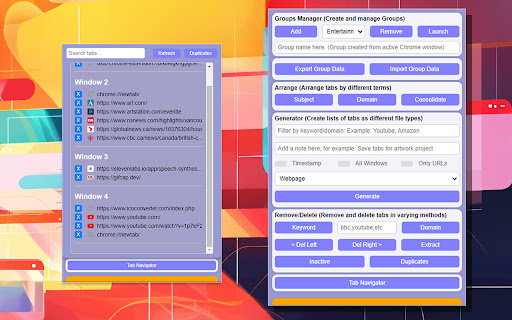
A Chrome extension to organize your tabs Tab Wrangler organizes your Chrome tabs and allows you to navigate more effectively while enhancing productivity and decluttering your browsing experience. Create tab groups, arrange tabs by domain or subject, consolidate windows, and generate lists of open tabs in various formats. Features include keyword filtering, removing inactive or duplicate tabs, and a dynamic Tab Navigator for quick access. Designed for ease of use, it offers a streamlined way to manage your digital workspace. Perfect for those looking to keep their browser organized and efficient. Tab Wrangler is ideal for researchers, students, professionals, and anyone juggling multiple projects or interests online. By organizing tabs into manageable groups and providing tools to quickly access or clear unnecessary tabs, it helps users stay focused and efficient. Whether consolidating research, separating work from personal browsing, or saving important tabs for later, Tab Wrangler enhances your ability to navigate and control your digital environment, making it an essential tool! All this is for free with no catch or data collection! Instructions are provided within the extension. Simply hover your cursor at the top to reveal the instructions page.

Chrome Notes
A simple notepad extension for Google Chrome NEW: You can now use speech to text NEW: You can now open Chrome Notes with Ctrl+Shift+X (Command+Shift+X on mac) NEW: You can now download and upload complete backups NEW: Chrome Notes adds a right click menu option to send the selected text to a new note! NEW: You can now have multiple notes! NEW: You can now customize the font size! A simple notes extension, right in your browser! Easily copy around a few words to and from different browser windows and other apps. Thank you for over 100,000 users, 100 ratings and 4.5 stars! Chrome Notes remembers your notes and mode, even after closing your browser or restarting your computer! Notes are stored in local storage, so nobody else will ever see them, not us, and not Google, Microsoft, or Apple. Features: * Resizable notepad * Shortcut buttons for cut, copy, paste, and select all * Normal keyboard shortcuts work too * Save as a .txt file * Open in new window * Speak selected text out-loud * Remembers last notepad size for you next time * Store multiple notes, and quickly create, edit, share, or delete * Focus mode for distraction free writing * Adjustable font size * Right click and send selection to new note * Download and upload full backups * Speech to text (click the mic and speak to put your words on the notepad) * Keyboard shortcut Ctrl+Shift+X (Command+Shift+X on mac) to open Chrome Notes is the smart, simple notepad built for you 😊

Tab Sorter
Extension for sorting your tabs. Tab Sorter Extension Organize Your Browser Tabs Efficiently Tab Sorter is a browser extension that helps you organize your open tabs using various sorting methods. Keep your browsing organized and find tabs quickly. Keyboard Shortcuts - Ctrl+Shift+Space - Sort tabs with your preferred method - Ctrl+Shift+L - Extract domain (move same-domain tabs to new window) Additional Features - Auto-sort - Automatically organize new tabs - Cross-window support - Works across all browser windows - Bilingual interface - English and French support - Privacy-focused - No data collection, local processing only 1. Install the extension from your browser store 2. Click the Tab Sorter icon or use keyboard shortcuts 3. Select your preferred sorting method 4. Your tabs will be organized instantly - Firefox - Available on Mozilla Add-ons - Chrome/Chromium - Available on Chrome Web Store - Works with all Chromium-based browsers For questions or issues, visit the GitHub repository: https://github.com/etienneschalk/tab-sorter-firefox/issues Tab Sorter - Keep your tabs organized.

Improved Potato
Chrome extension to manage bookmarks sanely Lets you export your bookmarks in markdown instead of the default shitty HTML format. Checkout the repo: https://github.com/patheticGeek/chrome-bookmark-exporter

Custom Scrollbar
Custom Scrollbar is a Chrome extension that allows users to customize the appearance of scrollbars in their browser Discover a new level of personalization for your web experience with Custom Scrollbar for Google Chrome! Tired of standard scrollbars that feel as bland as a diet without color? 🍞🙄 Install Custom Scrollbar and make your browser stylish and expressive as you've always dreamed! Choose from over 20 different designs - from classic minimalism to vibrant neon fireworks. The choice is yours! Here are just a few of the options we have: 1. Classic white ⚪ 2. Black with sleek lines ⚫ 3. Minimalistic gray 🌑 4. Subtle night mode 🌙 5. Fun pastel shades 🌈 6. Bright neon colors 💡 7. Geometric shapes 🔷 8. Marble effect 🏛️ 9. Silky gloss ✨ 10. Forest shades of green 🌲 You can customize the design to your liking to find your perfect style. 💡 Simply download the extension from the Chrome Web Store, choose your favorite style, and enjoy a fresh look for your web browsing! Convenience and beauty - what could be better? 😉 Don't wait any longer, add a splash of color to your online life with Custom Scrollbar! Your browser deserves an upgrade that will lift your spirits and make online surfing more enjoyable!
