
iakojhpeaoimjhbaelkgbdahchckiieg
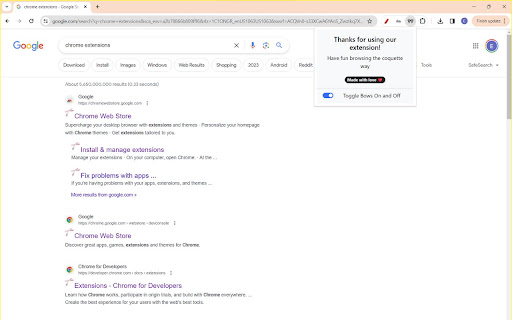
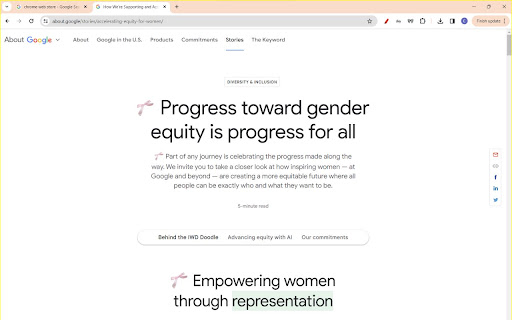
Live your coquette dreams while browsing with this new extension. When enabled, this extension adds cute bows to the upper left corner of webpage headings to add cute accents to even the dullest of websites. Tired of the bows? No worries! Just click on the extension icon and toggle it off with the toggle button in the extension pop-up. Turn them back on whenever you want the same way and enjoy!

Top and Bottom scroll buttons
Adds scroll to Top and Bottom buttons on all sites This extension adds two beautiful buttons at the corner of each page for fast scrolling to the top or the bottom of the page. The buttons are customisable. You can change its size, transparency, position and the way they are scrolling. You can also set the buttons to auto hide so you'll see them only when you want. This extension is free, created for the people of the internet. Limitations: As any other addon it doesn't work on Chrome web store, browser specific pages like "about:addons", on other extensions pages like options page of some addon. It's a browser security limitation, made for your own safety ;)

Extensions shortcut
Lets you create a keyboard shortcut to the extensions page An extremely lightweight extension (only runs when used) which lets you specify a custom keyboard shortcut which opens the extensions page. If turned on in the options, this extension will check if you already have an extension page open and switch to that one instead of opening a new. Because it is an option you don't have to trust this extension with a dangerous permission if you don't want to. Extension icon by Ganeshk (derived from "Wiki puzzle.svg") and Mysid (derived from "Insertpad.svg") both licensed under GFDL (http://www.gnu.org/copyleft/fdl.html) or CC-BY-SA-3.0 (http://creativecommons.org/licenses/by-sa/3.0/), via Wikimedia Commons.

Bookmark Sidebar
Adds a toggleable sidebar with all your bookmarks at the edge of your browser window. This extensions allows you to access your bookmarks by clicking on the left or right side your screen. You can edit, delete or rearrange your bookmarks by drag&drop and view some information about them by just clicking them with your left mouse button. You can check your bookmarks for updated or broken urls, too. You can also open your bookmarks in the side panel provided by Chrome. The sidebar will then be opened alongside the websites and stays there as a permanent sidebar. You can also optionally use a New Tab Page with the bookmark sidebar that can be enabled in the settings. If you found a bug, have ideas for features or improvements, please let me know.

Notion Spacer
Gain control over paragraph spacing in Notion. No more poor readability with tight spacing between paragraphs. Why did we make this? We saw people (rightly) taking issue with the tiny paragraph spacing in Notion and wanted to help.
